This thread has been locked.

If you have a related question, please click the "Ask a related question" button in the top right corner. The newly created question will be automatically linked to this question.

66AK2H14: HyperLink Interface PLL not getting Locked

Part Number: 66AK2H14

Hi,

We are using 66AK2H14DAAWA24 part in our design where the device is getting booted and all the DDR and SERDES(SRIO & ETHERNET Switch) interface are functioning properly, except HYPERLINK INTERFACE.

Issue with this interface is that the PLL is not getting locked for this interface

We have checked all the power as well as the clock(312.5Mhz) corresponding to hyperlink interface and all are as expected.

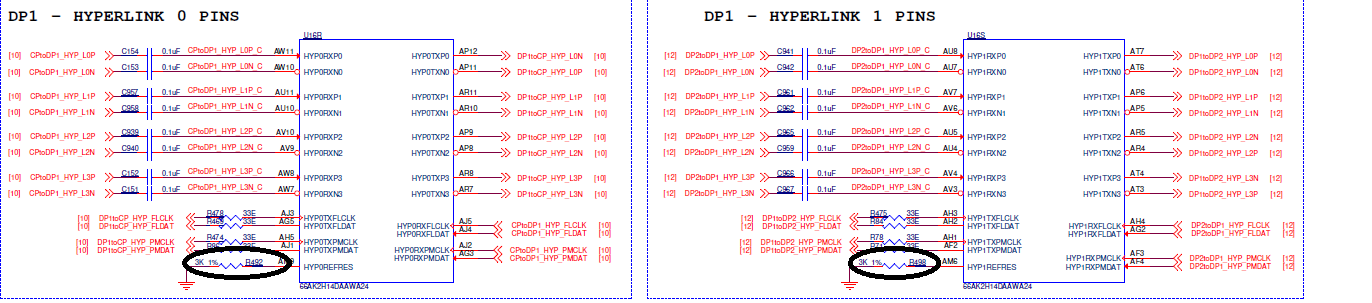
We have mounted 3K_Ohm from HYP0REFRES pin to GND as specified but the resistance but the observed resistance value across this was 1.2OHM, so we removed this resistor and checked the impedance at the resistor pads and observed same 1.2E(after removing 3K resistor). The same observation is see across HYP1REFRES and GND as well.

Is this the expected impedance value at this pin please suggest or is there any issue with, whether these pins are damaged internally,Should we replace the chipset or is there any alternate solution?

Request you to provide your valuable feedback ASAP.

Regards,
Karthik

  • Hi Karthik,

    This is strange. Not absolutely sure if the pins are necessarily damaged internally, it is possible.

    Have you followed all recommendations from Chapter 5 HyperLink Interface from the SerDes Implementation Guide: www.ti.com/.../sprabc1.pdf ?

    Best Regards,
    Yordan
  • Hi Yordan,

    Thanks for your reply.

    We have followed all the recommendation that is been given in the application note and have manufactured 14 set of boards, out of which 13 cards are functioning properly only in one card we are observing this issue.

    Here all other interfaces such as DDR3,SRAM,SRIO & Ethernet Switch all are functioning properly except this Hyperlink interface.

    As described earlier I have removed the R492 & R498 resistor as shown in the reference image Hypelink_ref_res_schematic and measured the impedance across the resistor pads and it was 1.4OHM.

    Here we are not observing Dead short(Zero ohm) to GND from this pin.

    I have also attached the layout snapshot of these nets (the net is highlighted in yellow, R492 & R498 is highlighted in Blue and Ground net in Green) in Hyperlink_ref_resistor_layout for you reference.

    Please let me is there any other parameter due to which affect this and we observed such low impedance please suggest. Could you please highlight me more on this issue?

    Regards,
    Karthik

  • Hi,

    We have followed all the recommendation that is been given in the application note and have manufactured 14 set of boards, out of which 13 cards are functioning properly only in one card we are observing this issue.

    Have you measured the power supplies of the processor? Any abnormal values observed on the power plains? If not, I think this indeed may be an issue with the soc itself, since 1 out of 14 boards is not working. I've notified the design team to elaborate with some debugging tricks.

    FYI, the layout snapshot of the nets (Hyperlink_ref_resistor_layout) is not present in your last post. Maybe it wasn't uploaded properly.

    Best Regards,
    Yordan

  • Karthik,

    What impedance do you measure across the REFRES on your functioning boards?  The extremely low resistance on these REFRES pins on the failed board does imply some type of chip damage.  I recommend having the chip removed and replaced.  Before soldering on a replacement, you should verify that the resistance from this pad to ground is high impedance and/or equal to 3.0K when the resistor is installed.

    I am not aware of a failure like this on another design.  I recommend that you carefully verify the power -> clock -> reset sequencing and that you verify there are no unexpected voltage spikes or transitions.  All supplies must be valid and stable before associated clocks are enabled and then all clocks must be stable at the rated speed before resets are released.  You should also check the power down sequencing.  It should ideally be the reverse of the power-up sequencing or generally all supplies need to be shut off and the voltage decay at about the same time/rate.

    Tom

  • Karthik,

    Is there any update on this thread?  If no update in the next few days, we can close this one.  If you later want to re-open it, you can respond to this thread or initiate a new one if it has become locked.

    Tom

  • Dear Tom,

    Thanks for your reply.

    The issue is not solved, Actually in our single PCB we have three K2H processor out of which earlier one processor had this issue with the hyperlink interface(HYP1REFRES & HYP0REFRES) now similarly same issue is observed at SGMI interface  (Impeadance across SGMIIREFRES pin to GROUND is 1.2E) in the another processor of the same board which was working fine earlier.

    Now out of three processor in only one processor the impedance are proper and in other two it is showing 1.2E at HYP1REFRES & HYP0REFRES at one processor and SGMIIREFRES pin at another processor
    I have attached a high level block diagram for your reference purpose. 

    What are the voltage associated with these pins and why it is showing such low impeadance?

    Please let me know what can we do to overcome this problem.

    Regards,
    KarthikTI_Processor_issue.pptx

  • Karthik,

    I am not aware of a design /assembly issue that causes this behavior.  Did you replace the chip on this board?  While it was removed, did you verify that the resistance measured at this pin to ground was the expected 3000 ohms?  Are the other 13 boards still all working correctly?

    Tom

  • Hi Tom,

    All 13 boards are working fine.

    No we did not replace the chip as currently we don't have new chip set with us.
    Am Not sure how this second processor SGMIIREFRES pin is showing low impedance. because we have tested this interface before and it was working fine. 

    Regards,
    Karthik

  • Karthik,

    As suggested before, I recommend re-validating the power, clock and reset sequencing.  This is the only reason that I could envision SERDES failure unless it is due to a probing short or something like that.  Are you maintaining the chip in a valid temperature range?  Of course, these are all guesses.  You will need to repair the board as suggested to prove that the chip has failed and to verify that the board and assembly are not the cause.  You also need to be alert for another device failure and to learn what was being done when the failure occurred.

    Tom

  • Karthik,

    I will close this thread since there is no continuing discussion.  Once you have repaired the broken board, either re-open this thread or start a new one to continue this discussion.

    Tom