This thread has been locked.

If you have a related question, please click the "Ask a related question" button in the top right corner. The newly created question will be automatically linked to this question.

Linux/AM3352: Keypad controller issue

Part Number: AM3352
Other Parts Discussed in Thread: TCA8418,

Tool/software: Linux

Hi All, 

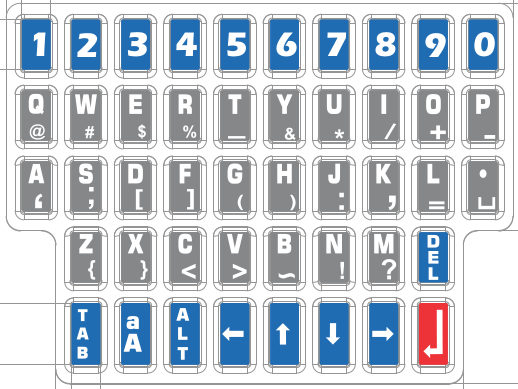
    We are using AM3352 Processor with TI Staging Linux 4.1.18 and we need help form your side about TCA8418 I2C Matrix Keypad Same Key with Multiple Function. In my product Qwerty key(A-Z, a-z) working properly but Special characters not working.

  • /* This dtsi for Keypad config */


    #include "am33xx.dtsi"

    &am33xx_pinmux {

    pinctrl-names = "default";
    pinctrl-0 = <&clkout2_pin>;

    i2c1_pins:pinmux_i2c1_pins {
    pinctrl-single,pins = <0x158 0x72 0x15c 0x72 0x3c 0x2f>;
    };
    };

    &i2c1 {
    pinctrl-names = "default";
    pinctrl-0 = <&i2c1_pins>;
    status = "okay";
    clock-frequency = <100000>;

    tca8418@34 {
    compatible = "ti,tca8418";
    reg = <0x34>;
    interrupt-parent = <&gpio1>;
    interrupts = <0xf 0x1>;
    irq-gpio = <&gpio1 0xf 0x1>;
    keypad,num-rows = <0x8>;
    keypad,num-columns = <0xa>;
    linux,keymap = <

    0x1000002
    0x1010003
    0x1020004
    0x1030005
    0x1040006
    0x1050007
    0x1060008

    0x2000009
    0x201000A
    0x202000B
    0x2030010
    0x3040011
    0x2050012
    0x2060013

    0x3000014
    0x3010015
    0x3020016
    0x3030017
    0x3040018
    0x3050019
    0x306001E

    0x400001F
    0x4010020
    0x4020021
    0x4030022
    0x4040023
    0x4050024
    0x4060025

    0x5000026
    0x5010039
    0x502002C
    0x503002D
    0x504002E
    0x505002F
    0x5060030

    0x1070031
    0x2070032
    0x307000E
    0x407000F
    0x50700E0

    0x6000038
    0x6010069
    0x6020067
    0x603006C
    0x604006A
    0x605001C

    0x7000001
    >;

    };
    };

    dts file

  • root@beaglebone:~# evtest /dev/input/event0
    Input driver version is 1.0.1
    Input device ID: bus 0x18 vendor 0x1 product 0x1 version 0x1
    Input device name: "tca8418"
    Supported events:
    Event type 0 (EV_SYN)
    Event type 1 (EV_KEY)
    Event code 1 (KEY_ESC)
    Event code 2 (KEY_1)
    Event code 3 (KEY_2)
    Event code 4 (KEY_3)
    Event code 5 (KEY_4)
    Event code 6 (KEY_5)
    Event code 7 (KEY_6)
    Event code 8 (KEY_7)
    Event code 9 (KEY_8)
    Event code 10 (KEY_9)
    Event code 11 (KEY_0)
    Event code 14 (KEY_BACKSPACE)
    Event code 15 (KEY_TAB)
    Event code 16 (KEY_Q)
    Event code 17 (KEY_W)
    Event code 18 (KEY_E)
    Event code 19 (KEY_R)
    Event code 20 (KEY_T)
    Event code 21 (KEY_Y)
    Event code 22 (KEY_U)
    Event code 23 (KEY_I)
    Event code 24 (KEY_O)
    Event code 25 (KEY_P)
    Event code 28 (KEY_ENTER)
    Event code 30 (KEY_A)
    Event code 31 (KEY_S)
    Event code 32 (KEY_D)
    Event code 33 (KEY_F)
    Event code 34 (KEY_G)
    Event code 35 (KEY_H)
    Event code 36 (KEY_J)
    Event code 37 (KEY_K)
    Event code 38 (KEY_L)
    Event code 44 (KEY_Z)
    Event code 45 (KEY_X)
    Event code 46 (KEY_C)
    Event code 47 (KEY_V)
    Event code 48 (KEY_B)
    Event code 49 (KEY_N)
    Event code 50 (KEY_M)
    Event code 56 (KEY_LEFTALT)
    Event code 57 (KEY_SPACE)
    Event code 103 (KEY_UP)
    Event code 105 (KEY_LEFT)
    Event code 106 (KEY_RIGHT)
    Event code 108 (KEY_DOWN)
    Event code 224 (KEY_BRIGHTNESSDOWN)
    Event type 4 (EV_MSC)
    Event code 4 (MSC_SCAN)
    Properties:
    Testing ... (interrupt to exit)

  • Hello,

    As far as I can tell, everything looks ok from a Linux standpoint. I'm going to put this in front of the TCA8418 experts to see if they can verify the h/w configuration.

    Thanks for the post.

  • Hi Siva,

    Are the issues related to (a) specific button(s) or combination of buttons?  If so, which ones?  I looked at the schematic you uploaded and it seems to just have the keypad array - do all of the ROW/COL IOs connect directly to the TCA8418, or are any other components (pull-up resistors, filtering capacitors, etc.) used?

    Regards,
    Max

  • Hi Max,

                   Thanks for the update. As far as your question concern, we don't find any issues regarding Matrix Keypad(A-Z, a-z, 0-9, Navigator button) & hardware. My query is that I need to work on combination of buttons( ALT + Q=@, ALT + W=#). Kindly sort out my only query regarding the combination of buttons as my thread explained. 


  • Siva,

    Does this issue occur with all combinations of two buttons, or only a few?  Is the first button press of the combination recorded successfully but not the second?  Do the results vary if you hold the first button down for a few seconds before holding down the next one?  Can you tell if both button presses are being logged correctly in the TCA8418 event table?

    Max