This thread has been locked.

If you have a related question, please click the "Ask a related question" button in the top right corner. The newly created question will be automatically linked to this question.

AM5728: AM5728: U-boot BMP display

Part Number: AM5728


HI,

I have a problem for uboot logo , that previously displayed a YUV image.I follow the step below the link;

fhttp://www.ti.com/lit/an/sprac49/sprac49.pdf

Now, I want to display the BMP image,I found the following post:

https://e2e.ti.com/support/processors/f/791/t/867820

I modified bit [4-1], bit9 and bit10 of register DISPC_VIDx_ATTRIBUTES ,but the BMP images are not yet displayed. 
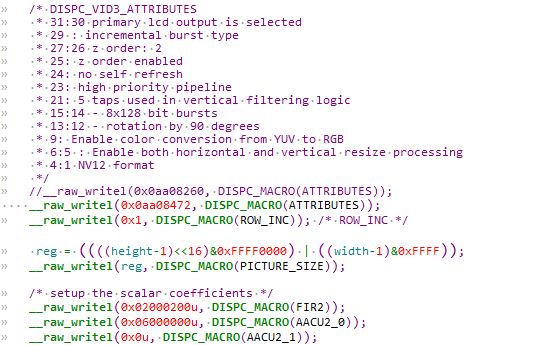
In addition, the YUV image is less than 2M bytes, so I used the OCMC-RAM2 and OCMC-RAM2 region as the framebuffer.
But it is not enough to display the bmp image (1280 * 800,RGB24). Do I need to allocate the framebuffer on DDR?

Looking forward to your reply, thanks!

  • Hi Zhang,

    You mentioned that YUV image display worked previously, is that usecase still functional or are you seeing issues with that as well.

    Also can you share the info on the TI baseline release info here.

    On the BMP image, is the new format RGB24?. I see video replication to be enabled as against the earlier is that intended? 

    On the size, if the size can't be fit into OCMC-RAM2 it needs to be allocated in the DDR as you mentioned. For that you have to set aside a reserved region as mentioned in the application note. Is your input image same as the display size, I do see resize being enabled here.

    Thanks,

    Gowtham

  • Hi Gowtham,

    YUV is still functional. But BMP is more convenient to use and convert.
    The sdk release: processor-sdk-linux 05.02.00.10.

    Yes,the BMP image is RGB24. 

    Previously using yuv image, the color space conversion is enabled and Video replication logic is disabled.

     Now using BMP image,the color space conversion is disabled and Video replication logic is enabled.

    OK,I will use DDR for large images.

    The input image and display size are both 1280 * 800.

  • Hi Gowtham,

     I can already display the bmp images. In addition to modifying register DISPC_VIDx_ATTRIBUTES bit [4: 1], bit [9] and bit [10], I also modified register DISPC_VIDx_ATTRIBUTES2 bit [8] to 0.


    But the bmp picture displayed is upside down. Which registers do I need to configure to rotate the display 180?

    Register DISPC_VIDx_ATTRIBUTES bit [13:12] (Video rotation flag) does not work, it seems to work only for yuv.

    Looking forward to your reply, thanks!

    Allen

  • Hi Allen,

    DSS in itself does not support rotation, but it can read the buffers from the tiler memory, and tiler memory can support rotation. So you need to allocate the buffers from tiler memory space and use it in DSS to get buffer rotated..

    Rgds,

    Brijesh

  • Hi Allen,

    Why not change the original image used for splash screen?

    Regards,
    Vishal

  • Hi Allen,

    The BMP format is such that the raw data is stored in upside down, and that is the reason for upside behavior you are seeing. As Brijesh pointed, the rotation in DSS is achieved through TILER memory and for this the buffer needs to be allocated in TILER memory. The other option as Vishal suggested is to modify the bmp image to have the raw data stored in right order. 

    Thanks,
    Gowtham

  • Hi Brijesh,

    It seems that using tiler memory in spl is not an easy task.I eventually modified the original image. 

    Thanks,

    Allen

  • Hi Vishal,

    OK, I have done it this way.

    Thanks,

    Allen

  • Hi Gowtham,

    I was thinking that if dss is easy to flip (such as configuring a certain register), I don't need to flip each BMP image. But it seems not easy, so I modified the original image as Brijesh and Vishal said.

    Thansk,

    Allen