This thread has been locked.

If you have a related question, please click the "Ask a related question" button in the top right corner. The newly created question will be automatically linked to this question.

TDA4VM: Using NOR Flash to store the primary and secondary bootloader

Part Number: TDA4VM
Other Parts Discussed in Thread: UNIFLASH

Dear TI support,

We would like to use the NOR Flash to store the tiboot3.bin, tispl.bin, u-boot.img & sysfw.itb. Can it be used to store all the primary and secondary bootloader files. if yes than how , what is the method ?

Regards

Manish

  • Hi Karan,

    I have already gone through this and using devices OSPI and QSPI . In this example they have used SD card and i can use UART xmodem and ymodem to transfer the files.

    Question --> no matter what i use here for transferring the above mentioned file, i need to reach u-boot prompt somehow right ? I assume you are using here SD card ?

    How can i use uniflash to load the uboot with UART . The document is created using the instructions mentioned , do you suggest adding something here ?How can i use uniflash to load the uboot with uart on board.docxon board?

    Regards

    Manish

  • Hi Manish,

    Manish Ahlawat said:
    no matter what i use here for transferring the above mentioned file, i need to reach u-boot prompt somehow right ? I assume you are using here SD card ?

    Not necessarily, you can also use the uniflash tool to do the same. Just flash to the correct addresses and you should be good to go.

    I'm assuming you have a familiarity with flashing using uniflash. If not, I have a quick reference - http://downloads.ti.com/jacinto7/esd/processor-sdk-rtos-jacinto7/latest/exports/docs/mcusw/mcal_drv/docs/drv_docs/demo_xip_profile_top.html#demo_xip_profile_flash

    The above is just to give you an idea on commands to flash. The UART SBL still needs to be flashed, so you need to run -

    ./dslite.sh –mode processors -c /dev/ttyUSB1 -f (Path to Uniflash Install Directory)/processors/FlashWriter/j721e_evm/uart_j721e_evm_flash_programmer_release.tiimage -i 0

    But after that you can flash anything. Please let me know if you see issues, I can reproduce your setup here and give more pointed answers.

    Regarsd,

    Karan

  • Hi Karan,

    ./dslite.sh –mode processors -c /dev/ttyUSB1 -f (Path to Uniflash Install Directory)/processors/FlashWriter/j721e_evm/uart_j721e_evm_flash_programmer_release.tiimage -i 0 - In this command the -i is small or capital as small i doesn't work ?

    On Linux Laptop -
    Terminal  hangs when i run the command, please see the attachment.

    Regards
    Manish
  • Hi Manish,

    Please use "--mode" instead of "-mode" and "-i" (small i) instead of "-I' (capital I)

    I think the documentation I pointed had the "--mode" wrongly mentioned, I'll get it fixed.

    Regards,

    Karan

  • Hi Karan,

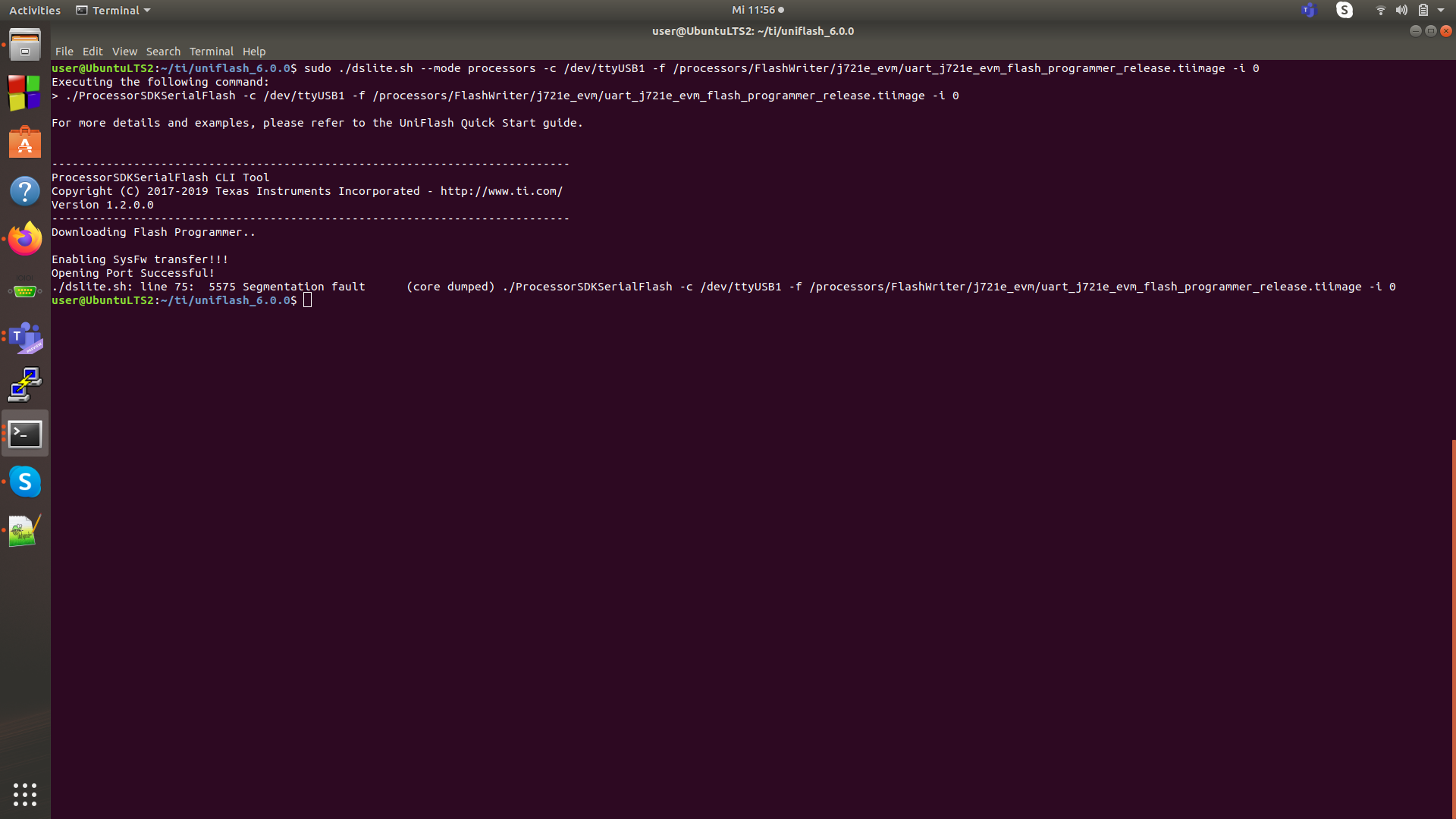
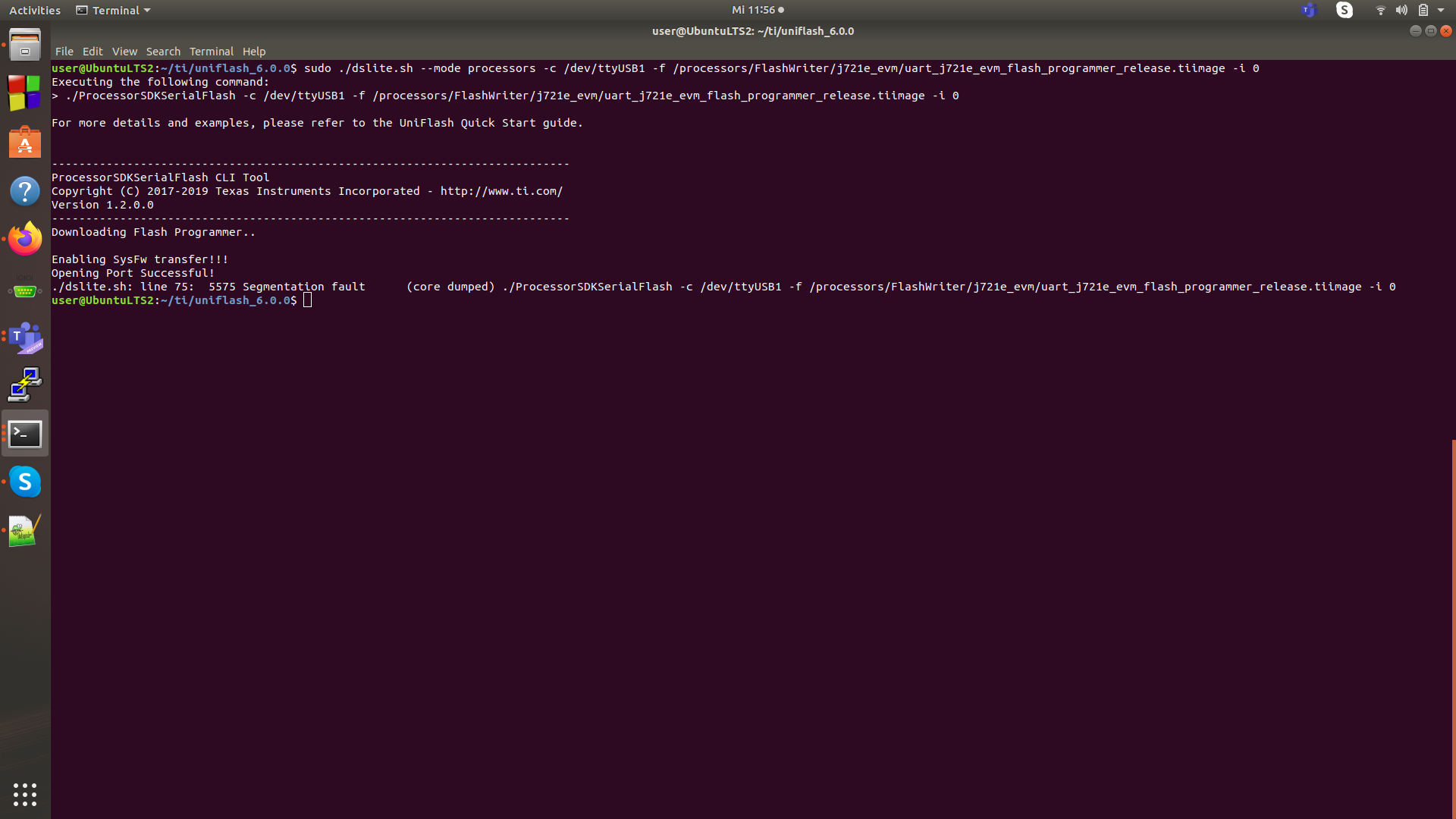
    That was taken care but now segmentation error. Kindly see the attachment.

    Regards

    Manish

  • Hi Karan,

    That was taken care but now segmentation error. Kindly see the attachment.

    Regards

    Manish

  • Manish,

    Are you in the UART boot mode while flashing? Please refer to the link I sent before - http://downloads.ti.com/jacinto7/esd/processor-sdk-rtos-jacinto7/latest/exports/docs/mcusw/mcal_drv/docs/drv_docs/demo_xip_profile_top.html#demo_xip_profile_flash

    Also please let me try, I've always used the uniflash 5.3. I believe you are on 6.0 (please confirm)

    Regards,

    Karan

  • yes i am using the version 6 and yes i am in UART mode at the moment and i see the ccc printed on my terminal when i connect. I am connected to MCU Domain UART port.

  • Manish,

    I think I know the problem, you are using the wrong path in the command, please provide the absolute path instead of the relative path.

    Also please be in UART boot mode and keep the SW3 as 0XXXXXXXXX (this is also there in the documentation). I was also able to verify using the uniflash 6.0

    Below are the successful logs.

    karan@karan:~/ti/uniflash_6.0.0$ sudo ./dslite.sh --mode processors -c /dev/ttyUSB1 -f /home/karan/ti/uniflash_6.0.0/processors/FlashWriter/j721e_evm/uart_j721e_evm_flash_programmer_release.tiimage -i 0
    Executing the following command:
    > ./ProcessorSDKSerialFlash -c /dev/ttyUSB1 -f /home/karan/ti/uniflash_6.0.0/processors/FlashWriter/j721e_evm/uart_j721e_evm_flash_programmer_release.tiimage -i 0
    
    For more details and examples, please refer to the UniFlash Quick Start guide.
    
    
    ----------------------------------------------------------------------------
    ProcessorSDKSerialFlash CLI Tool
    Copyright (C) 2017-2019 Texas Instruments Incorporated - http://www.ti.com/
    Version 1.2.0.0
    ----------------------------------------------------------------------------
    Downloading Flash Programmer..
    
    Enabling SysFw transfer!!!
    Opening Port Successful!
    
    Transferring File of size 215005 bytes
    File Transfer complete!
    Header Transfer complete
    Transferring System Firmware..
    Transferring File of size 263083 bytes
    File Transfer complete!
    

    Regards,
    Karan

  • Hi Karan,

    So it worked. 

    Now I would like to use UniFlash to flash the u-boot files needed by primary bootloader and secondary : https://software-dl.ti.com/jacinto7/esd/processor-sdk-linux-jacinto7/latest/exports/docs/linux/Foundational_Components_U-Boot.html#ospi-qspi

    The addresses mentioned in the link above for tiboot3.bin (0), tispl ( 80000) and so on in flash layout are ok? can i use these addresses directly to flash using uniflash with the command mentioned in : 

    dslite.sh --mode processors -c <COM_Port> -f <Path_to_the_file_to_be_transfered> -d <Device_Type> -i <Image_Type> -e <erase_length> -o <Offset>

    Regards
    Manish
  • Hi Manish,

    Yes you can use the same offsets.

    Please note that you can follow the http://downloads.ti.com/jacinto7/esd/processor-sdk-rtos-jacinto7/latest/exports/docs/mcusw/mcal_drv/docs/drv_docs/demo_xip_profile_top.html#demo_xip_profile_flash page for this too. 

    #same as before (this needs to be done everytime you start to flash
    sudo ./dslite.sh --mode processors -c /dev/ttyUSB1 -f /home/karan/ti/uniflash_6.0.0/processors/FlashWriter/j721e_evm/uart_j721e_evm_flash_programmer_release.tiimage -i 0
    
    #start flashing your binaries (this can be done for all the binaries)
    sudo ./dslite.sh --mode processors -c /dev/ttyUSB1 -f <Absolute path to the first binary> -d 3 -o <offset in HEX>
    sudo ./dslite.sh --mode processors -c /dev/ttyUSB1 -f <Absolute path to the second binary> -d 3 -o <offset in HEX>
    ...
    and so on

    Regards,

    Karan

  • Hi Karan,

    I understood what you mean but that is the case when i restart or disconnect with the HW. When i restarted my computer i got this error while transferring (See Attachment)

    Regards

    Manish

  • Manish,

    I remember you said that this stage passed? Are you stuck here again? What command did you run and what changed between now and the successful run?

    Regards,

    Karan

  • Hi Karan,

    The issue happens when i closed the terminal not properly. But i was able to flash the 4 images to OSPI address - https://software-dl.ti.com/jacinto7/esd/processor-sdk-linux-jacinto7/latest/exports/docs/linux/Foundational_Components_U-Boot.html#ospi-qspi

    When i change the boot mode to OSPI and connect to mcu uart again and restart the hardware i see blank. how do i check if the u-boot worked.

    I followed these steps :

    UART SBL and sysfw : ./dslite.sh –mode processors -c /dev/ttyUSB1 -f (Path to Uniflash Install Directory)/processors/FlashWriter/j721e_evm/uart_j721e_evm_flash_programmer_release.tiimage -i 0

    And then flashed all the 4 images at the given addresses in document.

    The steps 2-5 are also needed as i don't have these paths in my PSDKLA (do they intent to do something else or are necessary for the u-boot step ?)

    Regards

    Manish

  • I connected to main UART and i can see the logs and it enters into u-boot prompt -->

    Please also change the MCU UART to main UART in line Power off the board and change the bootmode to OSPI. Connect to second instance of UART and Power on the board. You should see the logs on the MCU uart console in the document 

    http://downloads.ti.com/jacinto7/esd/processor-sdk-rtos-jacinto7/latest/exports/docs/mcusw/mcal_drv/docs/drv_docs/demo_xip_profile_top.html#demo_xip_profile_flash


  • Hi Manish,

    The documentation is for running an RTOS app on MCU R5F core, hence it says connect to MCU UART.

    u-boot and kernel running on A72 will always print to MAIN UART 0th instance.

    Are their any more question on this or I can close the thread?

    Regards,

    Karan

  • Hi Karan,

    Thanks a lot for support and yes we can close this Thread. Attaching the log from the u-boot, hope it looks fine to you ?

    user@UbuntuLTS2:~$ picocom -b 115200 /dev/ttyUSB0
    picocom v2.2
    
    port is        : /dev/ttyUSB0
    flowcontrol    : none
    baudrate is    : 115200
    parity is      : none
    databits are   : 8
    stopbits are   : 1
    escape is      : C-a
    local echo is  : no
    noinit is      : no
    noreset is     : no
    nolock is      : no
    send_cmd is    : sz -vv
    receive_cmd is : rz -vv -E
    imap is        : 
    omap is        : 
    emap is        : crcrlf,delbs,
    
    Type [C-a] [C-h] to see available commands
    
    Terminal ready
    
    U-Boot SPL 2019.01-g350f3927b8 (Feb 17 2020 - 09:46:23 +0000)
    SYSFW ABI: 2.9 (firmware rev 0x0013 '19.12.1-v2019.12a (Terrific Lla')
    Trying to boot from SPI
    Loading Environment from MMC... spl: unsupported mmc boot device.
    sdhci@4f80000 - probe failed: -19
    spl: unsupported mmc boot device.
    sdhci@4fb0000 - probe failed: -19
    *** Warning - No MMC card found, using default environment
    
    Loading rproc fw image from device 3 not supported!
    Loading rproc fw image from device 3 not supported!
    Starting ATF on ARM64 core...
    
    NOTICE:  BL31: v2.2(release):ti2019.05-rc1
    NOTICE:  BL31: Built : 09:32:00, Feb 17 2020
    I/TC: 
    I/TC: OP-TEE version: ti2019.05-rc1-dev (gcc version 8.3.0 (GNU Toolchain for the A-profile Architecture 8.3-2019.03 (arm-rel-8.36))) #1 Mon Feb 17 09:40:16 UTC 2020 aarch64
    I/TC: Initialized
    
    U-Boot SPL 2019.01-g350f3927b8 (Feb 17 2020 - 09:48:06 +0000)
    Detected: J7X-BASE-CPB rev E3
    Detected: J7X-VSC8514-ETH rev E2
    Trying to boot from SPI
    
    
    U-Boot 2019.01-g350f3927b8 (Feb 17 2020 - 09:48:06 +0000)
    
    SoC:   J721E PG 1.0
    Model: Texas Instruments K3 J721E SoC
    Board: J721EX-PM2-SOM rev E7
    DRAM:  4 GiB
    Flash: 0 Bytes
    MMC:   sdhci@4fb0000 - probe failed: -123
    sdhci@4f80000: 0
    Loading Environment from MMC... OK
    In:    serial@2800000
    Out:   serial@2800000
    Err:   serial@2800000
    Detected: J7X-BASE-CPB rev E3
    Detected: J7X-VSC8514-ETH rev E2
    Net:   
    Warning: ethernet@046000000 using MAC address from ROM
    eth0: ethernet@046000000
    Hit any key to stop autoboot:  0 
    no mmc device at slot 1
    SD/MMC found on device 1


  • Hi Manish,

    Yes these look fine. 

    Please click on "verify answer" on the answer that solved your issue to close it.

    Regards,

    Karan

  • ok closed the thread. thank you and have a nice day.