This thread has been locked.

If you have a related question, please click the "Ask a related question" button in the top right corner. The newly created question will be automatically linked to this question.

CCS/LAUNCHXL-CC1310: Code Composer Studio™ forum

Part Number: LAUNCHXL-CC1310
Other Parts Discussed in Thread: CC1310

Tool/software: Code Composer Studio

Hi,

Yesterday when opening Code Composer Studio (version: 9.3.0.00012), I'm met with the much too well known warning about updating my "debug probe". I clicked update, and was then presented with the following error shown below.
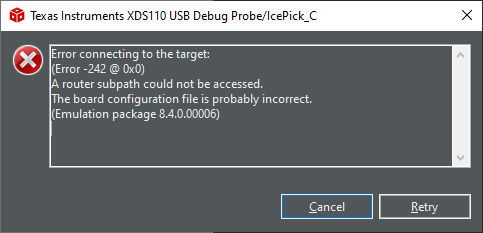
Can anybody help please?

I have three CC1310 LaunchPad's all failing to update, and I've tried installing CCS v. 8 (since this is the last environment I last used them in--I just updated to version CCS v. 9 recently and havent actually used it), but it fails to update in version 8 as well. Is there another way to update the programmer?

Yesterday I got the following, but the fw-update program that the error mentions in "ccs_base/common ..." just opens and closes, I get no information or choices. Also the "ReadMe.txt" file does not exist at all.
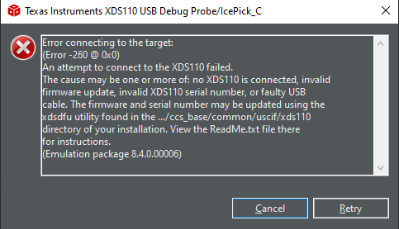
Best,

Rune

  • Rune,

    I am sorry to hear about this issue. The firmware update sometimes requires unplugging and re-plugging the board so the XDS110 is properly reset. Did you try to do that? 

    The Test Connection button on the target configuration file (.ccxml) that is present either in your project or workspace would help finding additional details about this problem. Does it report an error/ 

    At last, please follow the troubleshooting procedures shown in the XDS110 page below. 

    https://software-dl.ti.com/ccs/esd/documents/xdsdebugprobes/emu_xds110.html

    Hope this helps,

    Rafael

  • Hi Rafael,

    Thanks for your reply.

    I double-clicked a .ccxml-file in one of my projects, and then selected "Test Connection", and this is the response I get:

    [Start: Texas Instruments XDS110 USB Debug Probe]
    
    Execute the command:
    
    %ccs_base%/common/uscif/dbgjtag -f %boarddatafile% -rv -o -S integrity
    
    [Result]
    
    
    -----[Print the board config pathname(s)]------------------------------------
    
    C:\Users\BALDRN~1\AppData\Local\TEXASI~1\
        CCS\ccs901\0\0\BrdDat\testBoard.dat
    
    -----[Print the reset-command software log-file]-----------------------------
    
    This utility has selected a 100- or 510-class product.
    This utility will load the adapter 'jioxds110.dll'.
    The library build date was 'Nov 25 2019'.
    The library build time was '16:55:29'.
    The library package version is '8.4.0.00006'.
    The library component version is '35.35.0.0'.
    The controller does not use a programmable FPGA.
    The controller has a version number of '5' (0x00000005).
    The controller has an insertion length of '0' (0x00000000).
    This utility will attempt to reset the controller.
    This utility has successfully reset the controller.
    
    -----[Print the reset-command hardware log-file]-----------------------------
    
    The scan-path will be reset by toggling the JTAG TRST signal.
    The controller is the XDS110 with USB interface.
    The link from controller to target is direct (without cable).
    The software is configured for XDS110 features.
    The controller cannot monitor the value on the EMU[0] pin.
    The controller cannot monitor the value on the EMU[1] pin.
    The controller cannot control the timing on output pins.
    The controller cannot control the timing on input pins.
    The scan-path link-delay has been set to exactly '0' (0x0000).
    
    An error occurred while hard opening the controller.
    
    -----[An error has occurred and this utility has aborted]--------------------
    
    This error is generated by TI's USCIF driver or utilities.
    
    The value is '-242' (0xffffff0e).
    The title is 'SC_ERR_ROUTER_ACCESS_SUBPATH'.
    
    The explanation is:
    A router subpath could not be accessed.
    The board configuration file is probably incorrect.
    
    [End: Texas Instruments XDS110 USB Debug Probe]
    

    Does this provide anything useful? Thanks.

  • In regards to the troubleshooting guide (https://software-dl.ti.com/ccs/esd/documents/ccs_debugging_jtag_connectivity_issues.html), it mentions a few options:

    • "If this error is originated in hardware (custom hardware or faulty board or connections), please check this e2e forum thread."
      • This is not custom hardware, but three CC1310 LaunchPads used many times before, so I think it's fair to assume this is not an HW issue or faulty connection since I have not changed anything about my setup (PC, USB hub, drivers, LaunchPads or otherwise).
    • "Also, power supply problems can lead to this issue as reported in this e2e forum thread."
      • Again, the HW has not been touched, so I guess this is irrelevant too.
    • "If this error is originated in software, it can be either due to a problem with the configuration file (as mentioned in this e2e forum thread"
      • I tried generating a new target configuration, but the error is the same.

  • It seems that the update went OK after all (although I have always gotten an error message when the update finishes). The problem reported had to do with the sequence trying to access the CC1310 afterwards, which it can't because ... reasons.