This thread has been locked.

If you have a related question, please click the "Ask a related question" button in the top right corner. The newly created question will be automatically linked to this question.

CC2640R2F: Tried suggested fixes for SysCtrlSystemReset() hanging the 1st time it is called after flashing device, still not working

Part Number: CC2640R2F
Other Parts Discussed in Thread: UNIFLASH, CC3120,

I have tried the fixes suggested in this thread: https://e2e.ti.com/support/wireless_connectivity/bluetooth_low_energy/f/538/t/632725

My device still hangs after calling SysCtrlSystemReset(). If I power cycle the device, everything works fine.

The difference in my environment is that I'm using an XDS100v3. The last post on the referenced thread was from someone who was also using an XDS100v3 and was still having the issue. Is there a fix for the XDS100v3, or do I have to switch to an XDS110?

  • Hi Ed,

    This sounds like the Halt in Boot issue for sure. I have not done extensive research as to how the issue affects the XDS100v3.
    We will follow up with our tools team.
  • Hi,

    Can you tell me the specifics of the SW you are using?

    • IAR version (e.g. 8.11.2)
    • Texas Instruments Emulation Software ("emupack") version (e.g. 7.0.48.0)
      • The installation directory of the emupack IAR is using is found by browsing (in IAR) to Project > Options > TI XDS.
      • Relative to the folder listed above, you should find ../install_logs/ folder with the version number. 

    It would be great if you can share the scenario and steps to reproduce this, so that we can try it on my side.

    Thanks

  • Hi,

    We're actually using CCS v7.4, but we're using SmartRF Flash Programmer 2 v1.7.5 to flash the code, and the emupack version is 7.0.100.1.

    But I think the key is we're using a XDS100v3 debugger instead of the CDS110.

    The steps to reproduce is:

    1) With Flash Programmer 2, erase/program/verify the image on the device

    2) Flash Programmer 2 resets the device

    3) Application on device runs, issues SysCtrlSystemReset(), and then hangs

    Thanks,

    -Ed

  • I received my XDS110 debugger today and tried it with mixed results.

    If I flashed my device using Flash Programmer 2, everything works great, and the device does not hang after the call to SysCtrlSystemReset().

    However, if I try to use CCS v7.4 or Uniflash v4.2.0, I get this error trying to verify the connection to my target:

    -------------------------
    This error is generated by TI's USCIF driver or utilities.

    The value is '-267' (0xfffffef5).
    The title is 'SC_ERR_XDS110_TARGET_SUPPLY'.

    The explanation is:
    The controller could not detect valid target supply. Check target
    JTAG connection and/or connection setting specifying voltage level.
    -----------------------------

    This error was discussed in this thread: e2e.ti.com/.../635939

    I don't believe it is a XDS110 issue as it works with Flash Programmer 2, but I can't figure out why it doesn't work with CCS or Uniflash. Any ideas?

    Thanks,
    -Ed
  • Have you configured your target configuration file (.ccxml) to use XDS110 + the correct device?

    Br,
    TIABO

  • Hi Tiabo,

    Yes, I did. I was searching yesterday to see what .ccxml or equivalent that Flash Programmer 2 uses since that application works. Do you know where I can find that?
  • Hi Ed,

    As of Uniflash 4.2.x there should be a detected devices screen and you can select your device based on its XDS serial number

  • Are there any other differences in the JTAG setup of the two boards (i.e. PC side settings) have you connected Vtref to VCC of the chip?
  • Hi Sean,

    I'm using the exact same setup for the 2 boards. One thing that may be different from what you normally see is we have an adapter board between the XDS100v3/XDS110 and our target board. The debugger lines are all brought through, but we power our target via USB instead of via the debugger. This is because our target has a CC3120 chip on it, and we discovered early on that the debugger can't supply enough current for our target board. But again, this worked with the XDS100v3, and the XDS110 works with Flash Programmer 2, but not CCS or Uniflash. So there must be something different in the target setup of Flash Programmer 2 that makes everything work correctly.
  • OK, my apologies - it now works. I hadn't seen the Target Configuration option in the Advanced Setup area of the .ccxml "editor" that shows up when you double-click on the target config file of your project. When I clicked on that, and then highlighted the "Texas Instruments XDS110 USB Debug Probe_0" line of the Target Configuration page, there is a "Power Selection" entry where you can choose "Target Supplied Power" or "Probe Supplied Power". When I picked "Target Supplied Power", everything started working. Sorry for the confusion.
  • Thanks for following up Ed!
  • Hi,

    I ran into a new issue with this. I recently had my computer upgraded to Windows 10, so I installed CCS v7.4, Flash Programmer 2 v1.7.5, and emupack v7.0.188.0. I copied the emupack files to the Flash Programmer 2 config/xds folder as described earlier in this thread as well. However, I am back to the device hanging after the first call to SysCtrlSystemReset() after flashing the device.

    Are there Windows 10 specific issues related to the XDS110?
  • Hi, not that I am aware of.

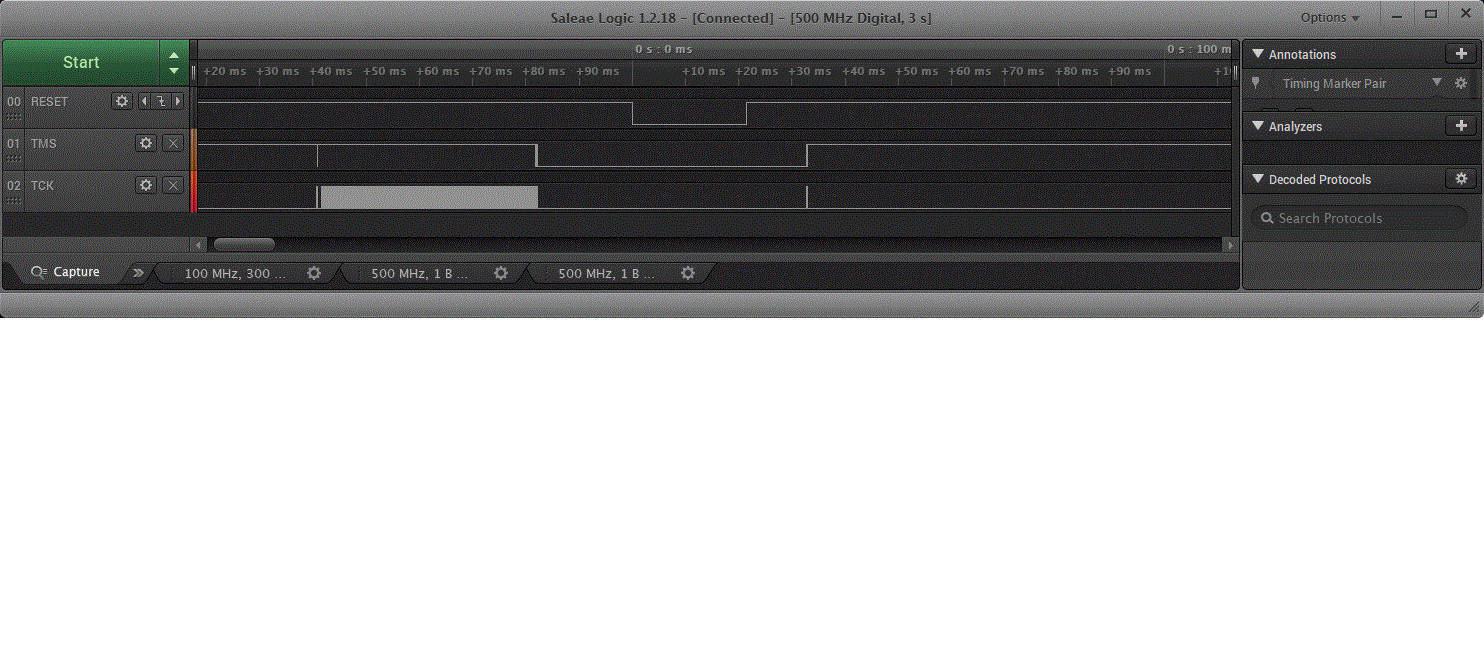
    Can you share a logic analyzer screenshot showing the TCK and TMS pins?

    TIABO

  • Hi,

    Sure, here it is. It seems to confirm that there is activity on TCK after the reset, which I believe causes the HIB issue. I double checked, and I copied the emupack 7.0.188.0 files into the Flash Programmer 2 config\xds folder, which is all I thought needed to be done to fix the HIB issue. Is there something I missed?

  • Hi, I'm unable to see the same thing when patching my srfprog2 v1.7.5 installation with emupack 7.0.188.0. Are you sure you patched

    The following files was changed on my side:

    bin/ftd2xx.dll
    config/xds/board_config/XDS110.dat
    config/xds/board_config/XDS110c2.dat
    config/xds/common/bin/libusb-1.0.dll
    config/xds/common/bin/ti_targetdb_parser.dll
    config/xds/common/bin/xerces-c_2_8.dll
    config/xds/common/uscif/jioserdesusb.dll
    config/xds/common/uscif/jioserdesusbv3.dll
    config/xds/common/uscif/jioxds110.dll
    config/xds/common/uscif/jscserdes.dll
    config/xds/common/uscif/jscserdesv3.dll
    config/xds/common/uscif/jscxds110.dll
    config/xds/common/uscif/xds110/firmware.bin
    config/xds/common/uscif/xds2xx.bin
    config/xds/common/uscif/xds2xx/update_xds2xx.bat
    config/xds/common/uscif/xds2xx/xds2xx_conf.exe
    config/xds/common/uscif/xds2xx/xds2xx_usbconf.dll
    config/xds/common/uscif/xds2xx_ecom.dll
    config/xds/common/uscif/xds2xxu_io.dll
    config/xds/common/uscif/xdsalias.cfg
    config/xds/common/uscif/xdsboard.dll
    config/xds/common/uscif/xdsecom3.dll
    config/xds/common/uscif/xdserror.cfg
    config/xds/common/uscif/xdserror.dll
    config/xds/common/uscif/xdsfamily.cfg
    config/xds/common/uscif/xdsfast3.dll
    config/xds/common/uscif/xdsicicle.dll
    config/xds/common/uscif/xdslocal.dll
    config/xds/common/uscif/xdsroute.dll
    config/xds/common/uscif/xdstrove.dll
    config/xds/emulation/drivers/TargetAdapter.dll
    config/xds/emulation/drivers/cmapi.dll
    config/xds/emulation/drivers/prsc.dll
    config/xds/emulation/drivers/tixds510cortexM.dvr
    config/xds/emulation/drivers/tixds510cs_dap.dvr
    config/xds/emulation/drivers/tixds510dap_pc.dvr
    config/xds/emulation/drivers/tixds510icepick_c.dvr
    config/xds/emulation/drivers/tixds560cortexM.dvr
    config/xds/emulation/drivers/tixds560dap_pc.dvr
    config/xds/emulation/drivers/tixds560icepick_c.dvr

  • Hi Tiabo,

    That doesn't match what I patched. I thought the procedure was to replace the files in C:\Program Files (x86)\Texas Instruments\SmartRF Tools\Flash Programmer 2\config\xds with those from the emupack installation. So in my case, I replaced:

    C:\Program Files (x86)\Texas Instruments\SmartRF Tools\Flash Programmer 2\config\xds\common with the files from C:\ti\ccs_base\common

    C:\Program Files (x86)\Texas Instruments\SmartRF Tools\Flash Programmer 2\config\xds\emulation with the files from C:\ti\ccs_base\emulation

    Can you provide details as to what you replaced?

    Thanks!

    -Ed

  • Hi Ed, Thanks for following up. I am closing this thread since you have clicked the resolved button.
  • Hi Sean,

    Please don't close this thread as I am still having issues with Windows 10.

    Thanks,

    Ed

  • HI Ed,

    Understood, I will leave the thread open.
    This is my mistake as our tracking system did not show the further discussion between you and the other TIer. My apologies, the thread is open.
  • Hello, everybody.

    Sorry, that I ask my question in this topic.

    Could you to explain what is differences between HAL_SYSTEM_RESET() and SysCtrlSystemReset() ?

  • Hi Ed,

    You should copy everything from the emupack installer into <fp2_install_dir>/config/xds/*

    It appears that the steps you posted might miss a few files. Additionally, can you confirm that the contents of C:\ti\ccs_base\common contain the correct emupack release?

    Hi Oleg,

    HAL_SYSTEM_RESET is a macro that writes directly to the AON_SYSCTL_O_RESETCTL register to trigger a PIN reset.

    SysCtrlSystemReset() is similar, but will disable interrupts before hitting the register. and will spin to wait for a reset.

    You can inspect their implementations in hal_mcu.h and sys_ctrl.h.
  • Hi Sean,

    Yes, C:\ti\ccs_base\common contains the correct emupack release.

    I want to be clear on what to copy. Looking at the install log, it looks like I should copy:

    C:\ti\ccs_base\common

    C:\ti\ccs_base\emulation

    C:\ti\ccs_base\scripting

    to C:\Program Files (x86)\Texas Instruments\SmartRF Tools\Flash Programmer 2\config\xds?

  • Hi Ed,

    It seems you are on the right track, it wouldn't hurt to copy the entire contents of ccs_base to config\xds\board_config
  • Hi, Sean, thank for your responce.
    What kind of the Reset functions is more usefull, more safe?
    I ask, because I have some troubles with the Reset procedure. My topic is: e2e.ti.com/.../674296
  • Hello,

    SysCtrlSystemReset() is more thorough because it will disable interrupts and spin waiting for the reset to propagate instead of writing the register and continuing execution before the reset occurs.
  • Ok, Sean, thank. I will try to test it...

  • Hi Sean,

    I copied ccs_base to config\xds\board_config, but the issue still persists. Any other ideas, like a particular XDS110 firmware version that you know works?

    Thanks,
    -Ed
  • Hi Ed,

    No I don't have any other ideas, I have reached out to the tools team for more info.
    Can you confirm what XDS 110 firmware you are using?
  • There may be an issue with the XDS110 firmware which makes the XDS110 leave the TCK pin floating. On LaunchPads with shifters this can cause TCK flicker on the target side, leading to the halt in boot mechanism to be triggered (which in turn makes the SysCtrlSystemReset() to hang the first time it is called). You can try out this preliminary firmware image for the XDS110 which should fix that particular issue.

    1. Browse to <srfprog_install>\config\xds\common\uscif\xds110 and copy the attached file into it.
    2. Open Windows Command window and make sure only 1 XDS110 emulator is connected to your PC.
    3. Run the following command to set the XDS110 in upgrade mode:
      > xdsdfu.exe -m
    4. Run the following command to upgrade to the new firmware image
      > xdsdfu.exe -f firmware_xds110_prelim.bin -r
    5. Power cycle your board (just to make sure)

    If you want to revert to the previous firmware image, do the same steps, but with "firmware.bin" in step 4.

    Br,
    TIABO

    https://e2e.ti.com/cfs-file/__key/communityserver-discussions-components-files/538/firmware_5F00_xds110_5F00_prelim.bin

  • Hi Tiabo,

    Thank you for the firmware image. I flashed it into the XDS110, but I was then unable to flash my image into my device. Flash Programmer 2 was failing when trying to verify the CC2640r2F image. When I replaced the XDS110 firmware with the previous image, everything worked fine. I read the flash contents into a file using the XDS110 image you provided, and the original XDS110 image, and the contents of my CC2640r2F device flash was indeed different. It looks like the last 17 bytes of each CC2640r2 flash page are different. An example is the end of the 1st page:

    original XDS110 firmware:

    :102FE000012002200CF048F905E0C046640C0020E6
    :102FF0000846FFF709F80949487800280CBF022065

    new XDS110 firmware:

    :102FE000012002200CF048F905E0C046640C000006
    :102FF00000000000000000000000007D0300000051

    Thanks,

    -Ed

  • Hi Tiabo,

    I should also mention that I tried a trick where I flashed my CC2640r2 device using the original XDS110 firmware, and after Flash Programmer 2 reset the device, I quickly flashed the new XDS110 firmware, and then performed a read of the CC2640r2 flash, which resets the device when it it done. When my CC2640r2 application issued a SysCtrlSystemReset(), the device still hung.

    If, however, I run xds110reset.exe before my application calls SysCtrlSystemReset(), the device does not hang when SysCtrlSystemReset() is called. So something about xds110reset.exe seems to clear the halt-in-boot scenario.

    Thanks,
    -Ed