• Join
  • Sign In with my.TI Login
Texas Instruments
  • Products
  • Applications
  • Tools & Software
  • Support & Community
  • Sample & Buy
  • About TI
Sample & Purchase Cart Sample & Purchase Cart
  • Search
  • Advanced
TI E2E™ Community
  • Support Forums
  • Blogs
  • Groups
  • Videos
  • 简体中文
  • More ...
TI Home » TI E2E Community » Support Forums » Interface » Consumer & Computing » Consumer & Computing Forum » A HDMI to Parallel RGB converter.
Share
Consumer & Computing
  • Forum
  • Files
Options
  • Subscribe via RSS
Check out
Analog Wire blog
  • $core_v2_blog.Current.Name

    RS-485 - Who says you can't teach an old dog new tricks?

    Posted 2 days ago
    by Neel Seshan
    Would you agree that RS-485 has turned out to be one of the most...
  • $core_v2_blog.Current.Name

    Filter for thought

    Posted 3 days ago
    by Soufiane Bendaoud
    Have you ever wondered how engineers designed active filters...
  • $core_v2_blog.Current.Name

    Let’s take this driver out for a spin

    Posted 9 days ago
    by Soufiane Bendaoud
    Before I suggest a suitable op amp to drive an ADC, I look at...

A HDMI to Parallel RGB converter.

A HDMI to Parallel RGB converter.

This question is answered
Robert Grootjans
Posted by Robert Grootjans
on Jan 22 2012 11:37 AM
Prodigy20 points

Dear all,

I want to connect a LCD display with parallel RGB, to HDMI (for those interested, I want to connect it to a Raspberry Pi in the future). First of all the LCD is a TFT LCD from a photoframe, with not a standard parallel RGB pinout (e.g. HSYNC/VSYNC/CK). Instead it has some other (for me unknown pins.). The pinout is in the datasheet (page 8, I've marked the pins I don't know about). 2450.CLAA080MB0GCW.pdf. My idea is to use the TFP401A to connect the HDMI to the RGB interface.

My question is, how do I connect these two together(the chip and the display). Or is this not possible?

If this is possible, which pin do I connect to what?

I've made a overview of what I'm planning to make (The device being a computer or a Raspberry Pi for example):
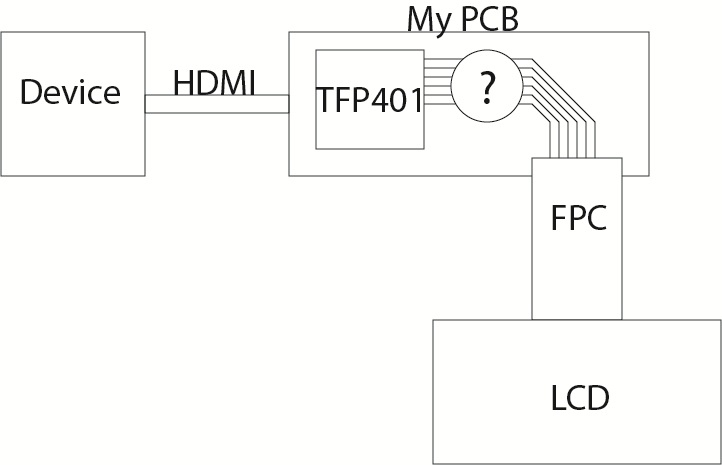
Thank you in advance,

Robert Grootjans

Report Abuse
  • Reply
You have posted to a forum that requires a moderator to approve posts before they are publicly available.
All Replies
  • RossE
    Posted by RossE
    on Jan 23 2012 22:44 PM
    Expert7555 points

    Hi Robert, I'm looking into this and will get back to you shortly.

    Thanks,
    RE

    Report Abuse
    • Reply
    You have posted to a forum that requires a moderator to approve posts before they are publicly available.
  • RossE
    Posted by RossE
    on Jan 24 2012 20:01 PM
    Verified Answer
    Verified by ELIAS VILLEGAS
    Expert7555 points

    Those certainly are cryptic pin descriptions.  RGB video normally involves the data bus (often 18-bit or 24-bit), Hsync, Vsync, DataEnable, and clock.  DataEnable isn't always needed.

    The TFP401 deserializes DVI data to the standard 27-bit +clock interface.  This panel appears to use something totally different and much less conventional for its input clock and sync, as Page 13 shows "CLKH" and "CLKV".  I suggest either contacting Chunghwa for more info, or selecting a different panel that uses the very common RGB interface.

    Here's one list of panels out there, and here are lots of datasheets.  You might notice that many 800x600 panels use an LVDS interface--that's ok and can be workable, as we have an app note for a 2 chip HDMI-to-LVDS bridge solution:  http://www.ti.com/lit/an/slla325/slla325.pdf

    Thanks,
    RE

    Report Abuse
    • Reply
    You have posted to a forum that requires a moderator to approve posts before they are publicly available.
  • Robert Grootjans
    Posted by Robert Grootjans
    on Jan 25 2012 02:57 AM
    Prodigy20 points

    Thank you very much for your help. I have sent an email to the Chunghwa, to see if they can clarify this. Once I receive some info I will post it.
    Otherwise I think I have to get another LCD instead indeed. Nevertheless the links and documents you posted are very useful.
    I'll let you know how everything pans out.
    Regards,

    Robert

    Report Abuse
    • Reply
    You have posted to a forum that requires a moderator to approve posts before they are publicly available.
  • Rui Sebastiao
    Posted by Rui Sebastiao
    on Jun 27 2012 07:39 AM
    Prodigy10 points

    Hi Robert,

    Maybe this could help you:

    http://www.harbaum.org/till/dvi2par/index.shtml

    Report Abuse
    • Reply
    You have posted to a forum that requires a moderator to approve posts before they are publicly available.
  • Tony Rayo
    Posted by Tony Rayo
    on Mar 06 2013 15:47 PM
    Prodigy10 points

    I'm attempting to complete a similar challenge with the use of the TFP401 and a Raspberry Pi B board.  The posted link for http://www.harbaum.org/till/dvi2par/index.shtml is a good one, and I will end up contacting that person, however I was wondering if anyone had specific advice regarding connecting the infamous (mostly for it's price point) Sharp TFT-LCD LQ038J7DH52 (6406.LQ038J7DH52.pdf) .  As nice as it would be to get the integrated touchscreen working, I'm just focusing on adapting the screen for output (even if it's just 18-bit color with QVGA resolution).  I guess I've been spoiled by modern electronics/connections as I'm unsure how to split the RGB/Grey data up at this point.

    Report Abuse
    • Reply
    You have posted to a forum that requires a moderator to approve posts before they are publicly available.
TI E2E™ Community
  • Support Forums
  • Blogs
  • Videos
  • Groups
  • Site Support & Feedback
  • Settings
TI E2E™ Community Groups
  • TI University Program
  • Make the Switch
  • Microcontroller Projects
  • Motor Drive & Control
Other Communities
  • Deyisupport
  • Designsomething.org
  • beagleboard.org
  • TI on Element 14
  • TI on TechXchangeSM
Other Technical & Support Resources
  • WEBENCH® Design Center
  • Product Information Centers
  • Technical Documents
  • TI Design Network
  • TI Technical Articles
  • TI Training

All content and materials on this site are provided "as is". TI and its respective suppliers and providers of content make no representations about the suitability of these materials for any purpose and disclaim all warranties and conditions with regard to these materials, including but not limited to all implied warranties and conditions of merchantability, fitness for a particular purpose, title and non-infringement of any third party intellectual property right. TI and its respective suppliers and providers of content make no representations about the suitability of these materials for any purpose and disclaim all warranties and conditions with respect to these materials. No license, either express or implied, by estoppel or otherwise, is granted by TI. Use of the information on this site may require a license from a third party, or a license from TI.

Content on this site may contain or be subject to specific guidelines or limitations on use. All postings and use of the content on this site are subject to the Terms of Use of the site; third parties using this content agree to abide by any limitations or guidelines and to comply with the Terms of Use of this site. TI, its suppliers and providers of content reserve the right to make corrections, deletions, modifications, enhancements, improvements and other changes to the content and materials, its products, programs and services at any time or to move or discontinue any content, products, programs, or services without notice.

Follow Us Texas Instruments on Facebook Texas Instruments on Twitter Texas Instruments on LinkedIn Texas Instruments on Google+
TI Worldwide | Contact Us | my.TI Login | Site Map | Corporate Citizenship | mobile m.ti.com (Mobile Version)

TI is a global semiconductor design and manufacturing company. Innovate with 100,000+ analog ICs and
embedded processors, along with software, tools and the industry’s largest sales/support staff.

© Copyright 1995-2013 Texas Instruments Incorporated. All rights reserved.
Trademarks | Privacy Policy | Terms of Use