This thread has been locked.

If you have a related question, please click the "Ask a related question" button in the top right corner. The newly created question will be automatically linked to this question.

TUSB8041: TUSB8041RGCT hub detection issue in Yocto Linux

Part Number: TUSB8041

Hi,

We’re working on a custom board running Yocto Linux and using a TI TUSB8041RGCT USB 3.0 hub. USB devices connected through the hub are not being detected/enumerated.

I’ve attached our current Device Tree configuration and the relevant dmesg/USB logs. Could you please review and confirm whether any required Device Tree settings are missing or misconfigured?

Thanks,
output-page17.pdf 
device-tree.txt 
usb-logs.txt 

 
  • HI Shaik:

       I didn't see TUSB8041 form your log, TUSB8041 VID is 0451.

       What voltage on USB_VBuS pin? it should be around 500mV.

    Best

    Brian


  • Hi Brian,

    USB_VBus pin voltage is 500mV

    I have also attached the power sequence.


    Below is the dmesg log error i'm getting?

    [   78.265642] usb 1-1: new high-speed USB device number 9 using xhci-renesas-hcd
    [   78.273133] usb 1-1: Device not responding to setup address.
    [   78.485813] usb 1-1: Device not responding to setup address.
    [   78.697640] usb 1-1: device not accepting address 9, error -71
    [   78.703823] usb usb1-port1: unable to enumerate USB device
    [   82.097682] usb usb2-port1: Cannot enable. Maybe the USB cable is bad?
    [   86.173594] usb usb2-port1: Cannot enable. Maybe the USB cable is bad?


    Regards,

  • Hi,

    when i toggle reset gpio manually from user space below is the output i get

         echo 0 > value                                                                                                                                                                                               
    root@hihope-rzg2h:/sys/class/gpio/gpio370# echo 0 > value [   86.233757] usb usb2-port1: Cannot enable. Maybe the USB cable is bad?
    cat value ^C
    root@hihope-rzg2h:/sys/class/gpio/gpio370# ^C
    root@hihope-rzg2h:/sys/class/gpio/gpio370# echo 1 > value 
    root@hihope-rzg2h:/sys/class/gpio/gpio370# [   90.285690] usb 1-1: new high-speed USB device number 10 using xhci-renesas-hcd
    [   90.421755] usb 1-1: device descriptor read/64, error -71
    [   90.453781] usb usb2-port1: Cannot enable. Maybe the USB cable is bad?
    [   90.661767] usb 1-1: device descriptor read/64, error -71
    [   90.901597] usb 1-1: new high-speed USB device number 11 using xhci-renesas-hcd
    [   91.037929] usb 1-1: device descriptor read/64, error -71
    [   91.277749] usb 1-1: device descriptor read/64, error -71
    [   91.390318] usb usb1-port1: attempt power cycle
    [   91.805688] usb 1-1: new high-speed USB device number 12 using xhci-renesas-hcd
    [   91.813285] usb 1-1: Device not responding to setup address.
    [   92.026060] usb 1-1: Device not responding to setup address.
    [   92.237678] usb 1-1: device not accepting address 12, error -71
    [   92.369595] usb 1-1: new high-speed USB device number 13 using xhci-renesas-hcd
    [   92.377211] usb 1-1: Device not responding to setup address.
    [   92.590032] usb 1-1: Device not responding to setup address.
    [   92.801683] usb 1-1: device not accepting address 13, error -71
    [   92.807918] usb usb1-port1: unable to enumerate USB device
    [   94.529695] usb usb2-port1: Cannot enable. Maybe the USB cable

  • HI Shaik:

       GRSTz should keep low at least 3ms after 3.3v and 1.1v are stable. can you delay GRSTz signal ?

    also use lsusb -tv to do test?

    Regards

    Brian

  • Hi Brian,

    During boot I was unable to introduce the required delay. Would it be acceptable if, after the system has fully booted (around 20 seconds later), I manually pull this GPIO low for more than 3 ms and then set it high again?

    When I attempt this, I encounter the following error.

    echo 1 > [  185.833718] usb usb2-port1: Cannot enable. Maybe the USB cable is bad?
    value 
    root@hihope-rzg2h:/sys/class/gpio/gpio370# [  188.393617] usb 1-1: new high-speed USB device number 6 using xhci-renesas-hcd
    [  188.529922] usb 1-1: device descriptor read/64, error -71
    [  188.769826] usb 1-1: device descriptor read/64, error -71
    [  189.009681] usb 1-1: new high-speed USB device number 7 using xhci-renesas-hcd
    [  189.145774] usb 1-1: device descriptor read/64, error -71
    [  189.385966] usb 1-1: device descriptor read/64, error -71
    [  189.498220] usb usb1-port1: attempt power cycle
    [  189.913592] usb 1-1: new high-speed USB device number 8 using xhci-renesas-hcd
    [  189.921093] usb 1-1: Device not responding to setup address.
    [  190.053727] usb usb2-port1: Cannot enable. Maybe the USB cable is bad?
    [  190.133933] usb 1-1: Device not responding to setup address.
    [  190.345679] usb 1-1: device not accepting address 8, error -71
    [  190.477681] usb 1-1: new high-speed USB device number 9 using xhci-renesas-hcd
    [  190.485185] usb 1-1: Device not responding to setup address.
    [  190.698031] usb 1-1: Device not responding to setup address.
    [  190.909593] usb 1-1: device not accepting address 9, error -71
    [  190.915804] usb usb1-port1: unable to enumerate USB device
    [  194.129718] usb usb2-port1: Cannot enable. Maybe the USB cable is bad?
    [  198.349720] usb usb2-port1: Cannot enable. Maybe the USB cable is bad?
    [  202.425732] usb usb2-port1: Cannot enable. Maybe the USB cable is bad?


    lsusb -tv
    /:  Bus 02.Port 1: Dev 1, Class=root_hub, Driver=xhci-renesas-hcd/1p, 5000M
        ID 1d6b:0003 Linux Foundation 3.0 root hub
    /:  Bus 01.Port 1: Dev 1, Class=root_hub, Driver=xhci-renesas-hcd/1p, 480M
        ID 1d6b:0002 Linux Foundation 2.0 root hub
    

  • I can not see TI hub detected in your system.

    Is there EEPROM installed ?  the EEPROM was programmed or empty?

    Can you take waveform for 1.1v /3.3v/GSRTz?

    Best

    Brian

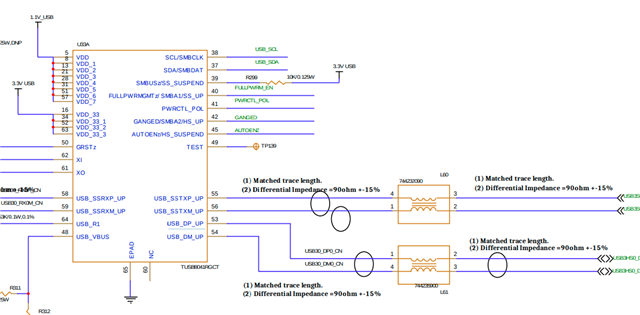
  • We have an AT24C04D-SSHM-B EEPROM where pins 38 and 37 from usb hub are connected to this eeprom , and pin 39 is connected to 3.3V.

    How can I verify whether the EEPROM contains programmed data or is empty?


  • If EEPROM was not programed before installed on PCB, then it should be empty.

    Just remove pullup on SCL/SDA and test again.

    Regards

    Brian

  • We will check this and share our observations tomorrow.

    In case the EEPROM is empty, should it be removed, or will the USB hub operate properly without the EEPROM? Alternatively, does the EEPROM need to be programmed for proper operation?

    Regards,
    Adnan

  • If EEPROM is empty, you need to remove the EEPROM  or remove PULL up  on  SCL/SDA.

    Hub can work in default  configuration without external EEPROM

    or hub can work with programmed EEPROM.

    Best

    Brian

  • We tried removing the pull-up resistors on SCL and SDA, but the issue still persists.
    We then removed the EEPROM entirely, however the upstream USB is still not being detected properly.

    Regards,
    Adnan

  • Does your system has USB hub redriver? Can you connect any USB3/2 hub into USB port of your system?

    Regards

    brian

  • Hi Brian,

    We isolated the D+ and D− signals going to the hub from our Soc and connected them directly to an external USB connector. When a USB device was connected(Mouse), it was detected correctly, but after making the reset GPIO low.

    Regards,
    Adnan

  • Hi Adnan:

      Mouse should be connected to hub downstream port . If mouse was working, hub should work too. But from  the log, I can not find TI hub there. TI hub VID is 0415. 

    Best

    Brian

  • Apart from reset timing is there anything else that can effect hub detection in upstream.
    Currently we have removed EEPROM.

    We are trying to get it to work atleast in usb 2.0 mode first

  • if  the  mouse on downstream port is working after reset, the hub  upstream port is working too. Can you do lsusb -tv again when mouse is working?

    Best

    brian

  • Sorry for the confusion. The mouse was not connected to the downstream port; it was connected directly to the upstream port.
    We disconnected L61(which connects hubs 53 and 54 pins) from hub and connected it directory to the mouse via external connector.

  • Ok, can you test with any other known good USB2 hub? Since mouse driver is different from hub driver.

    Best

    Brian

  • I tested the USB upstream connection using two different working USB hubs.

    The first was a generic USB 2.0 high-speed hub. When this hub was connected, it was detected without any issues, and the devices connected through it were also recognized correctly.

    The second hub was a Honeywell USB 2.0 hub. However, when this hub was connected, the same USB error -71 was observed.

    Regards,

  • Hi Brian,

    1. We would like to confirm the following connection between the SoC and the USB hub:

    SoC ------------> USB Hub

    TX+ ------------> TX+
    TX- ------------> TX-
    RX+ ------------> RX+
    RX- ------------> RX-
    DP ------------> DP
    DM ------------> DM

    Is this connection correct? 

    2. We would also like to confirm the reset sequence for the USB hub.

    For resetting the hub, is it necessary to pull the power rails (1.1 V and 3.3 V) low and then bring them back high before releasing the reset, ensuring that reset is asserted high only after all other lines are stable?

    Or alternatively, can we perform the reset in the following way:

    1. Ensure 1.1 V and 3.3 V power rails are already up and stable.

    2. The RESET pin is currently high.

    3. Pull the RESET pin low for more than 3 ms.

    4. Drive the RESET pin high again.

    Will this sequence successfully reset the hub?

    3. In our current sequence, the 1.1 V rail becomes stable first, followed by the 3.3 V rail. Since the RESET pin is pulled up to 3.3 V, it goes high by default when 3.3 V is applied.

    After approximately 20 seconds, we pull the RESET pin low for more than 3 seconds and then drive it high again.

    We would like to confirm whether this reset sequence is valid for properly resetting the hub.

    4. Also What should be the status for below usb hub pins:-

    39,40,41,42,45

    Regards,
    Adnan

  • 1. We would like to confirm the following connection between the SoC and the USB hub:

    SoC ------------> USB Hub

    TX+ ------------> TX+
    TX- ------------> TX-
    RX+ ------------> RX+
    RX- ------------> RX-
    DP ------------> DP
    DM ------------> DM

    Is this connection correct? 

    it should be:

    SoC ------------> USB Hub

    TX+ ------------> RX+
    TX- ------------> RX-
    RX+ ------------> TX+
    RX- ------------> TX-
    DP ------------> DP
    DM ------------> DM

  • For resetting the hub, is it necessary to pull the power rails (1.1 V and 3.3 V) low and then bring them back high before releasing the reset, ensuring that reset is asserted high only after all other lines are stable?

    Or alternatively, can we perform the reset in the following way:

    1. Ensure 1.1 V and 3.3 V power rails are already up and stable.

    2. The RESET pin is currently high.

    3. Pull the RESET pin low for more than 3 ms.

    4. Drive the RESET pin high again.

    Will this sequence successfully reset the hub?

    both should work.

  • Also What should be the status for below usb hub pins:-

    39,40,41,42,45

    pin 39 should high for i2C mode, other pins can be either high or low.

    what status for pin 49 (TEST) , it should be low.

    Best

    brian

  • Hi Brian,

    Thank you for your input.

    Based on this, it appears that our SoC to Hub TX and RX connections are incorrect on our Custom board.

    For quick validation, can we disconnect the TX and RX SuperSpeed signals and connect only the DP and DM lines of the hub to the SoC to verify the hub functionality?

  • Currently, we have removed the EEPROM and the pull-up resistors on the SCL and SDA pins. Since we are not using I²C/SMBus at the moment, should pin 39 be left NC (Not Connected), or should it be pulled High even though the I²C/SMBus interface is not being used?

  • Based on this, it appears that our SoC to Hub TX and RX connections are incorrect on our Custom board.

    For quick validation, can we disconnect the TX and RX SuperSpeed signals and connect only the DP and DM lines of the hub to the SoC to verify the hub functionality?

    you can disconnect TX and RX and USB2 should work.

    Currently, we have removed the EEPROM and the pull-up resistors on the SCL and SDA pins. Since we are not using I²C/SMBus at the moment, should pin 39 be left NC (Not Connected), or should it be pulled High even though the I²C/SMBus interface is not being used?

    pin 39 either high or floating. Both should work.

    Best

    Brian

  • I will check these points tomorrow and update you on the status.

    Regards,
    Adnan

  • waiting for your update.

  • Hi Brian,

    We tried disconnecting Tx and Rx and just connected dp,dm but still give same -71 error.

    We also tried to below connection but still no change?

    SoC ------------> USB Hub

    TX+ ------------> RX+
    TX- ------------> RX-
    RX+ ------------> TX+
    RX- ------------> TX-
    DP ------------> DP
    DM ------------> DM

    USB Logs:-

    lsusb
    Bus 001 Device 001: ID 1d6b:0002 Linux Foundation 2.0 root hub
    Bus 002 Device 001: ID 1d6b:0001 Linux Foundation 1.1 root hub
    Bus 004 Device 001: ID 1d6b:0003 Linux Foundation 3.0 root hub
    Bus 003 Device 001: ID 1d6b:0002 Linux Foundation 2.0 root hub
    root@hihope-rzg2h:~# lsusb -tv
    /:  Bus 04.Port 1: Dev 1, Class=root_hub, Driver=xhci-renesas-hcd/1p, 5000M
        ID 1d6b:0003 Linux Foundation 3.0 root hub
    /:  Bus 03.Port 1: Dev 1, Class=root_hub, Driver=xhci-renesas-hcd/1p, 480M
        ID 1d6b:0002 Linux Foundation 2.0 root hub
    /:  Bus 02.Port 1: Dev 1, Class=root_hub, Driver=ohci-platform/1p, 12M
        ID 1d6b:0001 Linux Foundation 1.1 root hub
    /:  Bus 01.Port 1: Dev 1, Class=root_hub, Driver=ehci-platform/1p, 480M
        ID 1d6b:0002 Linux Foundation 2.0 root hub
    root@hihope-rzg2h:~# dmesg usb
    dmesg: bad usage
    Try 'dmesg --help' for more information.
    root@hihope-rzg2h:~# dmesg | grep usb                                                                                                                                                   
    [    1.187524] usbcore: registered new interface driver usbfs
    [    1.187555] usbcore: registered new interface driver hub
    [    1.187583] usbcore: registered new device driver usb
    [    2.775561] ehci-platform ee080100.usb: EHCI Host Controller
    [    2.781245] ehci-platform ee080100.usb: new USB bus registered, assigned bus number 1
    [    2.789129] ehci-platform ee080100.usb: irq 215, io mem 0xee080100
    [    2.807491] ehci-platform ee080100.usb: USB 2.0 started, EHCI 1.10
    [    2.838294] ohci-platform ee080000.usb: Generic Platform OHCI controller
    [    2.845016] ohci-platform ee080000.usb: new USB bus registered, assigned bus number 2
    [    2.852890] ohci-platform ee080000.usb: irq 215, io mem 0xee080000
    [    2.954643] xhci-renesas-hcd ee000000.usb: xHCI Host Controller
    [    2.960580] xhci-renesas-hcd ee000000.usb: new USB bus registered, assigned bus number 3
    [    2.985182] xhci-renesas-hcd ee000000.usb: hcc params 0x014051ce hci version 0x100 quirks 0x0000000000830410
    [    2.995052] xhci-renesas-hcd ee000000.usb: irq 214, io mem 0xee000000
    [    3.001611] xhci-renesas-hcd ee000000.usb: xHCI Host Controller
    [    3.007542] xhci-renesas-hcd ee000000.usb: new USB bus registered, assigned bus number 4
    [    3.015641] xhci-renesas-hcd ee000000.usb: Host supports USB 3.0 SuperSpeed
    [    3.030772] usb usb4: We don't know the algorithms for LPM for this host, disabling LPM.
    [    3.047368] usbcore: registered new interface driver usb-storage
    [    3.053860] renesas_usbhs e6590000.usb: host probed
    [    3.058755] renesas_usbhs e6590000.usb: no transceiver found
    [    3.064478] renesas_usbhs e6590000.usb: gadget probed
    [    3.069705] renesas_usbhs e6590000.usb: probed
    [    3.075124] usbcore: registered new interface driver usbtouchscreen
    [    3.279077] usbcore: registered new interface driver usbhid
    [    3.283505] usb 3-1: new high-speed USB device number 2 using xhci-renesas-hcd
    [    3.284657] usbhid: USB HID core driver
    [    3.423727] usb 3-1: device descriptor read/64, error -71
    [    3.671793] usb 3-1: device descriptor read/64, error -71
    [    3.911601] usb 3-1: new high-speed USB device number 3 using xhci-renesas-hcd
    [    4.055780] usb 3-1: device descriptor read/64, error -71
    [    4.295881] usb 3-1: device descriptor read/64, error -71
    [    4.408076] usb usb3-port1: attempt power cycle
    [    4.823502] usb 3-1: new high-speed USB device number 4 using xhci-renesas-hcd
    [    4.831444] usb 3-1: Device not responding to setup address.
    [    5.043911] usb 3-1: Device not responding to setup address.
    [    5.255492] usb 3-1: device not accepting address 4, error -71
    [    5.387493] usb 3-1: new high-speed USB device number 5 using xhci-renesas-hcd
    [    5.395699] usb 3-1: Device not responding to setup address.
    [    5.607806] usb 3-1: Device not responding to setup address.
    [    5.819496] usb 3-1: device not accepting address 5, error -71
    [    5.826238] usb usb3-port1: unable to enumerate USB device
    root@hihope-rzg2h:~# lsusb -t
    /:  Bus 04.Port 1: Dev 1, Class=root_hub, Driver=xhci-renesas-hcd/1p, 5000M
    /:  Bus 03.Port 1: Dev 1, Class=root_hub, Driver=xhci-renesas-hcd/1p, 480M
    /:  Bus 02.Port 1: Dev 1, Class=root_hub, Driver=ohci-platform/1p, 12M
    /:  Bus 01.Port 1: Dev 1, Class=root_hub, Driver=ehci-platform/1p, 480M
    root@hihope-rzg2h:~# lsusb -v
    
    Bus 001 Device 001: ID 1d6b:0002 Linux Foundation 2.0 root hub
    Device Descriptor:
      bLength                18
      bDescriptorType         1
      bcdUSB               2.00
      bDeviceClass            9 Hub
      bDeviceSubClass         0 
      bDeviceProtocol         0 Full speed (or root) hub
      bMaxPacketSize0        64
      idVendor           0x1d6b Linux Foundation
      idProduct          0x0002 2.0 root hub
      bcdDevice            5.10
      iManufacturer           3 Linux 5.10.201-cip41-yocto-standard ehci_hcd
      iProduct                2 EHCI Host Controller
      iSerial                 1 ee080100.usb
      bNumConfigurations      1
      Configuration Descriptor:
        bLength                 9
        bDescriptorType         2
        wTotalLength       0x0019
        bNumInterfaces          1
        bConfigurationValue     1
        iConfiguration          0 
        bmAttributes         0xe0
          Self Powered
          Remote Wakeup
        MaxPower                0mA
        Interface Descriptor:
          bLength                 9
          bDescriptorType         4
          bInterfaceNumber        0
          bAlternateSetting       0
          bNumEndpoints           1
          bInterfaceClass         9 Hub
          bInterfaceSubClass      0 
          bInterfaceProtocol      0 Full speed (or root) hub
          iInterface              0 
          Endpoint Descriptor:
            bLength                 7
            bDescriptorType         5
            bEndpointAddress     0x81  EP 1 IN
            bmAttributes            3
              Transfer Type            Interrupt
              Synch Type               None
              Usage Type               Data
            wMaxPacketSize     0x0004  1x 4 bytes
            bInterval              12
    Hub Descriptor:
      bLength               9
      bDescriptorType      41
      nNbrPorts             1
      wHubCharacteristic 0x0009
        Per-port power switching
        Per-port overcurrent protection
      bPwrOn2PwrGood       10 * 2 milli seconds
      bHubContrCurrent      0 milli Ampere
      DeviceRemovable    0x00
      PortPwrCtrlMask    0xff
     Hub Port Status:
       Port 1: 0000.0100 power
    can't get device qualifier: Resource temporarily unavailable
    can't get debug descriptor: Resource temporarily unavailable
    Device Status:     0x0001
      Self Powered
    
    Bus 002 Device 001: ID 1d6b:0001 Linux Foundation 1.1 root hub
    Device Descriptor:
      bLength                18
      bDescriptorType         1
      bcdUSB               1.10
      bDeviceClass            9 Hub
      bDeviceSubClass         0 
      bDeviceProtocol         0 Full speed (or root) hub
      bMaxPacketSize0        64
      idVendor           0x1d6b Linux Foundation
      idProduct          0x0001 1.1 root hub
      bcdDevice            5.10
      iManufacturer           3 Linux 5.10.201-cip41-yocto-standard ohci_hcd
      iProduct                2 Generic Platform OHCI controller
      iSerial                 1 ee080000.usb
      bNumConfigurations      1
      Configuration Descriptor:
        bLength                 9
        bDescriptorType         2
        wTotalLength       0x0019
        bNumInterfaces          1
        bConfigurationValue     1
        iConfiguration          0 
        bmAttributes         0xe0
          Self Powered
          Remote Wakeup
        MaxPower                0mA
        Interface Descriptor:
          bLength                 9
          bDescriptorType         4
          bInterfaceNumber        0
          bAlternateSetting       0
          bNumEndpoints           1
          bInterfaceClass         9 Hub
          bInterfaceSubClass      0 
          bInterfaceProtocol      0 Full speed (or root) hub
          iInterface              0 
          Endpoint Descriptor:
            bLength                 7
            bDescriptorType         5
            bEndpointAddress     0x81  EP 1 IN
            bmAttributes            3
              Transfer Type            Interrupt
              Synch Type               None
              Usage Type               Data
            wMaxPacketSize     0x0002  1x 2 bytes
            bInterval             255
    Hub Descriptor:
      bLength               9
      bDescriptorType      41
      nNbrPorts             1
      wHubCharacteristic 0x0009
        Per-port power switching
        Per-port overcurrent protection
      bPwrOn2PwrGood       15 * 2 milli seconds
      bHubContrCurrent      0 milli Ampere
      DeviceRemovable    0x00
      PortPwrCtrlMask    0xff
     Hub Port Status:
       Port 1: 0000.0100 power
    can't get debug descriptor: Resource temporarily unavailable
    Device Status:     0x0001
      Self Powered
    
    Bus 004 Device 001: ID 1d6b:0003 Linux Foundation 3.0 root hub
    Device Descriptor:
      bLength                18
      bDescriptorType         1
      bcdUSB               3.00
      bDeviceClass            9 Hub
      bDeviceSubClass         0 
      bDeviceProtocol         3 
      bMaxPacketSize0         9
      idVendor           0x1d6b Linux Foundation
      idProduct          0x0003 3.0 root hub
      bcdDevice            5.10
      iManufacturer           3 Linux 5.10.201-cip41-yocto-standard xhci-hcd
      iProduct                2 xHCI Host Controller
      iSerial                 1 ee000000.usb
      bNumConfigurations      1
      Configuration Descriptor:
        bLength                 9
        bDescriptorType         2
        wTotalLength       0x001f
        bNumInterfaces          1
        bConfigurationValue     1
        iConfiguration          0 
        bmAttributes         0xe0
          Self Powered
          Remote Wakeup
        MaxPower                0mA
        Interface Descriptor:
          bLength                 9
          bDescriptorType         4
          bInterfaceNumber        0
          bAlternateSetting       0
          bNumEndpoints           1
          bInterfaceClass         9 Hub
          bInterfaceSubClass      0 
          bInterfaceProtocol      0 Full speed (or root) hub
          iInterface              0 
          Endpoint Descriptor:
            bLength                 7
            bDescriptorType         5
            bEndpointAddress     0x81  EP 1 IN
            bmAttributes            3
              Transfer Type            Interrupt
              Synch Type               None
              Usage Type               Data
            wMaxPacketSize     0x0004  1x 4 bytes
            bInterval              12
            bMaxBurst               0
    Hub Descriptor:
      bLength              12
      bDescriptorType      42
      nNbrPorts             1
      wHubCharacteristic 0x0009
        Per-port power switching
        Per-port overcurrent protection
      bPwrOn2PwrGood       50 * 2 milli seconds
      bHubContrCurrent      0 milli Ampere
      bHubDecLat          0.0 micro seconds
      wHubDelay             0 nano seconds
      DeviceRemovable    0x00
     Hub Port Status:
       Port 1: 00[  212.959691] usb 3-1: new high-speed USB device number 6 using xhci-renesas-hcd
    00.02a0 5Gbps power Rx.Detect
    Binary Object Store Descriptor:
      bLength                 5
      bDescriptorType        15
      wTotalLength       0x000f
      bNumDeviceCaps          1
      SuperSpeed USB Device Capability:
        bLength                10
        bDescriptorType        16
        bDevCapabilityType      3
        bmAttributes         0x02
          Latency Tolerance Messages (LTM) Supported
        wSpeedsSupported   0x0008
          Device can operate at SuperSpeed (5Gbps)
        bFunctionalitySupport   3
          Lowest fully-functional device speed is SuperSpeed (5Gbps)
        bU1DevExitLat           0 micro seconds
        bU2DevExitLat           0 micro seconds
    can't get debug descriptor: Resource temporarily unavailable
    Device Status:     0x0001
      Self Powered
    
    Bus 003 Device 001: ID 1d6b:0002 Linux Foundation 2.0 root hub
    [  213.096049] usb 3-1: device descriptor read/64, error -71
    [  213.336047] usb 3-1: device descriptor read/64, error -71
    [  213.575682] usb 3-1: new high-speed USB device number 7 using xhci-renesas-hcd
    [  213.712067] usb 3-1: device descriptor read/64, error -71
    [  213.952058] usb 3-1: device descriptor read/64, error -71
    [  214.064419] usb usb3-port1: attempt power cycle
    [  214.479676] usb 3-1: new high-speed USB device number 8 using xhci-renesas-hcd
    [  214.487308] usb 3-1: Device not responding to setup address.
    [  214.700184] usb 3-1: Device not responding to setup address.
    [  214.911686] usb 3-1: device not accepting address 8, error -71
    [  215.043678] usb 3-1: new high-speed USB device number 9 using xhci-renesas-hcd
    [  215.051284] usb 3-1: Device not responding to setup address.
    [  215.264178] usb 3-1: Device not responding to setup address.
    [  215.475676] usb 3-1: device not accepting address 9, error -71
    [  215.481957] usb usb3-port1: unable to enumerate USB device
    Device Descriptor:
      bLength                18
      bDescriptorType         1
      bcdUSB               2.00
      bDeviceClass            9 Hub
      bDeviceSubClass         0 
      bDeviceProtocol         1 Single TT
      bMaxPacketSize0        64
      idVendor           0x1d6b Linux Foundation
      idProduct          0x0002 2.0 root hub
      bcdDevice            5.10
      iManufacturer           3 Linux 5.10.201-cip41-yocto-standard xhci-hcd
      iProduct                2 xHCI Host Controller
      iSerial                 1 ee000000.usb
      bNumConfigurations      1
      Configuration Descriptor:
        bLength                 9
        bDescriptorType         2
        wTotalLength       0x0019
        bNumInterfaces          1
        bConfigurationValue     1
        iConfiguration          0 
        bmAttributes         0xe0
          Self Powered
          Remote Wakeup
        MaxPower                0mA
        Interface Descriptor:
          bLength                 9
          bDescriptorType         4
          bInterfaceNumber        0
          bAlternateSetting       0
          bNumEndpoints           1
          bInterfaceClass         9 Hub
          bInterfaceSubClass      0 
          bInterfaceProtocol      0 Full speed (or root) hub
          iInterface              0 
          Endpoint Descriptor:
            bLength                 7
            bDescriptorType         5
            bEndpointAddress     0x81  EP 1 IN
            bmAttributes            3
              Transfer Type            Interrupt
              Synch Type               None
              Usage Type               Data
            wMaxPacketSize     0x0004  1x 4 bytes
            bInterval              12
    Hub Descriptor:
      bLength               9
      bDescriptorType      41
      nNbrPorts             1
      wHubCharacteristic 0x0009
        Per-port power switching
        Per-port overcurrent protection
        TT think time 8 FS bits
      bPwrOn2PwrGood       10 * 2 milli seconds
      bHubContrCurrent      0 milli Ampere
      DeviceRemovable    0x00
      PortPwrCtrlMask    0xff
     Hub Port Status:
       Port 1: 0000.0101 power connect
    can't get device qualifier: Resource temporarily unavailable
    can't get debug descriptor: Resource temporarily unavailable
    Device Status:     0x0001
      Self Powered


    Regards,

  • Hi Brian,

    We also disconnected the hub’s TX, RX, DP, and DM lines from the SoC and connected the hub’s DP and DM signals directly to a USB cable. When this cable was plugged into a Linux (Ubuntu) laptop, the hub’s upstream interface was successfully detected.

    However, we had also connected a mouse to one of the hub’s downstream ports, and that device was not detected.


    lsusb -tv
    /:  Bus 001.Port 001: Dev 001, Class=root_hub, Driver=xhci_hcd/12p, 480M
        ID 1d6b:0002 Linux Foundation 2.0 root hub
        |__ Port 001: Dev 015, If 0, Class=Hub, Driver=hub/4p, 480M
            ID 0451:8142 Texas Instruments, Inc. TUSB8041 4-Port Hub
        |__ Port 003: Dev 011, If 0, Class=Vendor Specific Class, Driver=cp210x, 12M
            ID 10c4:ea60 Silicon Labs CP210x UART Bridge
        |__ Port 005: Dev 002, If 0, Class=Video, Driver=uvcvideo, 480M
            ID 0c45:6715 Microdia 
        |__ Port 005: Dev 002, If 1, Class=Video, Driver=uvcvideo, 480M
            ID 0c45:6715 Microdia 
        |__ Port 007: Dev 005, If 0, Class=Wireless, Driver=btusb, 12M
            ID 8087:0a2b Intel Corp. Bluetooth wireless interface
        |__ Port 007: Dev 005, If 1, Class=Wireless, Driver=btusb, 12M
            ID 8087:0a2b Intel Corp. Bluetooth wireless interface
        |__ Port 010: Dev 004, If 0, Class=Application Specific Interface, Driver=[none], 12M
            ID 0a5c:5832 Broadcom Corp. 
        |__ Port 010: Dev 004, If 1, Class=Chip/SmartCard, Driver=[none], 12M
            ID 0a5c:5832 Broadcom Corp. 
    /:  Bus 002.Port 001: Dev 001, Class=root_hub, Driver=xhci_hcd/6p, 5000M
        ID 1d6b:0003 Linux Foundation 3.0 root hub
    dell@dell-Latitude-7480:~/Documents/onvif/specs$ lsusb 
    Bus 001 Device 001: ID 1d6b:0002 Linux Foundation 2.0 root hub
    Bus 001 Device 002: ID 0c45:6715 Microdia Integrated_Webcam_HD
    Bus 001 Device 004: ID 0a5c:5832 Broadcom Corp. 5880
    Bus 001 Device 005: ID 8087:0a2b Intel Corp. Bluetooth wireless interface
    Bus 001 Device 011: ID 10c4:ea60 Silicon Labs CP210x UART Bridge
    Bus 001 Device 015: ID 0451:8142 Texas Instruments, Inc. TUSB8041 4-Port Hub
    Bus 002 Device 001: ID 1d6b:0003 Linux Foundation 3.0 root hub
    dell@dell-Latitude-7480:~/Documents/onvif/specs$ usb-devices
    
    T:  Bus=01 Lev=00 Prnt=00 Port=00 Cnt=00 Dev#=  1 Spd=480  MxCh=12
    D:  Ver= 2.00 Cls=09(hub  ) Sub=00 Prot=01 MxPS=64 #Cfgs=  1
    P:  Vendor=1d6b ProdID=0002 Rev=06.14
    S:  Manufacturer=Linux 6.14.0-33-generic xhci-hcd
    S:  Product=xHCI Host Controller
    S:  SerialNumber=0000:00:14.0
    C:  #Ifs= 1 Cfg#= 1 Atr=e0 MxPwr=0mA
    I:  If#= 0 Alt= 0 #EPs= 1 Cls=09(hub  ) Sub=00 Prot=00 Driver=hub
    E:  Ad=81(I) Atr=03(Int.) MxPS=   4 Ivl=256ms
    
    T:  Bus=01 Lev=01 Prnt=01 Port=00 Cnt=01 Dev#= 15 Spd=480  MxCh= 4
    D:  Ver= 2.10 Cls=09(hub  ) Sub=00 Prot=02 MxPS=64 #Cfgs=  1
    P:  Vendor=0451 ProdID=8142 Rev=01.00
    S:  SerialNumber=FB0200698D1E
    C:  #Ifs= 1 Cfg#= 1 Atr=e0 MxPwr=0mA
    I:  If#= 0 Alt= 1 #EPs= 1 Cls=09(hub  ) Sub=00 Prot=02 Driver=hub
    E:  Ad=81(I) Atr=03(Int.) MxPS=   1 Ivl=256ms
    
    T:  Bus=01 Lev=01 Prnt=15 Port=09 Cnt=01 Dev#=  4 Spd=12   MxCh= 0
    D:  Ver= 1.10 Cls=00(>ifc ) Sub=00 Prot=00 MxPS=64 #Cfgs=  1
    P:  Vendor=0a5c ProdID=5832 Rev=01.01
    S:  Manufacturer=Broadcom Corp
    S:  Product=5880
    S:  SerialNumber=0123456789ABCD
    C:  #Ifs= 2 Cfg#= 0 Atr=e0 MxPwr=100mA
    I:  If#= 0 Alt= 0 #EPs= 3 Cls=fe(app. ) Sub=00 Prot=00 Driver=(none)
    E:  Ad=01(O) Atr=02(Bulk) MxPS=  64 Ivl=0ms
    E:  Ad=81(I) Atr=02(Bulk) MxPS=  64 Ivl=0ms
    E:  Ad=85(I) Atr=03(Int.) MxPS=  16 Ivl=1ms
    I:  If#= 1 Alt= 0 #EPs= 3 Cls=0b(scard) Sub=00 Prot=00 Driver=(none)
    E:  Ad=02(O) Atr=02(Bulk) MxPS=  64 Ivl=0ms
    E:  Ad=82(I) Atr=02(Bulk) MxPS=  64 Ivl=0ms
    E:  Ad=86(I) Atr=03(Int.) MxPS=  16 Ivl=1ms
    
    T:  Bus=01 Lev=01 Prnt=04 Port=02 Cnt=01 Dev#= 11 Spd=12   MxCh= 0
    D:  Ver= 1.10 Cls=00(>ifc ) Sub=00 Prot=00 MxPS=64 #Cfgs=  1
    P:  Vendor=10c4 ProdID=ea60 Rev=01.00
    S:  Manufacturer=Silicon Labs
    S:  Product=CP2102 USB to UART Bridge Controller
    S:  SerialNumber=0001
    C:  #Ifs= 1 Cfg#= 1 Atr=80 MxPwr=100mA
    I:  If#= 0 Alt= 0 #EPs= 2 Cls=ff(vend.) Sub=00 Prot=00 Driver=cp210x
    E:  Ad=01(O) Atr=02(Bulk) MxPS=  64 Ivl=0ms
    E:  Ad=81(I) Atr=02(Bulk) MxPS=  64 Ivl=0ms
    
    T:  Bus=01 Lev=01 Prnt=11 Port=04 Cnt=01 Dev#=  2 Spd=480  MxCh= 0
    D:  Ver= 2.00 Cls=ef(misc ) Sub=02 Prot=01 MxPS=64 #Cfgs=  1
    P:  Vendor=0c45 ProdID=6715 Rev=60.07
    S:  Manufacturer=CN0PYJNXLOG007AKB22GA01
    S:  Product=Integrated_Webcam_HD
    C:  #Ifs= 2 Cfg#= 1 Atr=80 MxPwr=500mA
    I:  If#= 0 Alt= 0 #EPs= 1 Cls=0e(video) Sub=01 Prot=00 Driver=uvcvideo
    E:  Ad=83(I) Atr=03(Int.) MxPS=  16 Ivl=4ms
    I:  If#= 1 Alt= 0 #EPs= 0 Cls=0e(video) Sub=02 Prot=00 Driver=uvcvideo
    
    T:  Bus=01 Lev=01 Prnt=02 Port=06 Cnt=01 Dev#=  5 Spd=12   MxCh= 0
    D:  Ver= 2.00 Cls=e0(wlcon) Sub=01 Prot=01 MxPS=64 #Cfgs=  1
    P:  Vendor=8087 ProdID=0a2b Rev=00.10
    C:  #Ifs= 2 Cfg#= 1 Atr=e0 MxPwr=100mA
    I:  If#= 0 Alt= 0 #EPs= 3 Cls=e0(wlcon) Sub=01 Prot=01 Driver=btusb
    E:  Ad=02(O) Atr=02(Bulk) MxPS=  64 Ivl=0ms
    E:  Ad=81(I) Atr=03(Int.) MxPS=  64 Ivl=1ms
    E:  Ad=82(I) Atr=02(Bulk) MxPS=  64 Ivl=0ms
    I:  If#= 1 Alt= 0 #EPs= 2 Cls=e0(wlcon) Sub=01 Prot=01 Driver=btusb
    E:  Ad=03(O) Atr=01(Isoc) MxPS=   0 Ivl=1ms
    E:  Ad=83(I) Atr=01(Isoc) MxPS=   0 Ivl=1ms
    
    T:  Bus=02 Lev=00 Prnt=00 Port=00 Cnt=00 Dev#=  1 Spd=5000 MxCh= 6
    D:  Ver= 3.00 Cls=09(hub  ) Sub=00 Prot=03 MxPS= 9 #Cfgs=  1
    P:  Vendor=1d6b ProdID=0003 Rev=06.14
    S:  Manufacturer=Linux 6.14.0-33-generic xhci-hcd
    S:  Product=xHCI Host Controller
    S:  SerialNumber=0000:00:14.0
    C:  #Ifs= 1 Cfg#= 1 Atr=e0 MxPwr=0mA
    I:  If#= 0 Alt= 0 #EPs= 1 Cls=09(hub  ) Sub=00 Prot=00 Driver=hub
    E:  Ad=81(I) Atr=03(Int.) MxPS=   4 Ivl=256ms
    dell@dell-Latitude-7480:~/Documents/onvif/specs$ 
    dell@dell-Latitude-7480:~/Documents/onvif/specs$ 
    dell@dell-Latitude-7480:~/Documents/onvif/specs$ sudo dmesg | grep usb
    [sudo] password for dell: 
    [    0.369464] usbcore: registered new interface driver usbfs
    [    0.369483] usbcore: registered new interface driver hub
    [    0.369499] usbcore: registered new device driver usb
    [    0.592854] usb usb1: New USB device found, idVendor=1d6b, idProduct=0002, bcdDevice= 6.14
    [    0.592858] usb usb1: New USB device strings: Mfr=3, Product=2, SerialNumber=1
    [    0.592861] usb usb1: Product: xHCI Host Controller
    [    0.592863] usb usb1: Manufacturer: Linux 6.14.0-33-generic xhci-hcd
    [    0.592866] usb usb1: SerialNumber: 0000:00:14.0
    [    0.596604] usb usb2: New USB device found, idVendor=1d6b, idProduct=0003, bcdDevice= 6.14
    [    0.596609] usb usb2: New USB device strings: Mfr=3, Product=2, SerialNumber=1
    [    0.596612] usb usb2: Product: xHCI Host Controller
    [    0.596614] usb usb2: Manufacturer: Linux 6.14.0-33-generic xhci-hcd
    [    0.596616] usb usb2: SerialNumber: 0000:00:14.0
    [    0.840449] usb 1-5: new high-speed USB device number 2 using xhci_hcd
    [    0.981014] usb 1-5: New USB device found, idVendor=0c45, idProduct=6715, bcdDevice=60.07
    [    0.981025] usb 1-5: New USB device strings: Mfr=2, Product=1, SerialNumber=0
    [    0.981027] usb 1-5: Product: Integrated_Webcam_HD
    [    0.981030] usb 1-5: Manufacturer: CN0PYJNXLOG007AKB22GA01
    [    1.130617] usb 1-7: new full-speed USB device number 3 using xhci_hcd
    [    1.256580] usb 1-7: New USB device found, idVendor=8087, idProduct=0a2b, bcdDevice= 0.10
    [    1.256588] usb 1-7: New USB device strings: Mfr=0, Product=0, SerialNumber=0
    [    1.369708] usb 1-10: new full-speed USB device number 4 using xhci_hcd
    [    1.527641] usb 1-10: New USB device found, idVendor=0a5c, idProduct=5832, bcdDevice= 1.01
    [    1.527660] usb 1-10: New USB device strings: Mfr=1, Product=2, SerialNumber=3
    [    1.527667] usb 1-10: Product: 5880
    [    1.527673] usb 1-10: Manufacturer: Broadcom Corp
    [    1.527678] usb 1-10: SerialNumber: 0123456789ABCD
    [    1.528193] usb 1-10: config 0 descriptor??
    [    3.622612] usbcore: registered new interface driver btusb
    [    3.679886] usb 1-5: Found UVC 1.00 device Integrated_Webcam_HD (0c45:6715)
    [    3.752592] usbcore: registered new interface driver uvcvideo
    [ 8078.411883] usb usb1: root hub lost power or was reset
    [ 8078.411887] usb usb2: root hub lost power or was reset
    [ 8078.694419] usb 1-5: reset high-speed USB device number 2 using xhci_hcd
    [ 8078.817732] usb 1-10: WARN: invalid context state for evaluate context command.
    [ 8078.929450] usb 1-10: reset full-speed USB device number 4 using xhci_hcd
    [ 8079.062648] usb 1-7: WARN: invalid context state for evaluate context command.
    [ 8079.174643] usb 1-7: reset full-speed USB device number 3 using xhci_hcd
    [ 8275.592791] usb 1-7: USB disconnect, device number 3
    [ 8276.574547] usb 1-7: new full-speed USB device number 5 using xhci_hcd
    [ 8276.699856] usb 1-7: New USB device found, idVendor=8087, idProduct=0a2b, bcdDevice= 0.10
    [ 8276.699876] usb 1-7: New USB device strings: Mfr=0, Product=0, SerialNumber=0
    [11266.918564] usb usb1: root hub lost power or was reset
    [11266.918565] usb usb2: root hub lost power or was reset
    [11267.081228] usb 1-10: WARN: invalid context state for evaluate context command.
    [11267.193940] usb 1-10: reset full-speed USB device number 4 using xhci_hcd
    [11267.441270] usb 1-5: reset high-speed USB device number 2 using xhci_hcd
    [11267.564824] usb 1-7: WARN: invalid context state for evaluate context command.
    [11267.676365] usb 1-7: reset full-speed USB device number 5 using xhci_hcd
    [12246.918123] usb 1-1: new full-speed USB device number 6 using xhci_hcd
    [12247.073332] usb 1-1: New USB device found, idVendor=10c4, idProduct=ea60, bcdDevice= 1.00
    [12247.073340] usb 1-1: New USB device strings: Mfr=1, Product=2, SerialNumber=3
    [12247.073343] usb 1-1: Product: CP2102 USB to UART Bridge Controller
    [12247.073346] usb 1-1: Manufacturer: Silicon Labs
    [12247.073348] usb 1-1: SerialNumber: 0001
    [12247.164766] usbcore: registered new interface driver usbserial_generic
    [12247.164777] usbserial: USB Serial support registered for generic
    [12247.172172] usbcore: registered new interface driver cp210x
    [12247.172191] usbserial: USB Serial support registered for cp210x
    [12247.173302] usb 1-1: cp210x converter now attached to ttyUSB0
    [13729.537227] usb 1-1: USB disconnect, device number 6
    [13730.857972] usb 1-1: new full-speed USB device number 7 using xhci_hcd
    [13731.013329] usb 1-1: New USB device found, idVendor=10c4, idProduct=ea60, bcdDevice= 1.00
    [13731.013347] usb 1-1: New USB device strings: Mfr=1, Product=2, SerialNumber=3
    [13731.013355] usb 1-1: Product: CP2102 USB to UART Bridge Controller
    [13731.013362] usb 1-1: Manufacturer: Silicon Labs
    [13731.013368] usb 1-1: SerialNumber: 0001
    [13731.024456] usb 1-1: cp210x converter now attached to ttyUSB0
    [13749.811696] usb 1-1: USB disconnect, device number 7
    [13751.761160] usb 1-1: new full-speed USB device number 8 using xhci_hcd
    [13751.916475] usb 1-1: New USB device found, idVendor=10c4, idProduct=ea60, bcdDevice= 1.00
    [13751.916491] usb 1-1: New USB device strings: Mfr=1, Product=2, SerialNumber=3
    [13751.916499] usb 1-1: Product: CP2102 USB to UART Bridge Controller
    [13751.916504] usb 1-1: Manufacturer: Silicon Labs
    [13751.916510] usb 1-1: SerialNumber: 0001
    [13751.927779] usb 1-1: cp210x converter now attached to ttyUSB0
    [17937.672495] usb 1-1: USB disconnect, device number 8
    [19879.237592] usb 1-1: new full-speed USB device number 9 using xhci_hcd
    [19879.393277] usb 1-1: New USB device found, idVendor=10c4, idProduct=ea60, bcdDevice= 1.00
    [19879.393295] usb 1-1: New USB device strings: Mfr=1, Product=2, SerialNumber=3
    [19879.393303] usb 1-1: Product: CP2102 USB to UART Bridge Controller
    [19879.393309] usb 1-1: Manufacturer: Silicon Labs
    [19879.393315] usb 1-1: SerialNumber: 0001
    [19879.405566] usb 1-1: cp210x converter now attached to ttyUSB0
    [21083.272703] usb 1-1: USB disconnect, device number 9
    [25627.617480] usb usb1: root hub lost power or was reset
    [25627.617483] usb usb2: root hub lost power or was reset
    [25627.911296] usb 1-5: reset high-speed USB device number 2 using xhci_hcd
    [25628.037948] usb 1-10: WARN: invalid context state for evaluate context command.
    [25628.149348] usb 1-10: reset full-speed USB device number 4 using xhci_hcd
    [25628.282509] usb 1-7: WARN: invalid context state for evaluate context command.
    [25628.394604] usb 1-7: reset full-speed USB device number 5 using xhci_hcd
    [28781.237582] usb usb1: root hub lost power or was reset
    [28781.237584] usb usb2: root hub lost power or was reset
    [28781.409794] usb 1-7: WARN: invalid context state for evaluate context command.
    [28781.524208] usb 1-7: reset full-speed USB device number 5 using xhci_hcd
    [28781.648383] usb 1-10: WARN: invalid context state for evaluate context command.
    [28781.760084] usb 1-10: reset full-speed USB device number 4 using xhci_hcd
    [28782.005067] usb 1-5: reset high-speed USB device number 2 using xhci_hcd
    [28917.667933] usb usb1: root hub lost power or was reset
    [28917.667935] usb usb2: root hub lost power or was reset
    [28917.876927] usb 1-7: WARN: invalid context state for evaluate context command.
    [28917.990206] usb 1-7: reset full-speed USB device number 5 using xhci_hcd
    [28918.114832] usb 1-10: WARN: invalid context state for evaluate context command.
    [28918.226378] usb 1-10: reset full-speed USB device number 4 using xhci_hcd
    [28918.471417] usb 1-5: reset high-speed USB device number 2 using xhci_hcd
    [28932.301511] usb 1-1: new full-speed USB device number 10 using xhci_hcd
    [28932.456612] usb 1-1: New USB device found, idVendor=10c4, idProduct=ea60, bcdDevice= 1.00
    [28932.456627] usb 1-1: New USB device strings: Mfr=1, Product=2, SerialNumber=3
    [28932.456633] usb 1-1: Product: CP2102 USB to UART Bridge Controller
    [28932.456639] usb 1-1: Manufacturer: Silicon Labs
    [28932.456644] usb 1-1: SerialNumber: 0001
    [28932.469514] usb 1-1: cp210x converter now attached to ttyUSB0
    [29599.752641] usb 1-1: USB disconnect, device number 10
    [30345.407418] usb 1-3: new full-speed USB device number 11 using xhci_hcd
    [30345.562680] usb 1-3: New USB device found, idVendor=10c4, idProduct=ea60, bcdDevice= 1.00
    [30345.562695] usb 1-3: New USB device strings: Mfr=1, Product=2, SerialNumber=3
    [30345.562702] usb 1-3: Product: CP2102 USB to UART Bridge Controller
    [30345.562708] usb 1-3: Manufacturer: Silicon Labs
    [30345.562712] usb 1-3: SerialNumber: 0001
    [30345.575985] usb 1-3: cp210x converter now attached to ttyUSB0
    [30363.371062] usb 1-1: new high-speed USB device number 12 using xhci_hcd
    [30363.494972] usb 1-1: New USB device found, idVendor=0451, idProduct=8142, bcdDevice= 1.00
    [30363.494985] usb 1-1: New USB device strings: Mfr=0, Product=0, SerialNumber=1
    [30363.494990] usb 1-1: SerialNumber: FB0200698D1E
    [30374.959846] usb 1-1: USB disconnect, device number 12
    [30381.736642] usb 1-1: new high-speed USB device number 13 using xhci_hcd
    [30381.860195] usb 1-1: New USB device found, idVendor=0451, idProduct=8142, bcdDevice= 1.00
    [30381.860209] usb 1-1: New USB device strings: Mfr=0, Product=0, SerialNumber=1
    [30381.860215] usb 1-1: SerialNumber: FB0200698D1E
    [30544.575598] usb 1-1: USB disconnect, device number 13
    [30558.536388] usb 1-1: new high-speed USB device number 14 using xhci_hcd
    [30558.659908] usb 1-1: New USB device found, idVendor=0451, idProduct=8142, bcdDevice= 1.00
    [30558.659914] usb 1-1: New USB device strings: Mfr=0, Product=0, SerialNumber=1
    [30558.659917] usb 1-1: SerialNumber: FB0200698D1E
    [30574.891499] usb 1-1: USB disconnect, device number 14
    [30938.807640] usb 1-1: new high-speed USB device number 15 using xhci_hcd
    [30938.931178] usb 1-1: New USB device found, idVendor=0451, idProduct=8142, bcdDevice= 1.00
    [30938.931184] usb 1-1: New USB device strings: Mfr=0, Product=0, SerialNumber=1
    [30938.931187] usb 1-1: SerialNumber: FB0200698D1E
    

  • This is correct connection, are there 100nf caps between SOC and  USB hub?

    SoC ------------> USB Hub

    TX+ ------------> RX+
    TX- ------------> RX-
    RX+ ------------> TX+
    RX- ------------> TX-
    DP ------------> DP
    DM ------------> DM

    Best

    Brian

  • Hi Brian,

    on which lines should 100nf be present ?
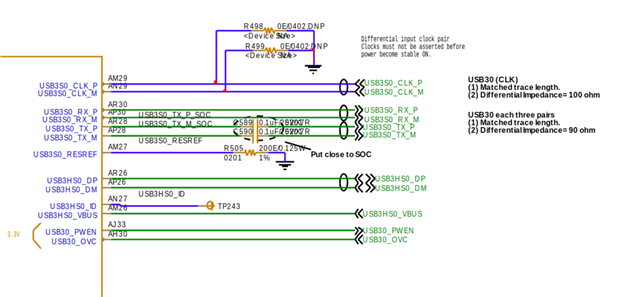
    Below are our soc to hub tx,rx and dp dm lines

  • so from hub to SOC, 100nf is need on SSTX_UP of hub. which is connected to SOC SSRX

    Best

    brian

  • Okay will see what can be done regarding the 100nf on SSRX_UP going to soc

    When we disconnected SSTX_UP and SSRX_UP from the SoC and kept only DP and DM connected, the upstream port was still not detected and the same error -71 continued to appear.

    However, when we disconnected the DP and DM lines from the SoC and instead connected them to a USB cable attached to a PC, the upstream port was detected on the PC, but the downstream ports were not detected.

    Is there any specific reason why this behavior might occur?

  • However, when we disconnected the DP and DM lines from the SoC and instead connected them to a USB cable attached to a PC, the upstream port was detected on the PC, but the downstream ports were not detected.

    do you have Vbus for downstream port ?

    Best

    Brian

  • yes downstream vbus is connected to 5V

  • did you try to USB HS device on downstream port instead of mouse or keyboard ?

    Best

    brian

  • Hi Brian,

    We have not yet tested with other devices.

    Currently, the upstream enumeration itself is failing. Could you confirm whether upstream enumeration requires any devices to be connected on the downstream ports?

    In our design, out of the 4 hub ports:

    • 2 ports are connected to USB Type-A connectors

    • 2 ports are connected to USB-to-LAN interfaces

    I’ve attached the schematics for your review. Apart from the earlier TX/RX swap issue (which has now been corrected in hardware), please let us know if anything else might be missing or incorrect.


    7536.usb-hub.pdf

    Regards,
    Adnan

  • Hub upstream enumeration don't need any device connected to downstream port.

    what is voltage on USB_VBus (pin48)? it should be > 400mv .

    Can you take waveform on upstream DP/DM during hub power on

     Best

    Brian