CCSTUDIO: Where can I find 55xdspx.lib?

Part Number: CCSTUDIO

I try to compile an old project on another computer.

Code Composer Studio Version: 4.2.4.00033. Part TMS320VC5502GZZ300

I have now reached the point where the compilation fails with:

cannot find file "55xdspx.lib"

Additionnaly, 

placement fails for object ".const"

placement fails for object ".stack"

I have found https://software-dl.ti.com/libs/c55_dsplib/latest/index_FDS.html but then it is unclear to me how I can install it.

  • I have found https://software-dl.ti.com/libs/c55_dsplib/latest/index_FDS.html but then it is unclear to me how I can install it.
    I am unfamiliar with this package so ran the exe and then extracted the installed zip file. There is a readme that has some information. It is just a package of source, CCS 3.3 examples projects, libraries, etc. This package did not come from the CCS team. I will see if I can find any device experts that can assist you further.

    Thanks

    ki

  • Hi Thierry,

    You are in the right place for download the C55x DSP libraries:  https://software-dl.ti.com/libs/c55_dsplib/latest/index_FDS.html.

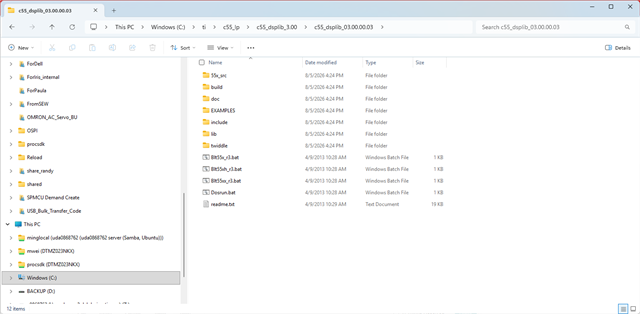
    As KI mentioned in his post, all you need to do is download and install the SPRC100-C55_DSPLIB-03.00.00.03-Setup.exe. After install, there will be a zip file. Unzip the zip file, you will get the following directory:

    It just works like any other libraries (doc folder has the programmer guide, include folder has the header files, lib folder has the pre-built libraries, EXAMPLES folder has the DSPLIB examples). One thing different is that the 55x_src folder has all the DSPLIB functions' source code (in assembly though)

    Best regards,

    Ming

  • Thank you .

    In the properties of my project, under "C/C++ Build",

    - in "C5500 Compiler - Include Options", I have added "C:\c55_lp\c55_dsplib_3.00\include". (It seems on the previous -now crashed- computer the project also had a similar path to "${PROJECT_ROOT}/../../C55xxCSL/include").

    - in "C5500 Linker - File Search Path", I have added "C:\c55_lp\c55_dsplib_3.00\lib". Likewise.

    In some sense it solves the first issue, because "55xdspx.lib" is found. So I do not need to recompile it using the bat-file?

    But I still have

    placement fails for object ".const"

    placement fails for object ".stack"

    I presume it is related to the memory model?


    errors encountered during linking; "<projname>.out" not built        <projname>    line 0    1785936734471    317
    placement fails for object ".const", size 0xd86 (page 0).  Available ranges: DARAM        size: 0xdd00       unused: 0x49a        max hole: 0x47c .const    >  DARAM align(32) fill = 00h        <projname>    line 0    1785936734471    316
    placement fails for object ".stack", size 0x2000 (page 0).  Available ranges: DARAM        size: 0xdd00       unused: 0x49a        max hole: 0x47c .stack    >  DARAM align(32) fill = 00h        <projname>    line 0    1785936734471    315

  • Attached is my lnkx.cmd file

    lnkx.zip

  • Hi Thierry,

    The linker errors below indicate that the memory region DARAM size is too small:

    placement fails for object ".const", size 0xd86 (page 0).  Available ranges: DARAM        size: 0xdd00       unused: 0x49a        max hole: 0x47c .const    >  DARAM align(32) fill = 00h        <projname>    line 0    1785936734471    316
    placement fails for object ".stack", size 0x2000 (page 0).  Available ranges: DARAM        size: 0xdd00       unused: 0x49a        max hole: 0x47c .stack    >  DARAM align(32) fill = 00h        <projname>    line 0    1785936734471    315

    There only 0x49a left in DRAM, but .const needs 0xd86 and .stack needs 0x2000.

    Best regards,

    Ming

  • Hi Ming,

    The problem is that neither the lnkx.cmd nor the source files (*.c, *.h) of the project have changed, and this project could compile (many times) on a previous computer. I have modified only the .cdtbuild file, because of the new installation. It is already a long story, after

     CCSTUDIO: Error loading managed make project information 

     CCSTUDIO: The Managed Make project file could not be written 

    the .*project files did not change.

  • Hi Thierry,

    There are two things may be affecting this:

    1. the 55xdspx.lib version is different.

    2. the profile you build is different. In general, the Debug profile is bigger than the Release profile.

    Best regards,

    Ming

  • Hi Ming,

    According to the .cdtbuild, I use the same profile as on my previous PC. Additionally, I have tried to increase the optimisation level, it did not change the size so much.

    I will try to recover the 55xdspx.lib files from my old PC (OS crashed, but some files could be recoverable). It will take some time.

    Otherwise, do you think it is possible/meaningful to install a completely new version of the tools?

    Thank you

    Thierry

  • Hi Thierry,

    If you meant install the whole CCS and C55x CGT, I do not recommend doing so, because it may create new problems, stick with what used to work is important. Another point, the latest 55xdspx.lib (rev3.0) may not work for the C5502, because it was optimized for the C55x DSP core rev 3.3 while the C5502 is using the older DSP core.

    Best regards,

    Ming