This thread has been locked.

If you have a related question, please click the "Ask a related question" button in the top right corner. The newly created question will be automatically linked to this question.

RTOS/TDA2HV: Stereo cam problem

Part Number: TDA2HV

Tool/software: TI-RTOS

Hi Sir,

I am working on tda2xx stereo cam algorithm.

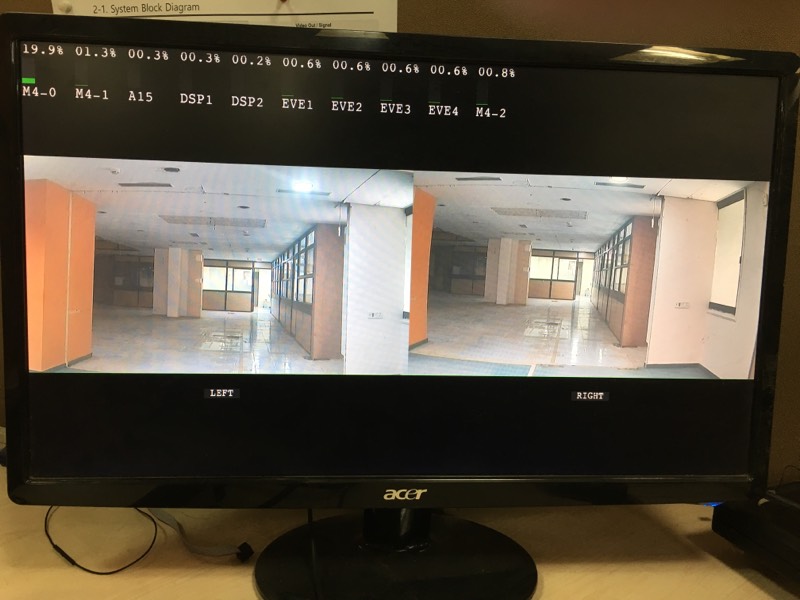
i am getting this output which is not accurate.

this is my camera configuration.

please help me with this.

Thanks,

Ravi

  • Hi Ravi,

    I have forwarded your question to an expert for comment.

    Regards,
    Yordan
  • Hello Ravi,

    It seems left and right cameras are not well rectified. Please make sure that

    1) you run stereo calibration use case first. Also low-distortion cameras are recommended (I see barrel distortion for left camera input). Otherwise, calibration may not come up with correct rectification tables.

    2) you connect right camera to the 1st camera port (FPD link cable) and left camera to the 2nd camera port.

    3) 10 ~ 15 cm of baseline is recommended

    I also put some notes in the attached documents. Please check and let me know if you have any questions.

    TDA2x_Stereo_Usecase_Notes.docxTDAx_Disparity_Calc_Dim.xlsx 

  • Hi Sir,

    i understood most of things. but

    2) you connect right camera to the 1st camera port (FPD link cable) and left camera to the 2nd camera port.
    is it necessary ?? can you please elaborate this??

    Thanks,

    Ravi.

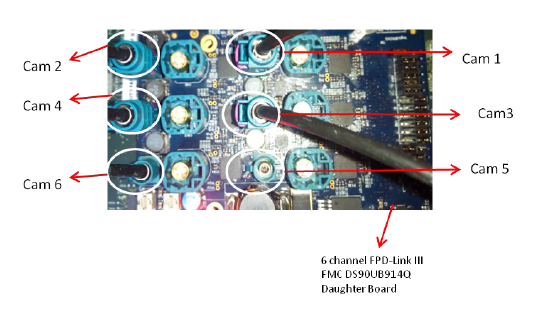
  • For example, if you use UB914 deserializer, you can connect up to 6 cameras to it as shown in the below figure. You have to connect the right camera to Cam 1, and left camera to Cam 2.

  • hi Sir,

    We are using separate deserializer for each camera. in that case what i have to do??

    now i have set baseline to 10cm.

    still not correct output.

    Thanks.

  • Then you can visual check if left (right) camera image on display is from left (right) camera. Questions for you:

    1. Did you run stereo calibration?

    2. Are you using low-distortion camera lens? Do left and right lenses have similar intrinsic parameters? If you can run stereo calibration use case, please share its screen shot.
  • Hi Sir,

    1. i ran calibration usecase as you suggested in document.

    At first use case was taking table from .c files now it is taking from QSPI flash.

    2.  i am attaching screen shot of stereo calibration use case

    i am getting too big output of right camera (very zoom)

  • That's the issue. Left and right camera are totally different. You have to use the same lens and sensor for both cameras. I also can see (barrel) distortion in left camera, which may affect rectification quality since stereo calibration assume there is no lens distortion.

  • Hi Sir,

    by changing camera we got correct output. but still there is very much noise in output. i did calibration many times but i am not unable to remove noise from output. otherwise it is working with objects.

    Thanks,

    Ravi.

  • From left and right images, you can see that rectification is quite off, i.e., one point on the left image is not on the same line on the right image. There are several reasons for that, e.g. large lens distortion, improper stereo camera setup. Can you show me auto-calibration display? When you run auto calibration, can you see selected feature points (red dots)?

    If it keeps happening, I would recommend off line calibration. Also you can use public domain chart based algorithm. 


  • Hi Sir,

    I have run auto calibration use case and got output is like:

    we got red dots on screen only when i select 2. capture stereo from menu:

    is there any possibility of errors in use case/algorithms? is it fully tested?

  • Hi Sir,

    There is one more question.
    what is rccc camera sensor? is that necessary for make this algorithm work??

    Thanks,
    Ravi.
  • For this natural image based calibration, you try to align left and right cameras well enough. Otherwise, it cannot find corresponding points (shown in red dots - you should see red dots when you select 1 and 2 from the menu.

    First of all, your stereo cameras are not well aligned. For example, the right camera looks rotated (roll angle), and zoomed in. If necessary, you can try with shorter baseline between left and right. And the lens distortion may cause calibration failure.

    When you collect feature points (by selecting 1 and 2 from the menu), put something in front of camera so that it can capture distinct features. But do not use checkerboard chart (or something has repeated pattern), because it can fool feature detector.

    When you select 3 from the menu, it create calibration table. You can see from a console the rectification error value. This error should be around 0.2 (shouldn't be larger than 0.3) 

    If you continue to have the same issue, I encourage you to try offline calibration.

  • I have no idea about RCCC. I don't think it is related with calibration