This thread has been locked.

If you have a related question, please click the "Ask a related question" button in the top right corner. The newly created question will be automatically linked to this question.

DP83869HM: Request for Schematic Review – Ethernet PHY (DP83869HMRGZR with AM2634)

Part Number: DP83869HM
Other Parts Discussed in Thread: AM2634, DP83869

Hello Team,

I am sharing our schematic here and would like to request your support for a detailed review.

We are working on a custom board where the DP83869HMRGZR Ethernet PHY is interfaced with the AM2634 MCU over RGMII. Currently, the Ethernet link is coming up (LED indication is present), but ping is not working.

I kindly request you to review the attached schematic and provide your feedback to help us identify the issue.

CUSTOM_BOARD-REV02.pdf 

Please let me know if any additional information (such as oscilloscope captures or layout details) is required from our side.

Looking forward to your support.


--
Thanks & Regards, 
Chinchetti Abhishek 

  • Hi Chinchetti,

    Looking at the schematic, here are my comments:

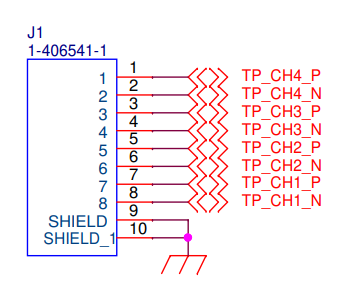
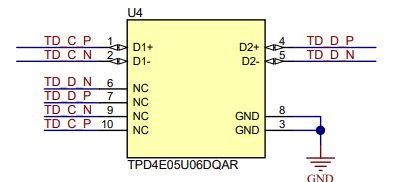
    1. One improvement you could make is to have pass-through ESD diodes. These diodes pass the signal through the diode, allowing you to mount the part directly onto the trace and negate potential stubs from a diode that hangs off the trace. I wouldn't expect this in-itself to cause ping issues, however it is one improvement that can be made. Below is an example of how this looks in our DP83869EVM schematic:

    2. Double check that your clock source and magnetics are within the datasheet specs:

    3. I recommend reading the strap registers of the PHY to make sure you are in the correct mode of operation. I cannot tell which resistors are populated here but reading the register would be the best way to check the PHY is strapped correctly:

    Otherwise your schematic looks ok. I recommend using our DP83869 schematic checklist as a second review of the design and going through our DP83869 troubleshooting guide for your ping troubles. This would be similar to our discussion on this E2E thread.

    Best,

    Shane

  • Hi Shane,

    Thank you for sharing the schematic checklist and the DP83869 troubleshooting guide

    Please find my observations below:

    1. I have checked the ESD diodes, and the implementation matches the schematic you shared.
    2. I verified the magnetics, and the signals were initially swapped. I have completed the rework as per the requirement and aligned them with the EVM design. The crystal is working as expected.
    3. Regarding the strap resistors, I would like to highlight one point: all data lines are pulled low, and the RX_CTRL signal has both pull-up and pull-down. With this configuration, we are able to achieve link-up. Also, all data lines correspond to PHY address 0.
    4. For your information, we are currently working on loopback testing. MAC loopback is working as expected. However, when it comes to PHY loopback, we are getting this log,

      =============================
       Enet Loopback: Iteration 1
      =============================
      CPSW_3G Test
      EnetAppUtils_reduceCoreMacAllocation: Reduced Mac Address Allocation for CoreId:0 From 4 To 2
      Open MAC port 1
      EnetPhy_bindDriver:1873
      PHY 0 is alive
      initQs() txFreePktInfoQ initialized with 16 pkts
      Cpsw_handleLinkUp:1653
      Transmitted 5000 packets
      Delete EnetApp_txTask() and exit..
      .

    --
    Thanks & Regards, 
    Chinchetti Abhishek 
  • Hi Chinchetti,

    Its good that MAC loopback works. By 'PHY loopback' are you referring to Reverse loopback (on the MDI) or some other type of loopback?

    Another question, are you able to read/write registers on the PHY ok? If so, I'd recommend reading register 0x0015 while you are testing ping or reverse loopback to see if the PHY is receiving any errors on the MDI.

    Best,

    Shane

  • Hi Shane,


    Thank you for your suggestions.


    We verified the following on our custom board:

    • PHY is detected correctly (ID: 0x2000 / 0xA0F3), and MDIO read/write is working as expected.
    • BMSR (0x01) = 0x796D and PHYSTS (0x11) = 0x7F02.
    • Register 0x0015 (error counter) remains 0x0000 during testing.

    We are attaching the PHY register dump log of our custom board. Kindly review and let us know your observations.

    We also ran the PHY internal loopback example (enet_CPSW_loopback_phy_end_am_263x_CC_r5fss0-0). The PHY is detected and link-up is indicated from CPSW, but the loopback test does not complete, and we do not observe any RX packet count..

    =============================
     Enet Loopback: Iteration 1
    =============================
    CPSW_3G Test
    EnetAppUtils_reduceCoreMacAllocation: Reduced Mac Address Allocation for CoreId:0 From 4 To 2
    Open MAC port 1
    EnetPhy_bindDriver:1873
    PHY 0 is alive
    initQs() txFreePktInfoQ initialized with 16 pkts
    Cpsw_handleLinkUp:1653
    Transmitted 5000 packets
    Delete EnetApp_txTask() and exit..


    Please let us know any suggestions or observations on the given data. What need to do, get ping and PHY loopback.

    --
    Thanks & Regards, 
    Chinchetti Abhishek 

  • Hi Chinchetti,

    From the register dump I see that register 0x11 = 7F02. This means you are linked up at 100Mbps. Is this the speed you are expecting to link up in?

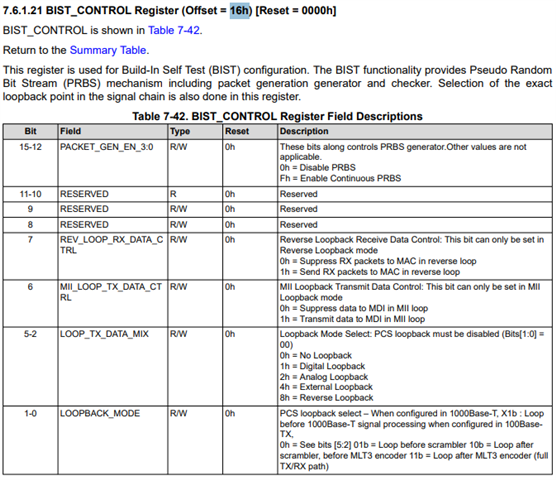
    Do you know which bits in the PHY that internal loopback example (enet_CPSW_loopback_phy_end_am_263x_CC_r5fss0-0) is setting? The reason I ask is that this PHY has multiple 'internal' loopback modes and I'd like to see which one is being tested here. We can tell which loopback is tested based on the value in register 0x0016[5:0].

    For instance, if this example sets 'Analog loopback' you would also need 100-ohm terminations on the MDI lines:

    If you can include a link to that example I can take a look as well.

    Best,

    Shane

  • Hi Shane,

    As you suggested we have implemented register read functionality and find below log for register's response.

    ==========================
          ENET LWIP App
    ==========================
    EnetAppUtils_reduceCoreMacAllocation: Reduced Mac Address Allocation for CoreId:0 From 4 To 2
    Mdio_open:320
    Open MAC port 1
    PHY 0 is alive
    
    ========= FULL PHY DUMP =========
    
    ---- STANDARD PHY REGISTERS (0x00–0x1F) ----
    Reg[0x00] (BMCR) = 0x3100
    Reg[0x01] (BMSR) = 0x796D
    Reg[0x02] (PHYID1) = 0x2000
    Reg[0x03] (PHYID2) = 0xA0F3
    Reg[0x04] (ANAR) = 0x01E1
    Reg[0x05] (ANLPAR) = 0xCDE1
    Reg[0x06] (ANER) = 0x006F
    Reg[0x07] (ANNPTR) = 0x2001
    Reg[0x08] (ANNPRR) = 0x4006
    Reg[0x09] (RES9) = 0x1200
    Reg[0x0A] (RESA) = 0x3800
    Reg[0x0B] (RESB) = 0x0000
    Reg[0x0C] (RESC) = 0x0000
    Reg[0x0D] (RESD) = 0x0000
    Reg[0x0E] (RESE) = 0x0000
    Reg[0x0F] (RESF) = 0xF000
    Reg[0x10] (PHYCR) = 0x5028
    Reg[0x11] (PHYSTS) = 0xBF02
    Reg[0x12] (MICR) = 0x0000
    Reg[0x13] (MISR) = 0x0000
    Reg[0x14] (PAGESEL) = 0x29C7
    Reg[0x15] (FCSCR) = 0x0000
    Reg[0x16] (RECR) = 0x0000
    Reg[0x17] (PCSR) = 0x0040
    Reg[0x18] (RBR) = 0x6150
    Reg[0x19] (LEDCR) = 0x4000
    Reg[0x1A] (PHYCTRL2) = 0x0002
    Reg[0x1B] (EDCR) = 0x0000
    Reg[0x1C] (RES1C) = 0x0000
    Reg[0x1D] (RES1D) = 0x0000
    Reg[0x1E] (RES1E) = 0x0012
    Reg[0x1F] (RES1F) = 0x000
    -------------------------------------------
    
    ---- EXTENDED PHY REGISTERS ----
    RGMII_CTRL = 0x0000
    RGMII_CTRL2   (0x33) = 0x0000
    PHY_CONTROL       (0x10) = 0x5028
    PHY_STATUS      (0x11) = 0xAF02
    INTERRUPT_MASK      (0x12) = 0x0000
    INTERRUPT_STATUS      (0x13) = 0x0000
    PHY_ERR_COUNT       (0x15) = 0x0000
    BIST_CONTROL       (0x16) = 0x0000
    LEDCR       (0x18) = 0x6150
    RGMIIDCTL   (0x0086) = 0x0077
    IO_MUX_CFG  (0x0170) = 0x0C0F
    --------------------------------
    ================================
    
    [0]: Starting lwIP, local interface IP is 192.168.1.200
    [LWIPIF_LWIP] NETIF INIT SUCCESS
    Host MAC address-0 : 70:ff:76:1d:ec:f2
    [LWIPIF_LWIP] Enet has been started successfully
    [0]status_callback==UP, local interface IP is 192.168.1.200
    UDP server listening on port 5001
    [0] link_callback==UP
          8.575s : CPU load =   8.14 %
         13.575s : CPU load =   1.68 %
         18.575s : CPU load =   1.68 %
         23.575s : CPU load =   1.68 %
         28.575s : CPU load =   1.68 %

    Please find loopback code which we are using right now for  custom board 
    enet_cpsw_loopback_phy_end_am263x-cc_r5fss0-0_freertos_ti-arm-clang.zip

    Currently, we are facing issues with clock behavior TXC not toggling during ping , and we suspect this may be related to improper RGMII delay (skew) configuration.

    During the PHY loopback test, we are able to observe both TXC and RXC clocks. According to the log, the MAC is transmitting 5000 packets to the PHY, but we are not receiving all 5000 packets back from the PHY to the MAC. This indicates that the PHY loopback test is incomplete.

    Request for Guidance

    We would like your support in correctly configuring the RGMII internal delays for the PHY.

    Specifically:

    How to enable internal delay mode in DP83869?
    Should we use RGMII-ID mode (internal delay enabled) or external PCB delay?
    Which registers need to be configured for:
    TX clock delay
    RX clock delay
    Recommended delay values for:
    TXC (≈ 2 ns?)
    RXC (≈ 2 ns?)
    Register-level configuration
    Which extended registers (e.g., RGMIIDCTL, PHYCR, etc.) should be programmed?
    Expected values for stable operation

    --
    Thanks & Regards, 
    Chinchetti Abhishek 

  • Hi Chinchetti,

    Currently, we are facing issues with clock behavior TXC not toggling during ping , and we suspect this may be related to improper RGMII delay (skew) configuration.

    The GTX_CLK signal from the MAC is not present during ping correct? If so, you should check why the MAC is not providing a TX_CLK. RGMII skew is set to ensure the PHY captures data correctly relative to the clock. If there is no clock at all, the changing skew settings would have no effect. Out of curiosity, is the RX_CLK provided by the PHY in your ping test?

    During the PHY loopback test, we are able to observe both TXC and RXC clocks. According to the log, the MAC is transmitting 5000 packets to the PHY, but we are not receiving all 5000 packets back from the PHY to the MAC. This indicates that the PHY loopback test is incomplete.

    You have the right idea. In this case adjusting the RGMII skew is a good next step. Its strange to me that the MAC provides TX_CLK in this scenario but not in your ping test. This may be something to investigate on the MAC side.

    To answer your questions:

    1. RGMII skew settings are described in section 7.4.4.2 of the datasheet: 
    2. Whether the skew is introduced internally or externally should not matter (it will have the same result). Changing the internal skew through registers will likely be more convenient so you may want to start there.
    3. There are no recommended values for RGMII skew. This will depend on each system individually, and needs to be tuned based on testing.
      1. One approach you can take is to send packets from the MAC to a connected link partner. If the link partner sees errors (and the cable, link partner, and MDI are known-good), it suggests an issue with the TX path RGMII skew. Similarly, packets can be sent from a link partner to the DUT MAC to isolate the RX path. These tests would make it possible to tune each path individually.
      2. Without path-isolation tests, both the TX skew and RX skew need to be tuned until the MII loopback test shows no errors.

    Best,

    Shane

  • Hi Shane,

    We tested multiple RGMII TX/RX delay configurations on the custom board to determine whether the issue is related to timing alignment between the PHY and MAC.

    The following cases were verified:

    • TX delay = 2000 ps, RX delay = 2000 ps
    • TX delay = 2000 ps, RX delay = 2500 ps
    • TX delay = 2000 ps, RX delay = 3000 ps
    • TX delay = 2000 ps, RX delay = 500 ps
    • TX delay = 1500 ps, RX delay = 2000 ps
    • TX delay disabled, RX delay disabled, assuming PCB-level delay is already present

    For Cases 1 to 5:

    • TX clock shift = enabled
    • RX clock shift = enabled

    For Case 6:

    • TX clock shift = disabled
    • RX clock shift = disabled

    In all cases, the PHY register logs remained unchanged, the link behavior was the same, and ping was still not working.

    As suggested, we have tested communication from Link Partner to MAC and from MAC to Link Partner. Kindly review the attached document and provide your feedback.

    TX_RX_Packets_on_EVM.docx

    MII Loopback Validation Observations – EVM

    Enabled PHY internal loopback (BMCR[14] = 1) with forced 100 Mbps full-duplex configuration.

    Verified that after enabling loopback:

    External PHY link goes DOWN (expected behavior).

    Ethernet link LED turns OFF.

    Ping from PC stops (external path disabled).

    When loopback is disabled:

    Link is restored.

    Ping works normally.


    Conclusion:

    MAC <----------> PHY interface (RGMII) is functioning correctly.

    Internal data path inside PHY is verified.

    No issues observed in MAC or RGMII interface on EVM.

    On custom board:

    • No change when enabling loopback
    • No expected behavior (link drop already / no logs / no effect)
    • No internal data path

    --
    Thanks & Regards, 
    Chinchetti Abhishek 

  • Hi Chinchetti,

    Its good that the loopback tests work, but I am still not clear on your statement regarding TX_CLK:

    Currently, we are facing issues with clock behavior TXC not toggling during ping , and we suspect this may be related to improper RGMII delay (skew) configuration.

    Do you see the TX_CLK signal during your ping test? If this is not present, the PHY would not send out any packets.

    Furthermore, I see a transmit path test for the custom board in your document. Is there a receive path test on the custom board?

    Best,

    Shane

  • Hi Shane,

    1. We modified the PHY resistor configuration on our custom board to match the EVM and flashed the CPSW code. After these changes, the Ethernet link was not established, but TXC and RXC clocks were observed at 25 MHz.
    2. We then tested with PHY loopback code. In this case also, TXC and RXC clocks remained at 25 MHz, and the RX error LED was glowing.
    3. To achieve link-up, we changed RX_CTRL from pull-down to pull-up. After this change, we were able to get link-up. Initially, we observed the RX error LED glowing continuously. To resolve this, we changed RD0 and RD1 from floating condition to pull-up and pull-down configuration.
    4. After this modification, the PHY address changed to 15, while TXC and RXC still remained at 25 MHz. Then, we configured RD0 and RD1 as pull-down to set the PHY address to 0.
    5. After these changes, the PHY address became 0, but there was still no change in TXC and RXC clocks, which continue to remain at 25 MHz.

    Could you please suggest what additional checks we can perform to debug why TXC/RXC remain at 25 MHz and why ping communication is still not working on the custom board?

    ...

    ...

    --
    Thanks & Regards, 
    Chinchetti Abhishek 

  • Hi Chinchetti, 

    Shane is currently out of office and will reply once he is back tomorrow US time. 

    Best,
    J

  • Hi Chinchetti,

    When you are not in loopback mode, RX_CLK is set based on the MDI link negotiated speed. If you are seeing 25MHz on RX_CLK, this suggests you are linked up at 100Mbps to a connected link partner. The MAC will provide TX_CLK:

    By 'link up' are you referring to a link on the MDI side of the PHY (register 0x1 = 796D/LED_0 asserted) or are you referring to a link between the MAC and link partner's MAC? In the PHY context, link up refers to a link on the MDI only. You can see what speed the PHY is linked up at by reading register 0x11. Does the link speed show that the PHY is linked up at 100M?

    • Furthermore, are there any register writes made by your CPSW code? 

    When you are in loopback mode, RX_CLK is coming directly from TX_CLK, which is set by the MAC. In this case, the MAC is setting the clock speed to 25MHz, not the PHY.

    Best,

    Shane

  • Hi Shane,

    Yes, here from MAC side their is now issue observed. Here im suspecting that PHY strap resistor configaration. For your refernece see the below image of registers which we have read on the board.

    We are currently verifying the strap resistor configuration and have observed an issue related to the RX_CTRL strap.

    According to the datasheet, the RX_CTRL strap resistor should be in a pull-down state to enable SGMII-to-RGMII operation. However, on our custom board, when RX_CTRL is pulled low, the Ethernet link is not established, and we are unable to read the PHY address over MDIO.

    Current strap configuration:

    • RX_D0 – Pull-up
    • RX_D1 – Pull-down
    • RX_D2 – Pull-down
    • RX_D3 – Pull-down
    • GPIO_1 – Pull-down
    • RX_CTRL – Pull-down

    Could you please advise on how to correctly achieve link-up for SGMII-to-RGMII mode? Any guidance on the required strap configuration or debugging steps would be very helpful. Here their no PHY add recommend, we can use any PHY add by strap resistors.

    --
    Thanks & Regards, 
    Chinchetti Abhishek 
  • Hi Chinchetti,

    If you intend to use RGMII-SGMII or SGMII-RGMII (bridge modes), you need to use the opmode strap setting below. In this case, RX_D3 and GPIO_1 should be pulled up, not pulled down.

    Your current strap settings are not correct as they configure the device for RGMII to copper. I am confused as the schematic you sent does not connect the SGMII pins, only the RGMII and copper pins of the PHY. Is this for a different design?

    Best,

    Shane

  • Hi Shane,

    We are using this PHY for RGMII to Copper conversion only, not for any other application.

    In our setup, when the RX_CTRL strap resistor is configured as pull-up, we are able to achieve link-up, and both TX and RX LEDs are blinking as expected. However, we also observe that the RX error LED is continuously ON.

    This behavior is confusing because, in the EVM board, the RX_CTRL pin is configured as pull-down. Due to this difference, we are unsure about the correct configuration.

    Could you please clarify the following:

    1. Why is the RX error LED active when RX_CTRL is pulled high?
    2. What is the correct RX_CTRL strap configuration for RGMII to Copper mode?
    3. Are there any additional register settings or checks required to avoid RX errors?

    Any guidance or suggestions to resolve this issue.

    --
    Thanks & Regards, 
    Chinchetti Abhishek

  • Hi Chinchetti,

    1. What value do you see in register 0x15 while linked up and sending data? This is the RX_ERROR counter register, and it tracks errors coming from the MDI. If there are errors in the cable, link partner, or the MDI routing of the board this register value may increase.

    2. RX_CTRL is the mirror mode strap in RGMII to copper. This will swap Channels A&D as well as B&C. This should be pulled high in your application as you are routing Channel A to pins 7/8 of the RJ-45 (Typically channel D). 

    On the EVM RX_CTRL is pulled high by default (Jumper J6 is populated by default). This is correct for the EVM as well.

    3. I would check register 0x15 first. If you see this value increasing, try swapping cables and link partners to see if there is improvement.

    Best,

    Shane

  • Hi Shane,

    I have understood the Mirror_Enable behavior of the RX-CTRL signal.

    I can confirm that MAC loopback is working, and we are able to read the PHY address from the MAC side. However, the PHY loopback test is not passing, although the PHY appears to be alive. and Link-up is also stable.

    While probing, I observe a 25 MHz clock on both RXC and TXC. However, I do not see any activity on TX-CTRL and TXD[0:3]; the data lines appear inactive.

    For your information same example code we are using EVM -Board is working.

    Could you please advise what conditions are required to observe valid TX waveforms or to successfully pass the PHY loopback test?

    --
    Thanks & Regards, 
    Chinchetti Abhishek

  • Hi Chinchetti,

    TX_CTRL and TXD[0:3] pass data from the MAC to the PHY. If you do not see activity on these lines it suggests the MAC is not sending any data to the PHY.

    Can you double check if the MAC is configured to send data when you see this? Without data coming from the MAC, an MII loopback test would not work.

    Best,

    Shane

  • Hi Shane,

    As per your suggestion, I have reviewed the MAC configuration to ensure it is set to transmit data. I am sharing the configuration screenshots for your reference.

    Could you please review them and let me know if the MAC is correctly configured to send data to the PHY? Currently, we are not observing activity on TX_CTRL and TXD[0:3], which may be why the MII loopback test is not working.


    Screenshot 2026-04-25 120732.zip


    Please let me know if any additional changes are required from our side.

    --
    Thanks & Regards, 
    Chinchetti Abhishek

  • Hi Chinchetti,

    Thank you for the details, I'm not familiar with the MAC configuration software you're showing so I'm wondering if you can check with the MAC vendor to ensure your setup is correct for transmitting packets.

    Pinging from the MAC to a connected link partner should also send packets from the MAC. If you are not seeing the TX lines toggle in any case there is something preventing the MAC from sending data. 

    Best,

    Shane 

  • Hi Shane,

    Sorry, I want to give some more clarity on our setup.

    Both MAC and PHY are from TI:

    • MAC: AM2634COLFHAZCZR
    • PHY: DP83869HMRGZR

    Currently, what I’m observing:

    • PHY is alive and MDIO communication is working fine (able to read/write registers).
    • TX side is not working — no activity on TXD[0:3] and TX_CTL.
    • RX side is intermittent — sometimes we are able to see data.
    • TXC and RXC clocks are present and toggling.

    Can you please confirm from your side whether the MAC configuration is correct for transmitting packets?

    Also, if there are any specific settings required in the PHY for TX enable or RGMII configuration, please let me know.

    The project timeline is getting tight, and production depends on closing this issue, so we need to resolve it ASAP.

    --
    Thanks & Regards, 
    Chinchetti Abhishek

  • Hi Chinchetti,

    Understood, I will notify a member of the Sitara team that supports the AM2634 to assist with transmitting packets. As I am on the PHY team I'm not sure on the configuration options of AM2634 myself.

    Hopefully they can reply on this thread directly. If not, you can create a new E2E thread directly with that processor part number and it will go to their team as well.

    Best,

    Shane 

  • Hi Shane,

    Thanks for your response.

    At this point, we would like to understand whether any changes are required on the PHY side, either from a hardware or software (register configuration) perspective.

    Also, we have created a new E2E thread under the processor section for better visibility. Please find the link below: to share with Sitara team.

    e2e.ti.com/.../am2634-am2634-mac-tx-not-working-dp83869-phy-loopback-failure-mdio-ok-and-not-pinging

    --

    Thanks & Regards, 
    Chinchetti Abhishek

  • Hi Chinchetti,

    The comments I gave in my initial response to this thread are the only comments I had when reviewing the schematic. So long as your strapping, clocking, and magnetics are correct I did not see any other hardware issues with the PHY. When strapped correctly, the PHY does not require software configuration.

    It would be good to run through loopback testing again when the MAC is able to transmit. If MII loopback and reverse loopback both work, then I would expect the PHY to have no issues with throughput or ping testing.

    Best,

    Shane