This thread has been locked.

If you have a related question, please click the "Ask a related question" button in the top right corner. The newly created question will be automatically linked to this question.

AM335x NDK stops responding

Other Parts Discussed in Thread: AM3359, SYSBIOS, TLK110, PROFIBUS

Hi all.

I'm observing a weird issue on NDK running on AM3359 cpu: after some minutes/hour NDK stops responding to any request.

Details are:

NDK: 2.24.3.35

SYS/BIOS: 6.42.2.29

Compiler: TI 5.2.5

CCS: 6.1.1.00022 

NDK NIMU drivers: provided by TI in Industrial SDK, folder \am335x_sysbios_ind_sdk_1.1.0.10\sdk\os_drivers

Hardware: custom board, TLK110 phy chip, 10/100

After restarting cpu (or downloading software via jtag) everything works fine: ping, telnet and http server run correctly.

After some minutes (or hours, depending on how much ethernet traffic is present on network) I stop getting responses from any service running on cpu. 

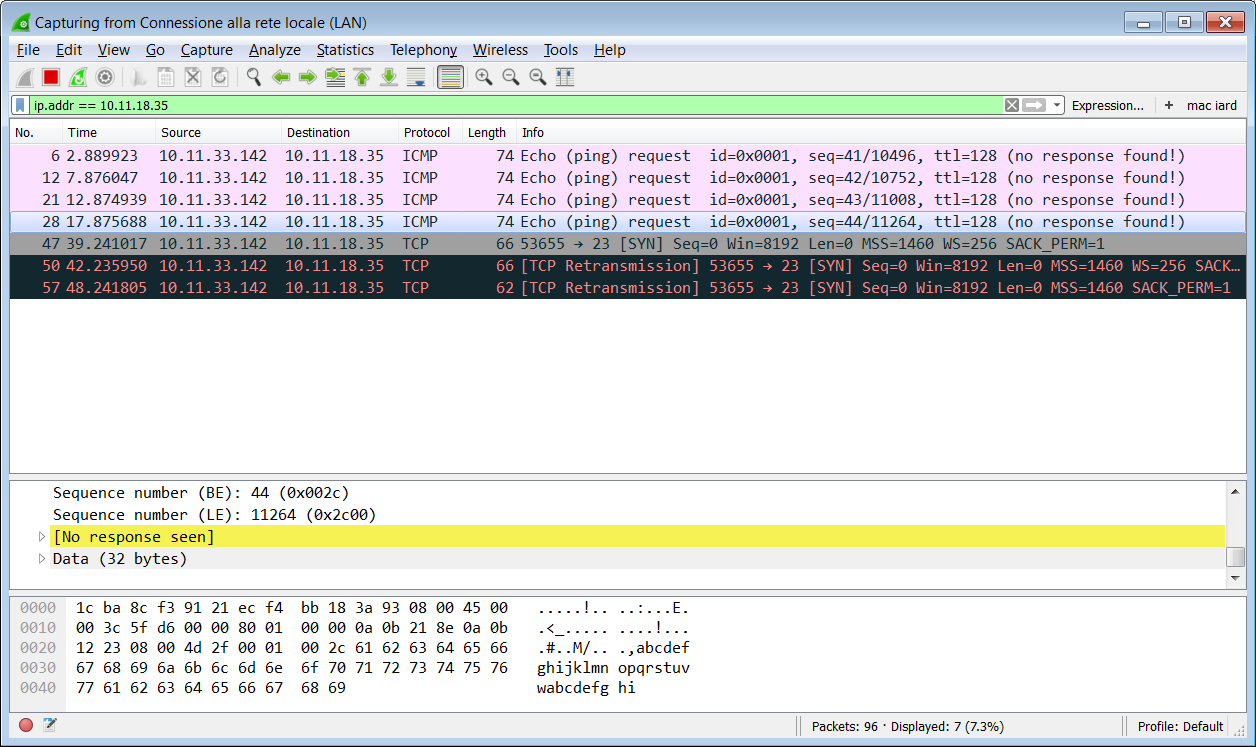
Wireshark does not give any hints, I can't see any response to host requests: 
Halting CPU I can't see anything wrong: ROV shows no issues, and Cpsw_HwIntRx is fired when a packet is received by CPSW hardware.

Following execution I can trace this:

CPSW_RxServiceCheck --> emacDequeueRx --> cpsw3gCfg.pfcbRxPacket() (ie:RxPacket) --> 

STKEVENT_signal( pPDI->hEvent, STKEVENT_ETHERNET, 1 )

Last is a semaphore post, and I can't guess the execution from here on...

Trying as a blind man, I placed a breakpoint in IPRxPacket, that should be called when an IP packet is received. 

When NDK stops responding, this function sometimes:

  • it's not called at all
  • it's called, but never reaches ICMPInput
  • reaches ICMPInput, but inside ICMPChecksum fails (line 86).

It seems to me that, under some circumstances, packets are corrupted in such a manner that NDK can't no more deliver them to the appropriate layer.

This happens after minutes in a highly loaded network, with tons of broadcasts packets.

In smaller networks (or just a single connection to the client PC), it happens after hours of service.

If you keep pinging (ping -l xx.xx.xx.xx), it never happens.

After some breaking/resuming, NDK switch back to normal operation. 

Hints? This is a serious issue, and it' s blocking the release of a new product.

  • I was talking to our NDK expert regarding your issue. Here is the expert's suggestion:

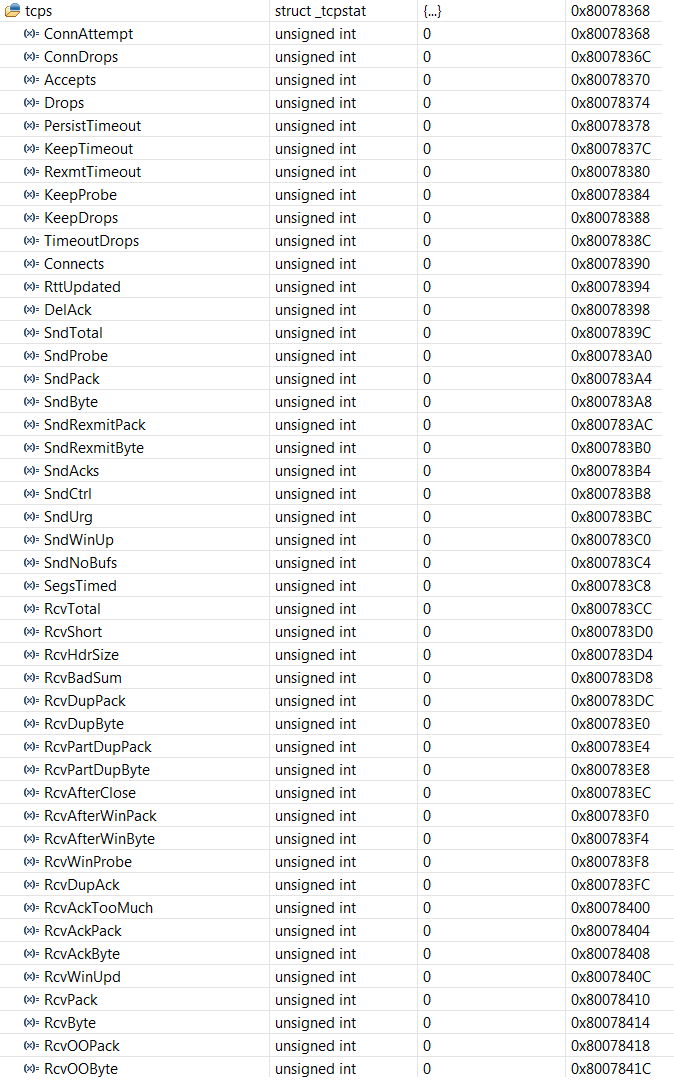
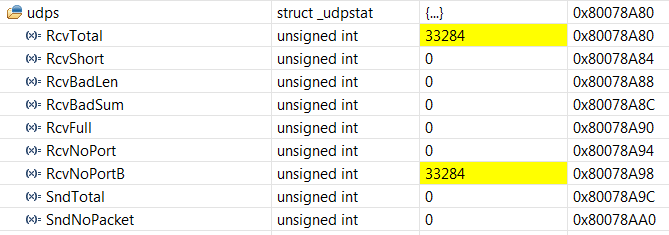
    "Can you ask them to check the NDK’s statistics? The stats are globals in the NDK, called "tcps", "udps", "ips" and “icmps”. You can see details in this thread on how to check, along with a screen shot."

    e2e.ti.com/.../1776221

    This would provide us more information to debug the issue.

    Vikram

  • I'm running some tests, and I discovered that NDK stops responding after at least ten minutes of inactivity.
    After that, it takes one to three minutes to switch back to normal operation.
    The only action required is to ping NDK until it recovers and starts responding to incoming ICMP messages. The ping rate is at least one ping every 30 seconds, or so.
    This happens both under Windows and Linux clients.

    Is this information useful?
  • I am not familiar with the low level details of NDK but I have contacted our NDK expert with the info that you provided. I will post back with our expert's reply.

    Thanks,
    Vikram
  • 
    

    Here is the response from our NDK expert:

    Can you ask them to list all of the tasks running in their system, as well as the priorities of each? 

    Do they have a simple test case that they can share that reproduces the problem?  Preferably this should be for the Am3359 (i.e. NOT their custom hardware). 

    Also, this begs another question – do they see this issue on the AM3359 EVM?  Or does it only happen on their custom h/w?

    For stack debug: 

    The point at which all Ethernet frames enter the stack is at NIMUReceivePacket (ti/ndk/stack/nimu/nimu.c).  It may be better to check for any expected packets in this function, instead of IPRxPacket().

     Regarding the stats they shared:

                    I see one stat in particular that stands out:

             UINT32  CantforwardBA;  /* packets rcvd with illegal addressing */

                    In the screen shot, it’s been incremented to 19,190 – that seems pretty high to me.

                     This stat provides us with a couple of hints, based on the code that increments it.  It’s incremented in 2 places in ipin.c:

                 /*

                 *  If IPDst is a multicast address, check extra

                 *  for perfect filtering:

                 *  - 224.0.0.1 is always allowed.

                 *  - If host is not joined, the others are filtered out.

                 *

                 */

                if (IN_MULTICAST(IPDst) && IPDst != HNC32(0xe0000001) &&

                    !IGMPTestGroup(IPDst, IFGetIndex(hIFRx))) {

                    /* Discard the packet, and update the counter */

                    ips.CantforwardBA++;

                    PBM_free( pPkt );

                    return;

                }

                   (Multicast packets received but this host is not part of the group)

                    And here:


        /* If we get here, the packet is not for us */

        /* Verify Packet can be forwarded */


        /* We can not foward ... */

        /*    - if the packet was rx'd on a local IF AND we're not source */

        /*      routing (this is loop caused by a bad route configuration) */

        /*    - if forwarding disabled */

        /*    - if addressed to an experimental, multicast, or loopback IP */

        /*    - if mac addr received on was broadcast */


        if( (!hIFRx && !SrcRoute) || !IP_FORWARDING ||

            IPDst == INADDR_ANY || IPDst == INADDR_BROADCAST ||

            IN_EXPERIMENTAL(IPDst) || IN_MULTICAST(IPDst) ||

            IN_LOOPBACK(IPDst) || (pPkt->Flags & FLG_PKT_MACBCAST) )

        {

            ips.CantforwardBA++;

            PBM_free( pPkt );

            return;

        }


    Both issues look to be related to multicast, or if not, to IP forwarding or a problem with the route table (case immediately above).

    Are they using multicast in their app?  Or does the above code ring a bell for them?

    Have they configured the EMAC driver to accept multicast packets?  If they aren’t using (or needing) multi cast, it could be that they are being overwhelmed by multicast traffic.

    In any case, based on that statistic, they are seeing a lot of drops due to one or both of these checks in the code shown above.

    Let us know if this helps.

    Vikram

  • This is task summary in ROV:

    HWI summary:

    Our custom hardware's ethernet section is identical to AM335X EVM board, with two differences:

    • PHY chip is a TLK110 instead of AR8031
    • PHY chip has its own clock source (25MHz oscillator), and AM335X_GMII1_REFCLK is used as GPIO to drive PHY reset signal, instead of PHY clock source.

    I think you should be able to run the software, providing the AR8031 clock source.

    I've tried to disable multicast in NDK .cfg file, with no difference.

    I've ran some other tests, and I've found that NDK hangs after at least 375s of inactivity (ie: no ping requets, full network broadcast/multicast traffic). It resumes after 80s of ping retries. This stats are related to my office network, heavily loaded with ARP/broadcast and multicast packets. In a quieter network the problem occurs after hours of inactivity. Here you can see 30 seconds of network "idle" traffic:

    2577.wireshark_network_log.zip

    I've already seen the "CantforwardBA" stats, but there is nothing I can do about: there is no custom code binded to NDK stack. Only stock ICMP handshake and telnet console example code. If "strange" packets are fed into NDK, they are from network traffic only.

    When NDK hangs, most of times NIMUReceivePacket is not called at all (so, no packets are processed by stack), but sometimes NIMUReceivePacket is called but no response is sent back to host PC. Same happens for RX HWI.

    Here you can find a sample application running NDK with telnet console:

    7367.ndk_test.zip

    Hope we can fix this!

  • Addendum: even when NDK is not responding, NDK sends ARP response to host when ping is starting.
    After that, host starts sending requests, but NDK is stuck somewhere.

    So, even when NDK is not working, ARP layer is working, and wireshark confirms that the ARP packet is well formed.
    Is this helpful?

  • Can you please let us know if you see this issue on the TI board?

    Also, I was working with our NDK expert to reproduce the issue using your project.  We found that the project is specific to your custom board and network which would take us sometime to get it building and running on TI board. It would easier for us if you could share a built project (with DHCP enabled instead of static IP) that runs on the TI Board.

    Thanks,

    Vikram

  • I've ported the sample NDK project to ICE v2 board. The issue is still present.

    In the attached file you can find the test application running on ICE V2 board:

    6761.ndk_test_icev2.zip

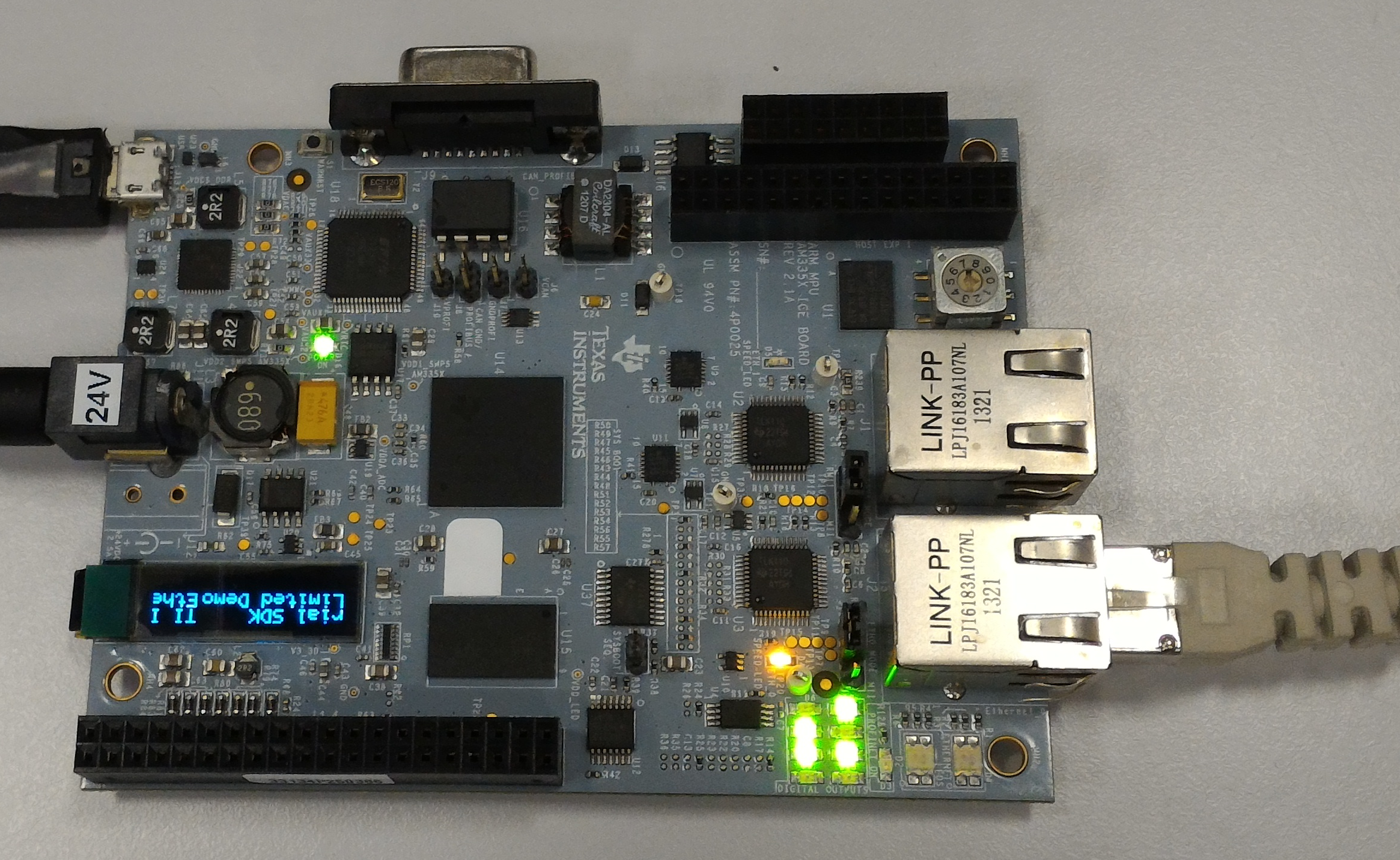
    NOTE: ethernet cable should be connected to J2 port, and J18 and J19 must be configured with pins 1-2 shorted.

  • Thanks for sharing the project.

    I ran the .out file from your project on TI ICE board, the application gets blocked before getting an IP address.

    I am trying to debug why DHCP cannot get an IP address. I will look through the configuration and see if there is anything missing. I haven't tried re-building the project locally on my machine yet.

    Let me know if you find anything in this information that I am missing setting up.

    Thanks,

    Vikram

  • And here is a pic of our board setup:

    1-2 shorted on J18 and J19. The ethernet cable connected to J2.

    Vikram

  • This is my ICE board running the project I shared:

    This is the console printout:

    00000.000 Using MAC Address: c4-ed-ba-87-50-82
    
    00000.000 SetPhyMode:       X Auto:8673, FD10:1, HD10:64, FD100:32, HD100:256, FD1000:128 LPBK:8192
    
    00000.000 EMAC has been started successfully
    
    00000.000 Registeration of the EMAC Successful
    
    Service Status: DHCPC    : Enabled  :          : 000
    Service Status: Telnet   : Enabled  :          : 000
    Service Status: DHCPC    : Enabled  : Running  : 000
    00000.300 cpsw_MDIO_FindingState: PhyNum: 1
    
    00000.400 Enable Phy to negotiate external connection
    
    00000.400 NWAY Advertising: 
    00000.400 FullDuplex-1000 
    00000.400 FullDuplex-100 
    00000.400 HalfDuplex-100 
    00000.400 FullDuplex-10 
    00000.400 HalfDuplex-10 
    00000.400 
    
    00002.000 Phy: 1, 
    00002.000 NegMode    X, NWAYadvertise    X, NWAYREadvertise    X
    
    00002.000 Negotiated connection: 
    00002.000 FullDuplex 100 Mbs
    
    Network Added: If-1:192.168.12.17
    Service Status: DHCPC    : Enabled  : Running  : 017
    

    I see that in your board the orange "SPEED LED" is off: maybe you have some issues negotiating the connection speed; I can't help, I don't know the os_drivers library details, nor the NDK stack details.

    In project I have included "ndk_test.ccxml" target configuration. Are you connecting to the target with this config?

    Are you running the application after CPU is initialized by GEL file? 

    You should see the error "timer frequency mismatch" when cpu tries to jump to main() function; this is a known issue: I've found lots of E2E forum topics about that error. With my custom board gel file this does not occur, so there must be troubles in TMDXICE3359_v2_1A.gel file. You can skip this issue, it's not the topic of the discussion and is not causing troubles to me.

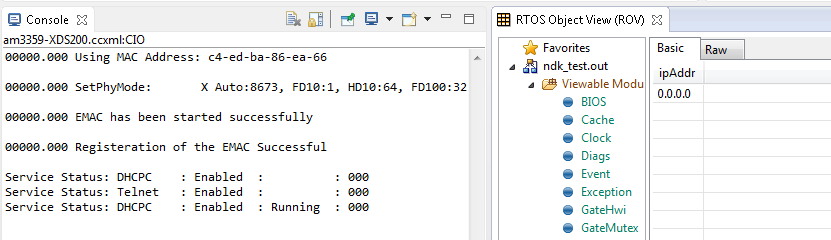
  • I spent some time trying to run your example but I had no luck. The app hung during DHCP as I had mentioned in previous post:

    Here is output from the console:

    [CortxA8] 00000.000 Using MAC Address: c4-ed-ba-86-ea-66
    00000.000 SetPhyMode:       X Auto:8673, FD10:1, HD10:64, FD100:32, HD100:256, FD1000:128 LPBK:8192
    00000.000 EMAC has been started successfully
    00000.000 Registeration of the EMAC Successful
    Service Status: DHCPC    : Enabled  :          : 000
    Service Status: Telnet   : Enabled  :          : 000
    Service Status: DHCPC    : Enabled  : Running  : 000
    00000.300 cpsw_MDIO_FindingState: PhyNum: 1
    00000.400 Enable Phy to negotiate external connection
    00000.400 NWAY Advertising: 
    00000.400 FullDuplex-1000 
    00000.400 FullDuplex-100 
    00000.400 HalfDuplex-100 
    00000.400 FullDuplex-10 
    00000.400 HalfDuplex-10 
    00000.400 
    Service Status: DHCPC    : Enabled  : Fault    : 002
    Then I spoke to our network expert and he sent a simple built app and gel file. I was able to run the app successfully though I had to short pins 2 and 3 on J18 and J19. I ran this app and after about 20 minutes I tested by pinging. The pings were successful, no packets were lost. The board was connected to our office network which has very high network traffic to emulate your set-up.
    My board set-up and app are attached as follows:
    Can you try running this app on your ICE set-up and check if it works?
    Thanks,
    Vikram
  • Hi Vikram. I've tested it and works.

    Your application runs NDK through ICSS subsystem, which has its own NDK drivers. My application needs to run NDK with CPSW peripheral, that has different drivers. Please, ask NDK team to share a working NDK TCP/IP example, running on ICEv2 and CPSW.

    The problem here is growing every minute, and we're running out of time.

  • Great that it works! I suspect the issue to be with the drivers rather than the NDK stack. The drivers are supported by the device team. We reached out to the team to get an example for you.

    They said that the CPSW with NDK driver and example are available in Industrial SDK 1.1.1.1 www.ti.com/.../sysbiossdk-ind-sitara but this is available only for legacy reasons and has no active support.

    You can get the latest CPSW NDK driver and example from PDK RTOS AM335x - www.ti.com/.../PROCESSOR-SDK-AM335X

    Hope this can help solve your issue.

    Vikram
  • Hi Vikram. I've:

    1. downloaded the processor SDK
    2. followed this guide
    3. imported NIMU_BasicExample_icev2AM335x_armExampleproject in CCSv6
    4. double clicked .cfg file to set my favourite IP address
    5. succesfully built the project
    6. downloaded to ICEv2 after executing TMDXICE3359_v2_1A_TI.gel INIT command.

    I need to retry several times to get the application jump to main():

    When (with a robust dose of serendipity) application starts, this is CCS console output (seems fine):

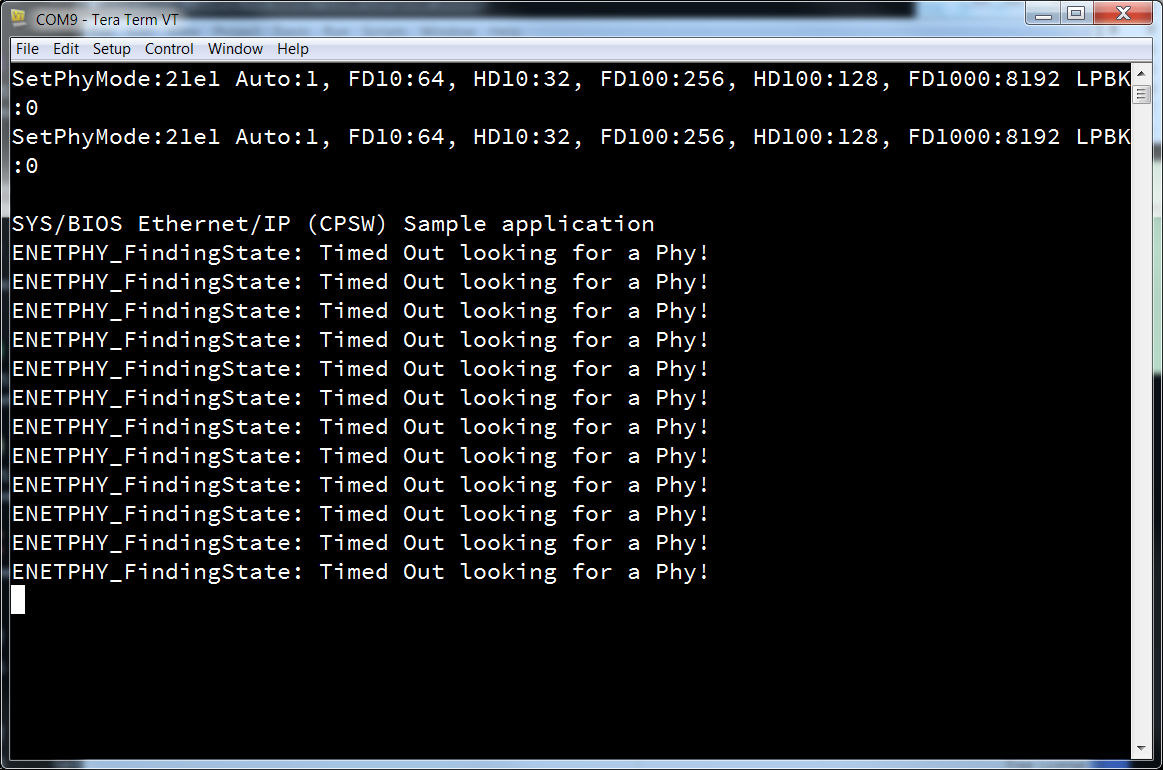
    but the application does not responds to ping commands, and on serial console I get this:

    In ROV there is no evidence of HWI (?):

    This is task summary tab:

    The link speed led on ICEv2 flashes randomly, and the same are doing the leds on switch's port where the ethernet cable is connected to.

    Could you share, here in the forum, the sources of the application in am3359.zip file you posted last week? I don't think it's secret software.

    This is growing to an hilarious dimension: if I pay someone, can I get seriuos support? HERE WE ARE IN TROUBLES.

  • We are in contact with the Processor SDK experts to help you with the issue. We will get back to you soon.

    We appreciate your patience.

    Thanks,

    Vikram 

  • I tried today and have no issue to run the NIMU example, here is the details:

    1. HW card: AM335x ICEv2 card
    2. CCS 6.1.2, JTAG: Texas Instruments xds100v2 USB Probe
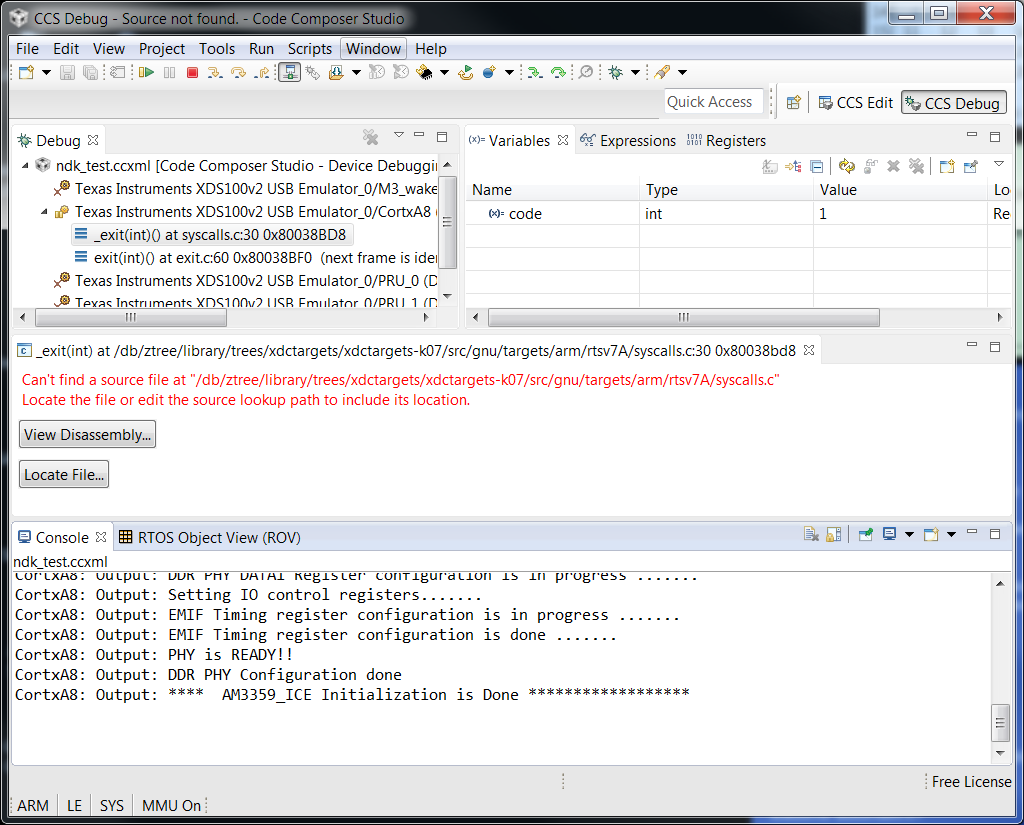
    3. When create the target connection, the Device is ICE_AM3359, so a GEL file ..\..\emulation\boards\ice_am3359\gel\TMDXICE3359.gel is automatically added to cortex A8
    4. When you connect the A8 core, the following is seen:

    CortxA8: Output: ****  AM3359_ICE Initialization is in progress ..........
    CortxA8: Output: ****  AM335x ALL PLL Config for OPP == OPP100 is in progress .........
    CortxA8: Output: Input Clock Read from SYSBOOT[15:14]:  24MHz
    CortxA8: Output: ****  Going to Bypass...
    CortxA8: Output: ****  Bypassed, changing values...
    CortxA8: Output: ****  Locking ARM PLL
    CortxA8: Output: ****  Core Bypassed
    CortxA8: Output: ****  Now locking Core...
    CortxA8: Output: ****  Core locked
    CortxA8: Output: ****  DDR DPLL Bypassed
    CortxA8: Output: ****  DDR DPLL Locked
    CortxA8: Output: ****  PER DPLL Bypassed
    CortxA8: Output: ****  PER DPLL Locked
    CortxA8: Output: ****  DISP PLL Config is in progress ..........
    CortxA8: Output: ****  DISP PLL Config is DONE ..........
    CortxA8: Output: ****  AM335x ALL ADPLL Config for OPP == OPP100 is Done .........
    CortxA8: Output: ****  AM335x DDR3 EMIF and PHY configuration is in progress...
    CortxA8: Output: EMIF PRCM is in progress .......
    CortxA8: Output: EMIF PRCM Done
    CortxA8: Output: DDR PHY Configuration in progress
    CortxA8: Output: Waiting for VTP Ready .......
    CortxA8: Output: VTP is Ready!
    CortxA8: Output: DDR PHY CMD0 Register configuration is in progress .......
    CortxA8: Output: DDR PHY CMD1 Register configuration is in progress .......
    CortxA8: Output: DDR PHY CMD2 Register configuration is in progress .......
    CortxA8: Output: DDR PHY DATA0 Register configuration is in progress .......
    CortxA8: Output: DDR PHY DATA1 Register configuration is in progress .......
    CortxA8: Output: Setting IO control registers.......
    CortxA8: Output: EMIF Timing register configuration is in progress .......
    CortxA8: Output: EMIF Timing register configuration is done .......
    CortxA8: Output: PHY is READY!!
    CortxA8: Output: DDR PHY Configuration done
    CortxA8: GEL Output: Turning on EDMA... 
    CortxA8: GEL Output: EDMA is turned on... 
    CortxA8: Output: ****  AM3359_ICE Initialization is Done ******************

    Then from the SW side:

    1. Used PROCESSOR SDK 2.0.1
    2. Used pdkprojectcreate.bat under pdk_am335x_1_0_1\packages to create the project NIMU_BasicExample_icev2AM335x_armExampleproject
    3. Import the project into CCS, build and run, there is no issue to go main(), there is no issue to run.
    4. You will see [CortxA8] Network Added: If-1:192.168.1.4 printed in CCS console

    Regards,Eric

  • Everything works as you suggested till point 3) of SW side:

    This is not an issue to me, because I need to work with am335x_sysbios_ind_sdk_1.1.0.10 framework (I use ethercat, profibus and other included in industrial SDK).

    I don't know how Processor SDK is related to Industrial SDK; NDK is a requirement for Industrial SDK, so it must work with am335x_sysbios_ind_sdk_1.1.0.10 examples. Processor SDK also uses GCC/Linaro stuff (why? TI will discontinue its compiler in the future?), but Industrial SDK (with all Ethercat/Profibus libraries) uses TI compiler: I'll expect issues with merging these two worlds.

    This said, I've run through some other testing, and the problems running C:\ti\am335x_sysbios_ind_sdk_1.1.0.10\sdk\examples\ethernetip_adapter example has been reported by other users in the past. I've found that this is caused by hardware multiplexing of some pins in ICEv2 board: if the board's bootloader loads Ethercat demo application (this is the "out of the box" configuration...), there is some hardware multiplexing that conflicts with CPSW configuration. At the end of this discussion you'll find the explanation and the workaround.

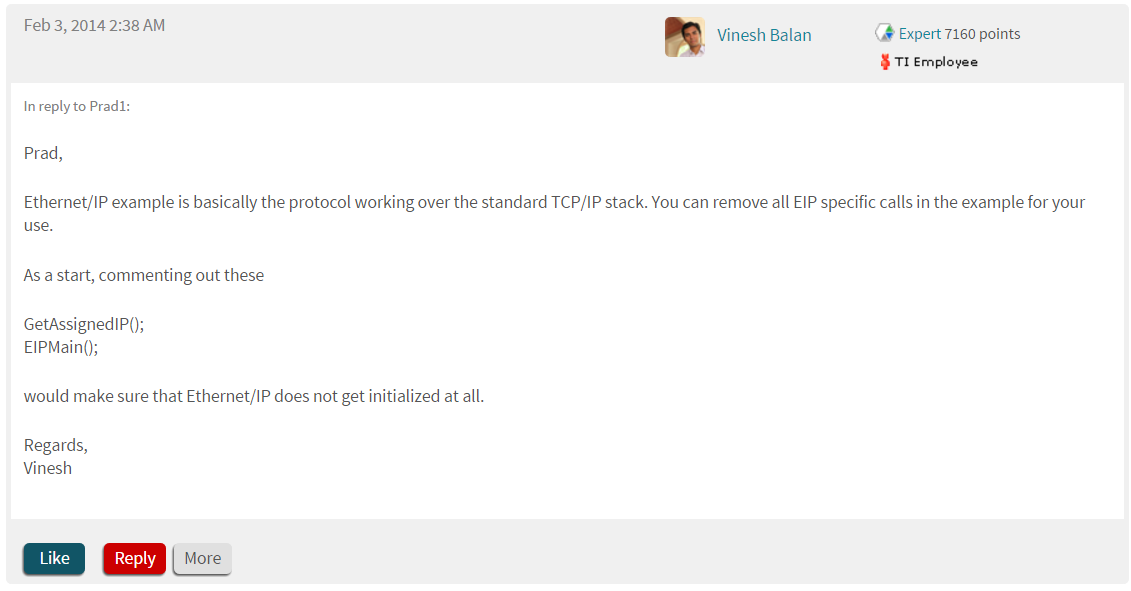
    Fixed this, I've followed the Vinesh's suggestion to try EthernetIP demo application: EthernetIP protocol stacks over NDK's TCP/IP, so commenting out EthernetIP stuff will result in a plain TCP/IP sample application:

    Everything works fine: the problem does not occur.

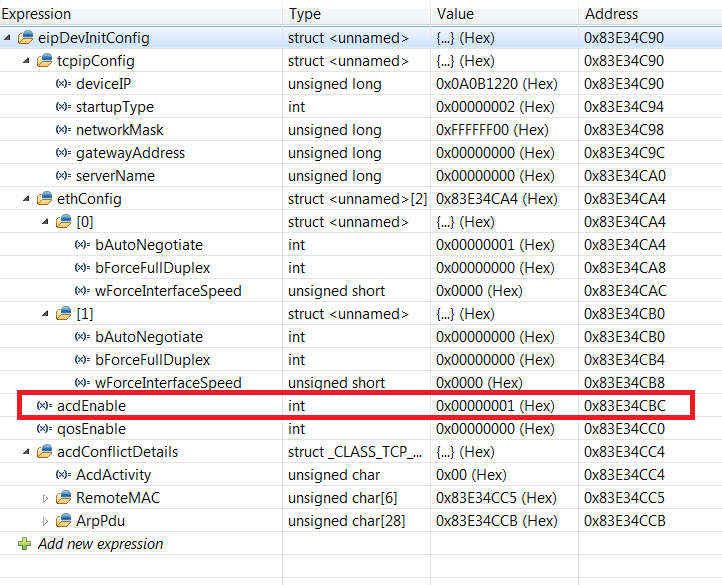
    So, following the code, I started to cut out all the EthernetIP related code and configs. No issues, until I set eipDevInitConfig.acdEnable=FALSE. This should disable some ethernetIP specific code (mind that EthernetIP main task in commented, so no EthernetIP stuff is actually running):

    With this flag set to 0 the issues comes ou! 

    So it must be something related to CPSW driver/NDK initialization that is skipped when that flag is set to FALSE.

    Could you test/fix this?

    For your convenience I attach the EthernetIP sample application (as provided by TI, runs on ICEv2):

    ethernetIP_adapter.zip

  • The Processor SDK tries to includes all the sitara devices and Keystone devices under the same the umberlla with common API. The Processor SDK and Industry SDK shall co-exist for sometimes.

    As the original issue was suspected in the NIMU driver of industry SDK, instead of  NDK layer, I guess this is the reason why suggested to try the NIMU driver in Processor SDK. And for some reason, the Processor SDK NIMU basic exmaple can't be run as it is, that is why I stepped in to try the NIMU example in Processor SDK and verified it works as it is.

    Now you use the Industry SDK but cut out Ethernet IP stuff and found out acdEnable bit cause the problem, we need to duplicate this and analyze back to you.

    Regards, Eric


  • Today update:

    - when eipDevInitConfig.acdEnable=FALSE and USE_CPSW_DRIVER is defined, NDK will hang in about 10 minutes.

    - when eipDevInitConfig.acdEnable=FALSE and USE_CPSW_DRIVER is NOT defined, NDK will be fine forever.

    So, NDK running through ICSS is fine, regardless of the acdEnable switch.

    This should restrict the investigation to some CPSW initialization code, somewhere in NIMU drivers.

  • Our expert who created this application should be able to help but he is OOO till Monday. There is a document on how to create switch example from Ethernetip - http://processors.wiki.ti.com/index.php/SYSBIOS_ISDK_Steps_for_creating_stand_alone_switch_example . Maybe you can try this in the meantime? Thanks for your patience!


    Regards, Eric


  • eugenio,

    Can you explain what you exactly trying to do and goals to reach?

    We do not support Industrial Ethernet (on PRU) + NDK Ethernet stack (on CPSW) simultaneously on AM335x. From Vinesh earlier suggestions, you can use NDK+CPSW on Processor SDK package. Why you have to work in am335x_sysbios_ind_sdk_1.1.0.10 package and cut off code to reach this goal?

    The Processor SDK package was already verified, if you have data verification error when loading the A8 out file, we can help you to resolve this.

    Regards, Eric

  • Ok, this thing has gone too far and now we lost the focus. Let's forget about the noise from the past ad analyse just this:

    I visited the link you suggested and I've done my homework following the TI's instructions step by step. The problem with NDK hanging is present exactly as I have described it since the beginning of this discussion. If I undefine the USE_CPSW_DRIVER compile flag, the problem does not occur.

    This information is for ease your troubleshooting: undefining USE_CPSW_DRIVER is not a solution for me, because ICSS subsystem is already busy doing other jobs in my applications. I cannot use it for  ethernet communication.

    I think TI should be able to understand this and - hopefully - take care and try to fix.

    Addendum: please, don't bounce me with PDK/IDK/politics stuff, that's not my business :-)

  • Hi Eugenio

    Will the application that you are developing have CPSW Ethernet and ICSS Industrial Ethernet operating in parallel?

    David

  • HI Eugenio,

    eipDevInitConfig.acdEnable is used by Ethernet/IP application to enable and disable ACD (Address Conflict detection). Once you use it as switch, this should not impact your application.

    I removed the EIP dependencies from the application, enable USE_CPSW_DRIVER and tested. The application worked for 12- 16 hours and during these time i was using five instances of fping to ping the application.  I have attached the modified application. Can you please test at your side.

    0564.ethernetip_adapter.zip

    Regards,

    Prajith

  • Hi Prajith , thank you for your support.

    If you keep pinging the application, it will run fine forever. The problem occurs when the board is connected to a network and no requests are done to its ip address for a certain amount of time. After about 450 seconds, the application will not reply to ping requests. I've written a simple dos shell script that (roughly) measure the time of inactivity needed to hang NDK, and the restore time:

    :: variables
    SET batch_name=%~n0
    SET parent_dir=%~dp0
    
    SET /A	test_if_working=1
    SET /A	test_if_not_working=0
    SET /A	time_between_working_test=410
    SET /A	time_between_non_working_test=30
    SET /A	total_resume_time=0
    SET /A  total_resume_retries=0
    
    :TEST_WORKING
    ping -n 1 10.11.18.32 | find "Trasmessi = 1, Ricevuti = 1"
    if %ERRORLEVEL% NEQ 0 (
    	echo NDK STOPPED WORKING
    	echo Time to fail=%time_between_working_test%
    	echo NDK STOPPED WORKING: time[s] =%time_between_working_test% >> results.txt
    	SET /A	time_between_non_working_test=30
    	SET /A	time_between_working_test=time_between_working_test-30
    	SET /A 	total_resume_time=0
    	SET /A  total_resume_retries=1
    	goto :TEST_NON_WORKING
    ) else (
    	echo NDK IS WORKING
    	SET /A	time_between_working_test=time_between_working_test+5
    	timeout %time_between_working_test%
    	goto :TEST_WORKING
    )
    
    :TEST_NON_WORKING
    ping -n 1 10.11.18.32 | find "Trasmessi = 1, Ricevuti = 1"
    if %ERRORLEVEL% NEQ 0 (
    	echo Wait for NDK resume...
    	SET /A	time_between_non_working_test=time_between_non_working_test+10
    	SET /A total_resume_time=totale_resume_time+time_between_non_working_test
    	SET /A  total_resume_retries=total_resume_retries+1
    	timeout %time_between_non_working_test%
    	goto :TEST_NON_WORKING
    ) else (
    	echo NDK resumed! 
    	echo time to restore = %time_between_non_working_test%
    	echo NDK RESUMED: time[s] =%total_resume_time% retry count=%total_resume_retries% >> results.txt
    	timeout %time_between_working_test%
    	goto :TEST_WORKING
    )


    :END
    ENDLOCAL
    ECHO ON
    @EXIT /B 0

    This is the script output after testing the application you posted in the forum:

    NDK STOPPED WORKING: time[s] =410 
    NDK RESUMED: time[s] =60 retry count=4 
    NDK STOPPED WORKING: time[s] =410 
    NDK RESUMED: time[s] =50 retry count=3 
    NDK STOPPED WORKING: time[s] =410 
    NDK RESUMED: time[s] =60 retry count=4 
    NDK STOPPED WORKING: time[s] =410 
    NDK RESUMED: time[s] =50 retry count=3 
    NDK STOPPED WORKING: time[s] =420 
    NDK RESUMED: time[s] =80 retry count=6 

    When I've imported the application, CCS complained about NDK and compiler version:

    I've installed NDK rev 2.22.3.20 and tested the application with both NDK 2.24.3.35 and 2.22.3.20 with no difference. 

    I 've tried to switch back from compiler 5.2.5 that comes with CCS v6.1.1 to compiler 5.1.2, but I can't find any download page from TI website that contains older TI compilers, so I've refactored the project with the new compiler.

    The "unresolved buildable linked resources" warning is related to icss_dlr.c and icss_eip_driver.c files that are linked to the project and excluded from build. I've deleted the references and the warning disappeared.

    Here your application compiled and tested (with the problem) on ICEv2 board. You can download the binary to an ICEv2 board and verify the issue:

    ethernetip_not_working.zip

  • Hi Eric, I've find that the problem in these steps is at point 3) of HW side.

    This gel file ..\..\emulation\boards\ice_am3359\gel\TMDXICE3359.gel does not fit ICE board rev 2.
    ICEv2 has DDR3 ram, and that gel file sets the DDR controller for DDR2 (stuffed in previous ICE board).

    ICEv2 comes with its own gel file: \ti\am335x_sysbios_ind_sdk_1.1.0.10\sdk\tools\gel\ICETMDXICE3359_v2_1A.gel

    How can you test the NIMU_BasicExample_icev2AM335x_armExampleproject with the wrong gel file?
  • In ti_6_1_2\ccsv6\ccs_base\emulation\boards\ice_am3359\gel\TMDXICE3359.gel

    hotmenu AM3359_ICE_Initialization()
        {
        GEL_TextOut("****  AM3359_ICE Initialization is in progress .......... \n","Output",1,1,1);   
        ARM_OPP100_Config();
        //DDR2_EMIF_Config();
        DDR3_EMIF_Config();
     
        GEL_TextOut("Turning on EDMA...  \n");
        EdmaPrcm();
        GEL_TextOut("EDMA is turned on...  \n");

     
        GEL_TextOut("****  AM3359_ICE Initialization is Done ****************** \n\n\n","Output",1,1,1);  
        }

    It configures DDR3, why you said configured DDR2?

    Regards, Eric

  • Hi Eric.

    I've said that because the TMCDICE3359.GEL that comes with CCSv6 has this AM3359_ICE_Initialization() routine:


    //****************************************************************************** //System Initialization //****************************************************************************** menuitem "AM335x System Initialization" hotmenu AM3359_ICE_Initialization() { GEL_TextOut("**** AM3359_ICE Initialization is in progress .......... \n","Output",1,1,1); ARM_OPP100_Config(); DDR2_EMIF_Config(); GEL_TextOut("**** AM3359_ICE Initialization is Done ****************** \n\n\n","Output",1,1,1); }

    This is the content of C:\ti\ccsv6\ccs_base\emulation\boards\ice_am3359\gel folder:

    Attached you can see the TMDXICE3359.gel file we're discussing about:

    TMDXICE3359.zip

  • Your GEL file is too old/incorrect:

    //####################################################
    //TMDXICE3359 GEL file
    //v1.0 Apr 3,2012  Added GEL_Reset to initialzation routine
    //v1.1 May2,2012  Streamlined DDR PHY configuration routines
    //v1.2 May3,2012  Fixed max DDR PLL config to 266MHz
    //v1.3 Oct25,2012 adjusted MPU freq. to match with DM
    //                other minor cleanup
    //v1.4 Jun3,2014  Added reference to PRU GEL file
    //####################################################

    The one under ti_6_1_2\ccsv6\ccs_base\emulation\boards\ice_am3359\gel\TMDXICE3359.gel is the latest:

    //####################################################
    //TMDXICE3359 GEL file
    //v1.0 Apr 3,2012  Added GEL_Reset to initialization routine
    //v1.1 May2,2012  Streamlined DDR PHY configuration routines
    //v1.2 May3,2012  Fixed max DDR PLL config to 266MHz
    //v1.3 Oct25,2012 adjusted MPU freq. to match with DM
    //                other minor cleanup
    //v2.0 Nov28,2012 Added DDR3 Initialization for the ICE EVM Rev2.0
    //v3.0 July7,2013 Added DDR3 clock and timing configuration for 400MHz,
    //                DDR_VTT_EN set to HIGH
    //v3.1 Sep4,2015  Added reference to PRU GEL file,
    //                Added System Reset before initialization
    //v3.2 Sep25,2015 Disabling MMU before loading code
    //####################################################

    Regards, Eric

  • Hi Eric, I thought I was clear: the file I've posted here in forum comes from the same path you suggested: C:\ti\ccsv6\ccs_base\emulation\boards\ice_am3359\gel\TMDXICE3359.GEL

    I'm so sorry, but this file come straight from the Code composer studio installation (six month ago, rev 6.1.1). Please, take a deeper look at my yesterday's post: you will see a screenshot of the gel files in the folder you specified.

    In C:\ti\am335x_sysbios_ind_sdk_1.1.0.10\sdk\tools\gel\ICE (Industrial SDK, the software pack that should be used to test ICE board) I can find two gel files: 

    TMDXICE3359_v2_1A.GEL

    //####################################################
    //TMDXICE3359 GEL file
    //v1.0 Apr 3,2012  Added GEL_Reset to initialization routine
    //v2.0 Nov 28, 2012 Added DDR3 Initialization for the ICE EVM Rev2.0
    //v3.0 July 7, 2013 Added DDR3 clock and timing configuration for 400MHz, 
    // DDR_VTT_EN set to HIGH
    //####################################################

    and TMDXICE3359.gel is

    //####################################################
    //TMDXICE3359 GEL file
    //v1.0 Apr 3,2012  Added GEL_Reset to initialization routine
    //v1.1 May2,2012  Streamlined DDR PHY configuration routines
    //v1.2 May3,2012  Fixed max DDR PLL config to 266MHz
    //v1.3 Oct25,2012 adjusted MPU freq. to match with DM
    //                other minor cleanup
    //####################################################

    Where I can find the version you mentioned?

    INFO: maybe the ccs6/SDK setup team should be informed about the latest version of files to be bundled in setup.exe installers!

  • I have both version of CCS installed: 6.1.1 (you mentioned) and latest 6.1.2, as you can see the file structure from the attached screenshot, they are indentical from both versions. I don't know why your installation of 6.1.1 are somewhat different. Or maybe I ran some update on 6.1.1 changed this, I am not sure.

    But the release note of Processor SDK 2.0.1 and 2.0.2 mentioned the CCS version used is 6.1.2, this is the version you need to use.

    Regards, Eric

  • Hi Prajith, do you have news for me?

  • Hello Eugenio ,

    I am Prajith's colleague and I saw this post today. First of all, I went through all discussions in this thread and was interested to reproduce the issue in our setup. But I could not see the issue in our environment!

    Below are the summary of steps I did:

    1. Downloaded the application which you have shared
    2. Used the the SD card binary (Debug\ethernetip_adapter_SD.bin) after renaming it to 'app'. I had SD card bootloader for AM335x ICEv2.1 already
    3. In the ICEv2.1 board, Jumper settings are made for CPSW mode and booted the board with SD card.
    4. In the UART console, startup messages displayed, but it didn't display the application IP address. When I connected the board to test PC and opened wireshark, I could see DHCP discover messages coming the ICEv2.1 board
    5. Using a DHCP server running in the test machine, I have assigned an IP address successfully to DUT, now I can ping the board from the test PC and ICMP response frames are seen wireshark
    6. As per your comment, The problem occurs when the board is connected to a network and no requests are done to its ip address for a certain amount of time. After about 450 seconds, the application will not reply to ping requests.', I have connected network packet generator (Its a hardware which we use for stress tests which can send around 148000 frames per second) to both ports of ICEv2 board and pumped a storm of Broadcast frames simultaneously.
    7. This setup is maintained for around 8 minutes. There is no ping requests to application during this time
    8. Removed the cables from packet generator and connected the test machine again to DUT
    9. Issued ping requests from cmd and I can see responses from the application (confirmed with wireshark)

    Can you please let us know what we are missing here compared to your test environment/procedure?


    Regards,
    Nijin P

  • Hi Nijin .

    You did all the things in the right sequence. The differences are :

    • point 6: I have not a packet generator, so all trafic to NDK comes from real network packets in my test setup.
    • point 8: you disconnect the cable frome packet generator and connect back to the test machine: could this trigger an NDK initialization? Did DHCP server re-assign the IP address?

    If I send you a 10 minutes wireshark log, you could playback all the real traffic (instead of using a packet generator). I'm using Colasoft Packet Player and works just fine for this purpose.

    In this case, I will encrypt the file (because it may contains some corporate data that must not be disclosed). How can we share the encryption key elsewhere (ie: via private mail or local TI's FAE)?

  • Hi Eugenio,

    Regarding Point 8, I had taken care of closing the DHCP server in the test machine after assigning the IP address for the first time. I see that the DUT loses the IP address and goes back to DHCP mode ONLY after an application restart (application retains the IP address during cable disconnect-reconnect scenarios)

    I will try with the colasoft packet player method you have suggested. Please use private message option to share confidential information (I have initiated the request for this already)

    Regards,
    Nijin

  • Hi Eugenio,

    We were able to reproduce the issue with the capture you shared. Here is some quick observation

    • During the scenario when there is no ping response, no RX interrupt is triggered(response only for an ARP BCast request)
    • When the issue is resolved(after a minute or two), a call to CPSWALEAgeOutNow is made at line 881 of cpswethdriver.c
    • if the aleticks(devPtr->Config.aleTicks) is configured to a way less value(line 472), things look better

    We tried setting aleTicks with a value of 100(originally set as 3000), and this issue wasn't visible. However, I'm not sure what the impact would be.

    From the observations, it seems that the issue is somewhere in the learning table. It could be that the learning table is full because of the generic traffic send in by colasoft and the device doesn't learn anymore(even the master PC's MAC). It has to wait for an AgeOut to clear up the table.

    Regards,
    Vinesh

  • Hi Vinesh.

    Got news?
  • Vinesh, still no news?
  • eugenio,

    I am checking with our colleagues Vinesh and Nijin and will update here. Sorry for the delayed response!

    Regards, Eric
  • eugenio,

    I got feedback from our development team. We are not supporting CPSW in Industrial-SDK_01.01.X.X. We had provided a solution (setting aleTicks with a value of 100(originally set as 3000) in May. And we thought you already confirmed the fix (correct me if I am wrong). Do you see further problem with the solution or you are asking for an official release with this fix?

    Regards, Eric
  • Hi Eric.

    I've taken my time to check the soultion you provided in May, and now I can confirm it works.
    Will this fix be included in next CPSW driver releases?